Join us at FabCon Atlanta from March 16 - 20, 2026, for the ultimate Fabric, Power BI, AI and SQL community-led event. Save $200 with code FABCOMM.
Register now!The Power BI Data Visualization World Championships is back! Get ahead of the game and start preparing now! Learn more
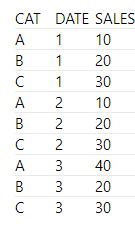
I have a table that is categorized by CAT and each CAT makes X sales per day. It looks like this:
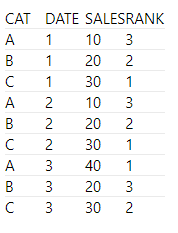
I want to rank them by the day (the rankings can change each day),
so I need it to look like this:
Solved! Go to Solution.
@ClearRide , Try column or measure rank
New column Rank
Rankx(filter(Table, Table[Date] = earlier(Table[Date])), [Sales],,desc,dense)
New measure Rank
Rankx(filter(allselected(Table[Cat],Table[Date]), Table[Date] = Max(Table[Date])), calculate(Sum(Table[Sales])),,desc,dense)
Column Rank: https://www.youtube.com/watch?v=wDS_Vi4r9I4&list=PLPaNVDMhUXGaaqV92SBD5X2hk3TMNlHhb&index=39
Measure Rank: https://www.youtube.com/watch?v=DZb_6j6WuZ0&list=PLPaNVDMhUXGaaqV92SBD5X2hk3TMNlHhb&index=40
@ClearRide , Try column or measure rank
New column Rank
Rankx(filter(Table, Table[Date] = earlier(Table[Date])), [Sales],,desc,dense)
New measure Rank
Rankx(filter(allselected(Table[Cat],Table[Date]), Table[Date] = Max(Table[Date])), calculate(Sum(Table[Sales])),,desc,dense)
Column Rank: https://www.youtube.com/watch?v=wDS_Vi4r9I4&list=PLPaNVDMhUXGaaqV92SBD5X2hk3TMNlHhb&index=39
Measure Rank: https://www.youtube.com/watch?v=DZb_6j6WuZ0&list=PLPaNVDMhUXGaaqV92SBD5X2hk3TMNlHhb&index=40
The Power BI Data Visualization World Championships is back! Get ahead of the game and start preparing now!
| User | Count |
|---|---|
| 14 | |
| 5 | |
| 4 | |
| 3 | |
| 2 |
| User | Count |
|---|---|
| 25 | |
| 10 | |
| 10 | |
| 6 | |
| 6 |