cancel
Showing results for 
Search instead for 
Did you mean: 

The Power BI Data Visualization World Championships is back! Get ahead of the game and start preparing now! Learn more

Reply
evadung
Frequent Visitor

Moving average excluding days without data

Hello, 


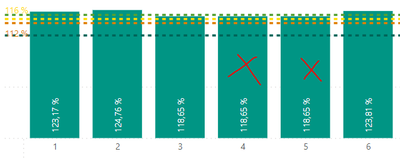
I have this chart with moving average. I dont want to see 4th and 5th day because theres no data (theres more date without data, 4th and 5th is for example). I have no clue what to do.

evadung_1-1676360046697.png


Its from calculated measure from two tables:


Table1: date, hours1
Table2: date, hours2

(In those tables arent days with null or blank spaces.)


calculated measure: Produtivität = hours1/hours2


Moving average % =

averagex(
    FILTER(ALLSELECTED(Kalender),
    Kalender[Datum] <= MAX(Kalender[Datum])),
        [Produktivität])
 
1 ACCEPTED SOLUTION
wdx223_Daniel
Super User
Super User

Moving average % =IF( [Produktivität],

averagex(
    FILTER(ALLSELECTED(Kalender),
    Kalender[Datum] <= MAX(Kalender[Datum])),
        [Produktivität]))

View solution in original post

2 REPLIES 2
wdx223_Daniel
Super User
Super User

Moving average % =IF( [Produktivität],

averagex(
    FILTER(ALLSELECTED(Kalender),
    Kalender[Datum] <= MAX(Kalender[Datum])),
        [Produktivität]))

Works! Thank you!

Helpful resources

Announcements
November Power BI Update Carousel

Power BI Monthly Update - November 2025

Check out the November 2025 Power BI update to learn about new features.

Fabric Data Days Carousel

Fabric Data Days

Advance your Data & AI career with 50 days of live learning, contests, hands-on challenges, study groups & certifications and more!

FabCon Atlanta 2026 carousel

FabCon Atlanta 2026

Join us at FabCon Atlanta, March 16-20, for the ultimate Fabric, Power BI, AI and SQL community-led event. Save $200 with code FABCOMM.