
Don't miss your chance to take the Fabric Data Engineer (DP-600) exam for FREE! Find out how by attending the DP-600 session on April 23rd (pacific time), live or on-demand.
Learn moreNext up in the FabCon + SQLCon recap series: The roadmap for Microsoft SQL and Maximizing Developer experiences in Fabric. All sessions are available on-demand after the live show. Register now
Bom dia Pessoal!
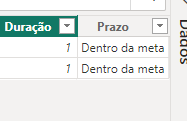
Criei duas medidas no Power BI, com a seguinte finalidade ver quais tarefas eu realizai dentro de 01 hora. Todas as tarefas que fiz até 1 hora ele retorna "Dentro da Meta", o que passar de 1 hora "Fora da Meta", porém tem tarefas que passou do prazo de 1 hora e ele está me retornado como "Dentro da Meta". conforme imagem abaixo:
As Medidas que criei são:
Duração = DATEDIFF('PENDENTES'[NUMERAÇÃO] , PENDENTES[ENVIO], HOUR)
Prazo = IF([Duração] <= 1, "Dentro da meta", "Fora da meta")
Imagem do BI:
Segue exemplo de dados:
Como ele aparece no BI:
Desde já agradeço se puderem me ajudar a identificar o problema.
Solved! Go to Solution.
DATEDIFF(HOUR) literally just subtracts the hour values, regardless of the actual duration. Use DATEDIFF(MINUTE) and compare to 60
If you have recently started exploring Fabric, we'd love to hear how it's going. Your feedback can help with product improvements.
A new Power BI DataViz World Championship is coming this June! Don't miss out on submitting your entry.
Experience the highlights from FabCon & SQLCon, available live and on-demand starting April 14th.
| User | Count |
|---|---|
| 6 | |
| 6 | |
| 3 | |
| 2 | |
| 2 |
| User | Count |
|---|---|
| 22 | |
| 10 | |
| 10 | |
| 7 | |
| 5 |