cancel
Showing results for 
Search instead for 
Did you mean: 

Get Fabric Certified for FREE during Fabric Data Days. Don't miss your chance! Request now

Reply
spandy34
Responsive Resident
Responsive Resident

Measures - Year to Date

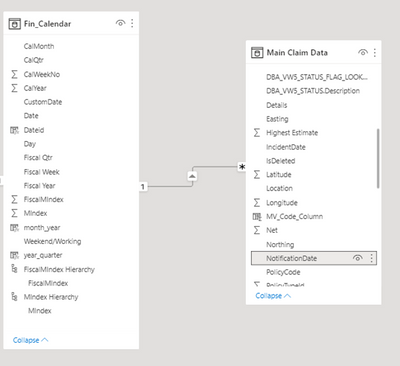
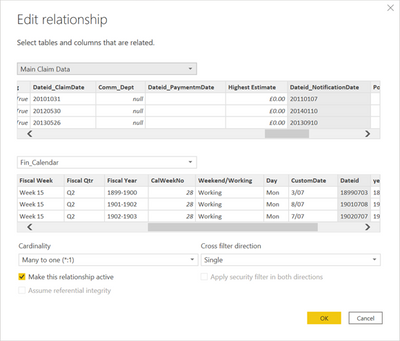
I have three DAX Statements and I would like to include results for Year to Date.  Please can someone tell me how to amend to reflect this please - based on the Notification Date - I have a FinCalendar Table which is my calendar table see diagram below 


spandy34_0-1645611123507.pngspandy34_1-1645611134907.png


1)
 
Recoveries No Successful Recoveries Uninsured Loss =
CALCULATE (
COUNTROWS ( 'Main Claim Data' ), 
FILTER (
'Main Claim Data',
'Main Claim Data'[ClassOfBusinessCode] = "OT"
&& CONTAINSSTRINGEXACT ( [PolicyCode], "REC" ))
 
 
2)
Amount Recovered Uninsured Loss £ = CALCULATE(SUM('Main Claim Data'[Net]),'Main Claim Data'[ClassOfBusinessCode] = "OT" && 'Main Claim Data'[REC_Code_Column] > 0)
 
3)
Team Fee Income Uninsured Loss £ = CALCULATE(SUM('Main Claim Data'[Net]),'Main Claim Data'[ClassOfBusinessCode] = "OT" && 'Main Claim Data'[REC_Code_Column] > 0 && 'Main Claim Data'[ADMIN_Code_Column] >0)


3 REPLIES 3
Anonymous
Not applicable

Hi @spandy34 
you can try

1)


Recoveries No Successful Recoveries Uninsured Loss =
CALCULATE (
COUNTROWS ( 'Main Claim Data' ), 
FILTER (
'Main Claim Data',
'Main Claim Data'[ClassOfBusinessCode] = "OT"
&& CONTAINSSTRINGEXACT ( [PolicyCode], "REC" )),
DATESYTD('Fin_Calendar'[Date]))


2)


Amount Recovered Uninsured Loss £ = CALCULATE(SUM('Main Claim Data'[Net]),'Main Claim Data'[ClassOfBusinessCode] = "OT" && 'Main Claim Data'[REC_Code_Column] > 0,DATESYTD('Fin_Calendar'[Date]))


 3)


Team Fee Income Uninsured Loss £ = CALCULATE(SUM('Main Claim Data'[Net]),'Main Claim Data'[ClassOfBusinessCode] = "OT" && 'Main Claim Data'[REC_Code_Column] > 0 && 'Main Claim Data'[ADMIN_Code_Column] >0,DATESYTD('Fin_Calendar'[Date]))


Regards,
Aditya

Thank you 

THe response for 1) I get the following

spandy34_0-1645613794905.png


The others are bringing no results


spandy34_1-1645613983383.png

 THis is what Im trying to achieve and strugging a bit


spandy34_2-1645614081724.png


Hi, @spandy34 


Can you provide a simple PBIX file for testing? Sensitive information can be removed in advance. 


Best Regards,

Community Support Team _Charlotte

If this post helps, then please consider Accept it as the solution to help the other members find it more.

Helpful resources

Announcements
November Power BI Update Carousel

Power BI Monthly Update - November 2025

Check out the November 2025 Power BI update to learn about new features.

Fabric Data Days Carousel

Fabric Data Days

Advance your Data & AI career with 50 days of live learning, contests, hands-on challenges, study groups & certifications and more!

FabCon Atlanta 2026 carousel

FabCon Atlanta 2026

Join us at FabCon Atlanta, March 16-20, for the ultimate Fabric, Power BI, AI and SQL community-led event. Save $200 with code FABCOMM.