cancel
Showing results for 
Search instead for 
Did you mean: 

Get Fabric Certified for FREE during Fabric Data Days. Don't miss your chance! Request now

Reply
granade1
Frequent Visitor

Measure in table that considers an if statement, divide two column sums

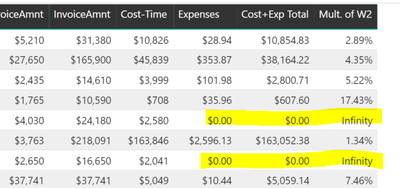
My mult. of W2 column is working with this measure:

Mult. of W2 = (SUM(Merge2[InvoiceAmnt]) / SUM(Merge2[Cost+Exp Total])/100)

Capture.PNG
 
but I need to include an if statement for when expenses are = 0. to avoid infinity.
So something like:
if expenses = 0 then SUM(Merge2[InvoiceAmnt]) / SUM(Merge2[Cost-Time])/100
ELSE (SUM(Merge2[InvoiceAmnt]) / SUM(Merge2[Cost+Exp Total])/100)                             <-my original measure
END
Still learning DAX and can't seem to figure this out. thanks!
1 ACCEPTED SOLUTION
Anonymous
Not applicable

First of all, mate, it's not a measure you're working with but a calculated column. The stuff you think is a measure is an in-column expression.


Mult. of W2 =
var __invoiceSum = SUM( Merge2[InvoiceAmnt] )
var __costMinusTimeSum = SUM( Merge2[Cost-Time] )
var __costPlusExpSum = SUM( Merge2[Cost+Exp Total] )
var __exprWhenExpensesEquals0 =
	DIVIDE ( 
		__invoiceSum,
		__costMinusTimeSum * 100
	)
var __exprWhenExpensesNotEquals0 =
	divide (
		__invoiceSum,
		__costPlusExpSum * 100
	)
var __result =
	if (
		Merge2[Expenses] = 0,
		__exprWhenExpensesEquals0,
		__exprWhenExpensesNotEquals0
	)
return
	__result

Best

Darek

View solution in original post

1 REPLY 1
Anonymous
Not applicable

First of all, mate, it's not a measure you're working with but a calculated column. The stuff you think is a measure is an in-column expression.


Mult. of W2 =
var __invoiceSum = SUM( Merge2[InvoiceAmnt] )
var __costMinusTimeSum = SUM( Merge2[Cost-Time] )
var __costPlusExpSum = SUM( Merge2[Cost+Exp Total] )
var __exprWhenExpensesEquals0 =
	DIVIDE ( 
		__invoiceSum,
		__costMinusTimeSum * 100
	)
var __exprWhenExpensesNotEquals0 =
	divide (
		__invoiceSum,
		__costPlusExpSum * 100
	)
var __result =
	if (
		Merge2[Expenses] = 0,
		__exprWhenExpensesEquals0,
		__exprWhenExpensesNotEquals0
	)
return
	__result

Best

Darek

Helpful resources

Announcements
November Power BI Update Carousel

Power BI Monthly Update - November 2025

Check out the November 2025 Power BI update to learn about new features.

Fabric Data Days Carousel

Fabric Data Days

Advance your Data & AI career with 50 days of live learning, contests, hands-on challenges, study groups & certifications and more!

FabCon Atlanta 2026 carousel

FabCon Atlanta 2026

Join us at FabCon Atlanta, March 16-20, for the ultimate Fabric, Power BI, AI and SQL community-led event. Save $200 with code FABCOMM.