cancel
Showing results for 
Search instead for 
Did you mean: 

The Power BI Data Visualization World Championships is back! Get ahead of the game and start preparing now! Learn more

Reply
Anonymous
Not applicable

ISBLANK doesn't work to replace null/blank values in a relationship between tables

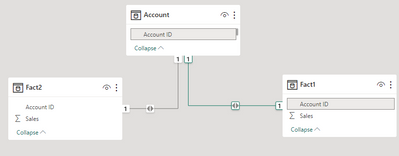
I have a common dimension i.e. Account joined to Fact 1 and Fact 2.


The requirement is to show Fact1 and Fact2 metrics by Account.Account # based on Fact1.Account ID = Account.Account ID and Fact2.Account Id =Account.Account ID. 


However, there are few accounts in Fact1 and Fact2 that doesn't have a matching Account ID in Account table. I would like to replace the Account # with "Unknown" if it is blank but

IF(ISBLANK(Account.Account#),"Unknown",Account.Account#)

and 

IF(Account.Account#="","Unknown",Account.Account#) doesn;t seem to work. 

Could you please help ?

4 REPLIES 4
Anonymous
Not applicable

HI @Anonymous 

Appreciate your response. However, the 2 fact tables are huge and combining them would be resource intensive especially when the Account # column is used in slicers -I am using Account Dimension to join the Fact tables to avoid the performance issues otherwise I could have done a left outer join in Power Query to handle this issue.

Abhinav054
Helper I
Helper I

I think It didn't work because you used "and" operator, try chnging it to "OR ( || )"

Anonymous
Not applicable

What I meant by the below is none of these conditions work, I tried them separately and together with OR operator but it doesn't work. 

IF(ISBLANK(Account.Account#),"Unknown",Account.Account#)

and 

IF(Account.Account#="","Unknown",Account.Account#) 

Anonymous
Not applicable

Hi @Anonymous ,


I think measure or calculated colunn are not supported in your situation. I suggest you to create a calculated table to achieve your goal.

My Sample:

vrzhoumsft_0-1695800393755.png

Calculated table:


Table = 
ADDCOLUMNS(UNION(Fact1,Fact2),"New Account ID",IF([Account ID] in VALUES(Account[Account ID]),[Account ID],"Unknown"))


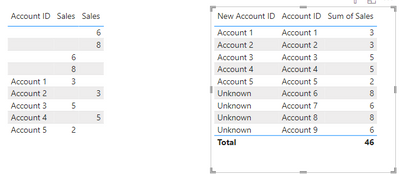
Result is as below.

vrzhoumsft_1-1695800430076.png


Best Regards,
Rico Zhou


If this post helps, then please consider Accept it as the solution to help the other members find it more quickly. 

Helpful resources

Announcements
Power BI DataViz World Championships

Power BI Dataviz World Championships

The Power BI Data Visualization World Championships is back! Get ahead of the game and start preparing now!

December 2025 Power BI Update Carousel

Power BI Monthly Update - December 2025

Check out the December 2025 Power BI Holiday Recap!

FabCon Atlanta 2026 carousel

FabCon Atlanta 2026

Join us at FabCon Atlanta, March 16-20, for the ultimate Fabric, Power BI, AI and SQL community-led event. Save $200 with code FABCOMM.