cancel
Showing results for 
Search instead for 
Did you mean: 

The Power BI Data Visualization World Championships is back! Get ahead of the game and start preparing now! Learn more

Reply
Anonymous
Not applicable

I want to take the average of the last 3 years of the total number on a monthly and yearly basis

Hi, I have a table like this. And I want to get the second table from this table. I try to use the rollup and sum functions with the filter but I can't find any solution for getting the right amount written in the table to show in a graphic. 


I wrote something like this but I should get also the next 3 years and the next three years till last year. 


Summary last 3 years = SUMMARIZE('Summary Incident Yearly'
, ROLLUP(ROLLUPGROUP('Summary Incident Yearly'[Country],'Summary Incident Yearly'[MAAND]))
, "3 years AVG", CALCULATE( SUM('Summary Incident Yearly'[amount])/3 ,FILTER('Summary Incident Yearly', 'Summary Incident Yearly'[JAAR]>=2015||'Summary Incident Yearly'[JAAR]<=2017))
, "Jaartaal", "15/16/17")


JAARMAANDCountryamount
20151Netherlands1082
20151Belgium174
20151Belgium8
20151Luxembourg1
20151Suriname15
20152Netherlands1181
20152Belgium212
20152Belgium5
20152Luxembourg2
20152Suriname5
20161Netherlands1244
20161Belgium259
20161Belgium23
20161Luxembourg1
20161Suriname2
20162Netherlands1252
20162Belgium264
20162Belgium19
20162Luxembourg2
20162Suriname4
20171Netherlands1088
20171Belgium243
20171Belgium17
20171Luxembourg4
20172Netherlands1054
20172Belgium288
20172Belgium15
20172Luxembourg2
20172Suriname5


AVG JAARMaandCountry AVG 
15/16/171Netherlands1138
15/16/171Luxembourg2
15/16/171Belgique120
15/16/172Netherlands1162
16/17/181Netherlands etc
16/17/181Luxembourgetc


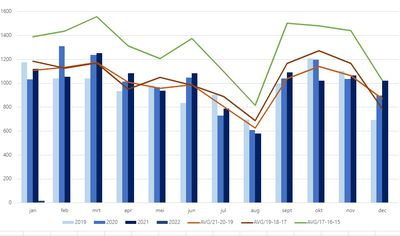
And at the end I will get a graphic like this :


cherche_0-1645009000014.png


Thank you for your help

1 ACCEPTED SOLUTION
Anonymous
Not applicable

Hi @Anonymous ,

I created a sample pbix file(see attachment) for you, please check whether that is what you want.

1. Create a month dimension table

Month No. Month Name
1 January
2 February
3 March
4 April
5 May
6 June
7 July
8 August
9 September
10 October
11 November
12 December

2. Create the measures as below to the average values(AVG/17-16-15,AVG/19-18-17 and )

AVG/17-16-15 = 
var _baseyear=2021
VAR _selmonth =
    SELECTEDVALUE ( 'Months'[Month No.] )
RETURN
    AVERAGEX (
        FILTER (
            'Summary Incident Yearly',
            'Summary Incident Yearly'[JAAR] >= _baseyear-6
                && 'Summary Incident Yearly'[JAAR] <= _baseyear-4
                && 'Summary Incident Yearly'[MAAND] = _selmonth
        ),
        [amount]
    )AVG/17-16-15 = 
var _baseyear=2021
VAR _selmonth =
    SELECTEDVALUE ( 'Months'[Month No.] )
RETURN
    AVERAGEX (
        FILTER (
            'Summary Incident Yearly',
            'Summary Incident Yearly'[JAAR] >= _baseyear-6
                && 'Summary Incident Yearly'[JAAR] <= _baseyear-4
                && 'Summary Incident Yearly'[MAAND] = _selmonth
        ),
        [amount]
    )
AVG/19-18-17 = 
var _baseyear=2021
VAR _selmonth =
    SELECTEDVALUE ( 'Months'[Month No.] )
RETURN
    AVERAGEX (
        FILTER (
            'Summary Incident Yearly',
            'Summary Incident Yearly'[JAAR] >= _baseyear-4
                && 'Summary Incident Yearly'[JAAR] <= _baseyear-2
                && 'Summary Incident Yearly'[MAAND] = _selmonth
        ),
        [amount]
    )
AVG/21-20-19 = 
var _baseyear=2021
VAR _selmonth =
    SELECTEDVALUE ( 'Months'[Month No.] )
RETURN
    AVERAGEX (
        FILTER (
            'Summary Incident Yearly',
            'Summary Incident Yearly'[JAAR] >= _baseyear-2
                && 'Summary Incident Yearly'[JAAR] <= _baseyear
                && 'Summary Incident Yearly'[MAAND] = _selmonth
        ),
        [amount]
    )

3. Create Line and clustered column chart as below
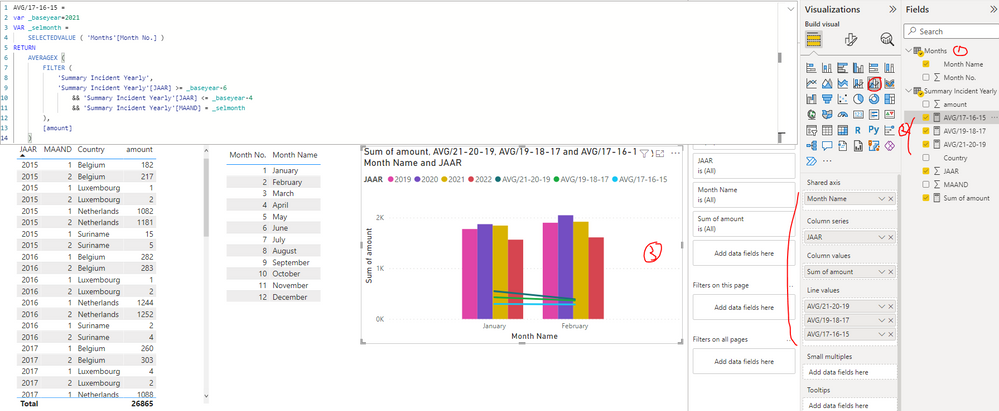
yingyinr_0-1645411269456.png

Best Regards

View solution in original post

1 REPLY 1
Anonymous
Not applicable

Hi @Anonymous ,

I created a sample pbix file(see attachment) for you, please check whether that is what you want.

1. Create a month dimension table

Month No. Month Name
1 January
2 February
3 March
4 April
5 May
6 June
7 July
8 August
9 September
10 October
11 November
12 December

2. Create the measures as below to the average values(AVG/17-16-15,AVG/19-18-17 and )

AVG/17-16-15 = 
var _baseyear=2021
VAR _selmonth =
    SELECTEDVALUE ( 'Months'[Month No.] )
RETURN
    AVERAGEX (
        FILTER (
            'Summary Incident Yearly',
            'Summary Incident Yearly'[JAAR] >= _baseyear-6
                && 'Summary Incident Yearly'[JAAR] <= _baseyear-4
                && 'Summary Incident Yearly'[MAAND] = _selmonth
        ),
        [amount]
    )AVG/17-16-15 = 
var _baseyear=2021
VAR _selmonth =
    SELECTEDVALUE ( 'Months'[Month No.] )
RETURN
    AVERAGEX (
        FILTER (
            'Summary Incident Yearly',
            'Summary Incident Yearly'[JAAR] >= _baseyear-6
                && 'Summary Incident Yearly'[JAAR] <= _baseyear-4
                && 'Summary Incident Yearly'[MAAND] = _selmonth
        ),
        [amount]
    )
AVG/19-18-17 = 
var _baseyear=2021
VAR _selmonth =
    SELECTEDVALUE ( 'Months'[Month No.] )
RETURN
    AVERAGEX (
        FILTER (
            'Summary Incident Yearly',
            'Summary Incident Yearly'[JAAR] >= _baseyear-4
                && 'Summary Incident Yearly'[JAAR] <= _baseyear-2
                && 'Summary Incident Yearly'[MAAND] = _selmonth
        ),
        [amount]
    )
AVG/21-20-19 = 
var _baseyear=2021
VAR _selmonth =
    SELECTEDVALUE ( 'Months'[Month No.] )
RETURN
    AVERAGEX (
        FILTER (
            'Summary Incident Yearly',
            'Summary Incident Yearly'[JAAR] >= _baseyear-2
                && 'Summary Incident Yearly'[JAAR] <= _baseyear
                && 'Summary Incident Yearly'[MAAND] = _selmonth
        ),
        [amount]
    )

3. Create Line and clustered column chart as below

yingyinr_0-1645411269456.png

Best Regards

Helpful resources

Announcements
Power BI DataViz World Championships

Power BI Dataviz World Championships

The Power BI Data Visualization World Championships is back! Get ahead of the game and start preparing now!

December 2025 Power BI Update Carousel

Power BI Monthly Update - December 2025

Check out the December 2025 Power BI Holiday Recap!

FabCon Atlanta 2026 carousel

FabCon Atlanta 2026

Join us at FabCon Atlanta, March 16-20, for the ultimate Fabric, Power BI, AI and SQL community-led event. Save $200 with code FABCOMM.