Join us at FabCon Atlanta from March 16 - 20, 2026, for the ultimate Fabric, Power BI, AI and SQL community-led event. Save $200 with code FABCOMM.
Register now!Get Fabric Certified for FREE during Fabric Data Days. Don't miss your chance! Request now
I need to calculate the average OEE for the last three shifts, but I only have shift as a time reference. However, I do not want to count OEE if no real parts were made. Also, some workplaces have multiple rows per shift.
I do not know how to make the filter count shift as a time.
| Workplace | Imputation date | Shift | Manufacturing reference | Real parts/h | OEE |
| C316 | 12/4/2022 | A | A3301 | 0.00 | 0.00 |
| C316 | 12/4/2022 | B | A3301 | 0.00 | 0.00 |
| C316 | 12/4/2022 | C | A3301 | 20.50 | 14.48 |
| C316 | 12/5/2022 | A | A3301 | 0.00 | 0.00 |
| C316 | 12/5/2022 | B | A3301 | 0.00 | 0.00 |
| C316 | 12/5/2022 | C | A3301 | 0.00 | 0.00 |
| C316 | 12/6/2022 | A | A3301 | 0.00 | 0.00 |
| C316 | 12/6/2022 | B | A3301 | 0.00 | 0.00 |
| C316 | 12/6/2022 | C | A3301 | 0.00 | 0.00 |
| C316 | 12/7/2022 | A | A3301 | 0.00 | 0.00 |
| C316 | 12/7/2022 | B | A3301 | 0.00 | 0.00 |
| C316 | 12/7/2022 | C | A3301 | 0.00 | 0.00 |
| C316 | 12/8/2022 | A | A3301 | 0.00 | 0.00 |
| C316 | 12/8/2022 | B | A3301 | 0.00 | 0.00 |
| HL2 | 12/6/2022 | C | S3119 | 191.40 | 48.14 |
| HL2 | 12/6/2022 | C | S3299 | 191.40 | 41.45 |
| HL2 | 12/7/2022 | A | S3119 | 182.89 | 50.21 |
| HL2 | 12/7/2022 | A | S3299 | 182.89 | 50.21 |
| HL2 | 12/7/2022 | B | S3119 | 204.03 | 61.12 |
| HL2 | 12/7/2022 | B | S3147 | 195.32 | 48.97 |
| HL2 | 12/7/2022 | B | WR | 92.31 | 0.00 |
| HL2 | 12/7/2022 | C | S3147 | 223.44 | 76.30 |
| HL2 | 12/7/2022 | C | S3209 | 223.44 | 76.30 |
| HL2 | 12/8/2022 | A | S3149 | 195.53 | 47.59 |
| HL2 | 12/8/2022 | A | S4119 | 195.53 | 53.76 |
| HL2 | 12/8/2022 | B | S3149 | 216.29 | 69.86 |
| HL2 | 12/8/2022 | B | S3505 | 151.68 | 23.86 |
| HL2 | 12/8/2022 | B | S3506 | 151.68 | 23.65 |
| HL2 | 12/8/2022 | B | S4119 | 216.29 | 69.86 |
| HL2 | 12/8/2022 | C | S3505 | 161.12 | 69.36 |
| HL2 | 12/8/2022 | C | S3506 | 161.12 | 69.36 |
| HL2 | 12/9/2022 | A | S3143 | 158.82 | 7.23 |
| HL2 | 12/9/2022 | A | S3144 | 158.82 | 7.23 |
| HL2 | 12/9/2022 | A | S3505 | 159.72 | 56.59 |
| HL2 | 12/9/2022 | A | S3506 | 159.72 | 56.59 |
| HL4 | 12/4/2022 | A | S4600 | 404.90 | 87.66 |
Please define what you mean by "the last three shifts". Will the user see a report that shows all days, or only the latest day with data? What is the expected outcome based on the sample data you provided?
some workplaces have multiple rows per shift
How should the average be calculated in that case? Average of sums or Average of values?
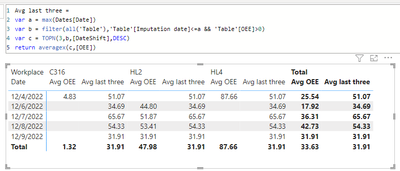
See attached for a proposal.
I need it only to show the last 24 hours, but I do not have hours, so I have to use shifts. I want to filter the shift and the work center. I will have a scorecard with the average OEE, which I need to update with every shift change to show the last 24 hours (the last three shifts). I need the ability to use a shift filter to look at a specific shift and a work center filter to look at a particular department. The manufacturing reference is the parts made in the work center that day. I have a calendar, work centers, shifts, and manufacturing reference lookup table. In the case of multiple rows, I need the average of the values. I need it to be the average at the bottom level, manufacturing reference. Dates -> shift -> work center -> manufacturing reference.
Se você tiver a escala de trabalho do turnos, acredito que ficará mais fácil para você, pois no meu projeto tenho que fazer analise de 4 turnos , e eu uso a escala de trabalho deles. se vc trabalha com um banco de dados, onde consta o gereciamento de produção, lá consta a entrada e saída de cada turno com datas e horários, sendo assim, vc pega essa base e no power bi , faz uma tabela só com os turnos .
Check out the November 2025 Power BI update to learn about new features.
Advance your Data & AI career with 50 days of live learning, contests, hands-on challenges, study groups & certifications and more!
| User | Count |
|---|---|
| 11 | |
| 9 | |
| 9 | |
| 6 | |
| 5 |
| User | Count |
|---|---|
| 27 | |
| 22 | |
| 19 | |
| 17 | |
| 11 |