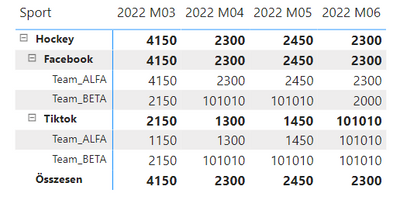
Hi Community,
I'd like to make a report based on occationally entered soc. media data.
The user enters data related to a specific date and team by soc. media.
How many followers the team has on the specific date?
There are missing weeks, months like this:
(The MAX of the timeperiod can be seen.
I'd like to put a visual on the report witch shows the trend in the end.)
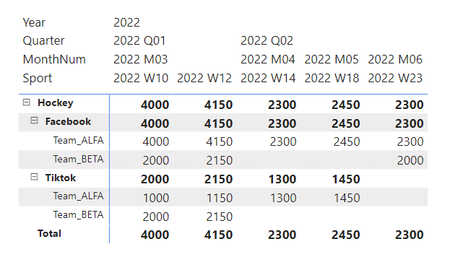
There are two tables in the sample:
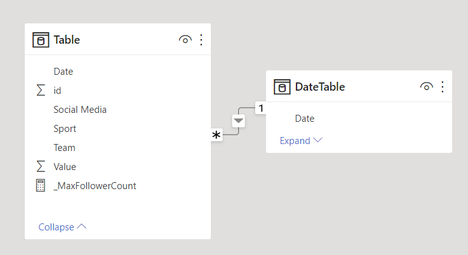
I wrote a measure to fill in the matrix cells.
The returning value would have to corrigate the missing values.
In place of 101010 will come a measure.
(... why don't we have DAX formatting here... )
_MaxFollowerCount =

    VAR dateMinDateInPeriod =
        MINX(
            VALUES('Table'[id]);
            VAR dateMin =
                CALCULATE(
                    MIN('DateTable'[Date]);
                    RELATEDTABLE(DateTable)
                )
            RETURN dateMin
        )

    VAR intMAXinPeriod =
        MAXX(
            'Table';
            VAR intMax = MAX('Table'[Value])
            RETURN
                IF(
                    ISBLANK(intMax) || intMax = 0;
                    101010;
                    intMax
                )
        )

    RETURN
        intMAXinPeriod
My problem is that:
The value in the blank cells is not BLANK() nor 0 ...
I never get back 101010...
What is my failure or missunderstanding?
Thank you for any help.
Regards,
F.