Hello developers,
I'm in need of some DAX assistance.
I'm trying to create a dashboard that reflects Head Count. It's almost complete, but I need to reflect a starting head count for periods selected in my slicer. Or more logicaly explained, Head Count for the period prior to the one selected.
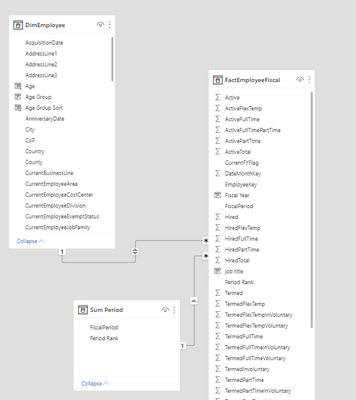
Head Count and Fiscal Period are in my Fact Table whilst Job Title is in my Dim table. The relationship between the two tables is linked by employee key and looks like this:

My fiscal periods are expressed with Fiscal Year first then the Fiscal Period. ex. 202301 = First Period in Fiscal Year 2023.
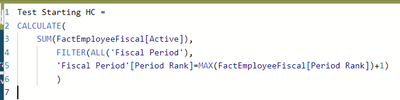
So far, the below DAX has been working out for me:
Starting HC =
CALCULATE(
SUM(FactEmployeeFiscal[Active]),
FILTER(ALL(FactEmployeeFiscal[FiscalPeriod]),FactEmployeeFiscal[FiscalPeriod]),
FactEmployeeFiscal[RowNum]=MAX(FactEmployeeFiscal[RowNum])+1)
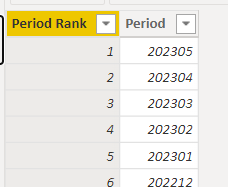
RowNum or Row Number is an index for the Fiscal Period with the Max period = 1. Currently the highest Fiscal Period available is 202305.
202305 = 1; 202304 = 2; 202303 = 3 etc.
The trouble starts when I filter to only FY2023 and select the first Fiscal Period. My results go blank.
Starting Head Count needs to be the headcount for the period prior to the one being selected. In this case when I select 202301, my measure looks for the headcout to 202212. But FY22 is filtered out, so the column goes blank.

I've switched up my formula to update the ALL comand to this:
Starting HC =
CALCULATE(
SUM(FactEmployeeFiscal[Active]),
FILTER(ALL(FactEmployeeFiscal),FactEmployeeFiscal[FiscalPeriod]),
FactEmployeeFiscal[RowNum]=MAX(FactEmployeeFiscal[RowNum])+1)
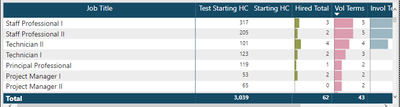
The total amount is right and it's a step in the right direction, but I'm getting the same amount for every row.
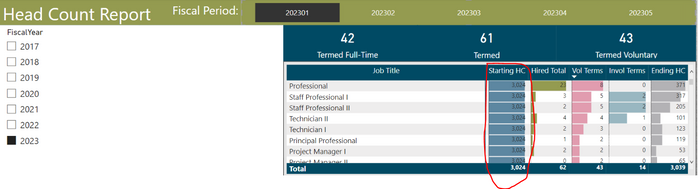
Do any of you geniouses out there know what I need to do to my DAX measure to accurately reflect HC for the first Fiscal Period in FY2023?
Thanks for any Help!!!