cancel
Showing results for 
Search instead for 
Did you mean: 

The Power BI Data Visualization World Championships is back! Get ahead of the game and start preparing now! Learn more

Reply
Anonymous
Not applicable

How to make Fixed Totals & Subtotals (filter independent)

How to make Fixed Totals & Subtotals?

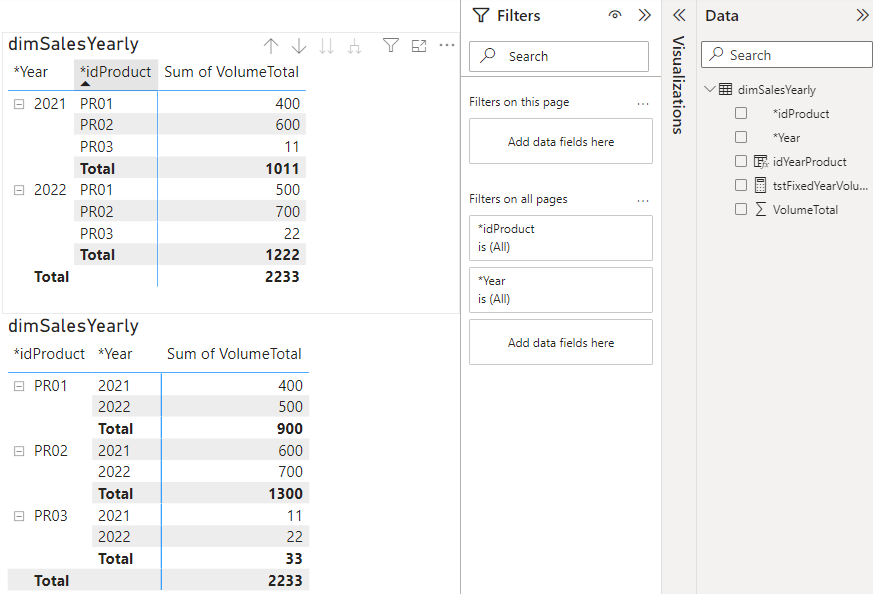
Example (two identical matrix -  just row order is different): 

DenisSipchenko_0-1679405296478.png


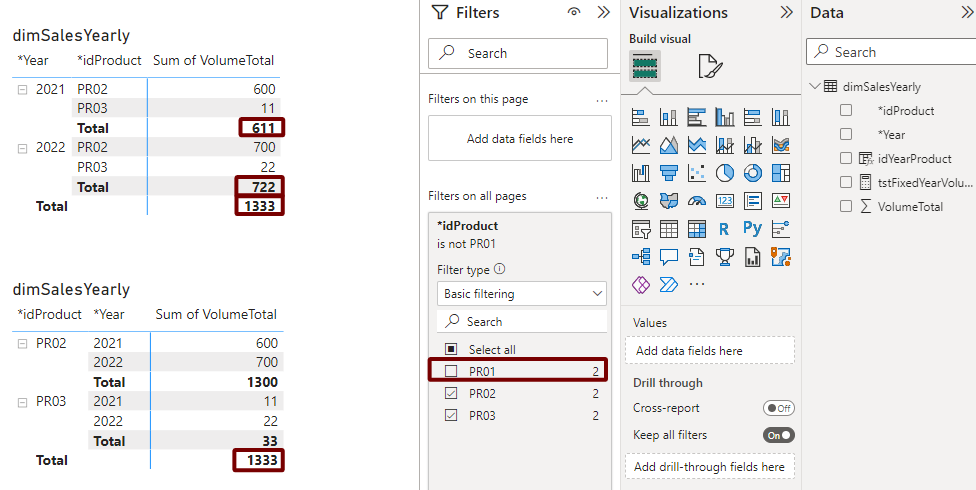
Problem: when I filter by year or product, subtotals are recalculated, but I want to see global fixed subtotals (by another words the same subtotals as on screen above)

DenisSipchenko_1-1679405646207.png

Is it possible?

Download Source File 

1 ACCEPTED SOLUTION
Anonymous
Not applicable

Possible Solution:


VolumeTotal(Fixed Totals) = 
VAR isInSc_Prod = ISINSCOPE(dimSalesYearly[*idProduct])
VAR isInSc_Year = ISINSCOPE(dimSalesYearly[*Year])
VAR Result =
    SWITCH(
        TRUE(),
        NOT isInSc_Prod && NOT isInSc_Year, CALCULATE(SUM(dimSalesYearly[VolumeTotal]), REMOVEFILTERS(dimSalesYearly[*idProduct],dimSalesYearly[*Year])),
        NOT isInSc_Prod , CALCULATE(SUM(dimSalesYearly[VolumeTotal]), REMOVEFILTERS(dimSalesYearly[*idProduct])),
        NOT isInSc_Year , CALCULATE(SUM(dimSalesYearly[VolumeTotal]), REMOVEFILTERS(dimSalesYearly[*Year])),
        SUM(dimSalesYearly[VolumeTotal])
    )

RETURN Result


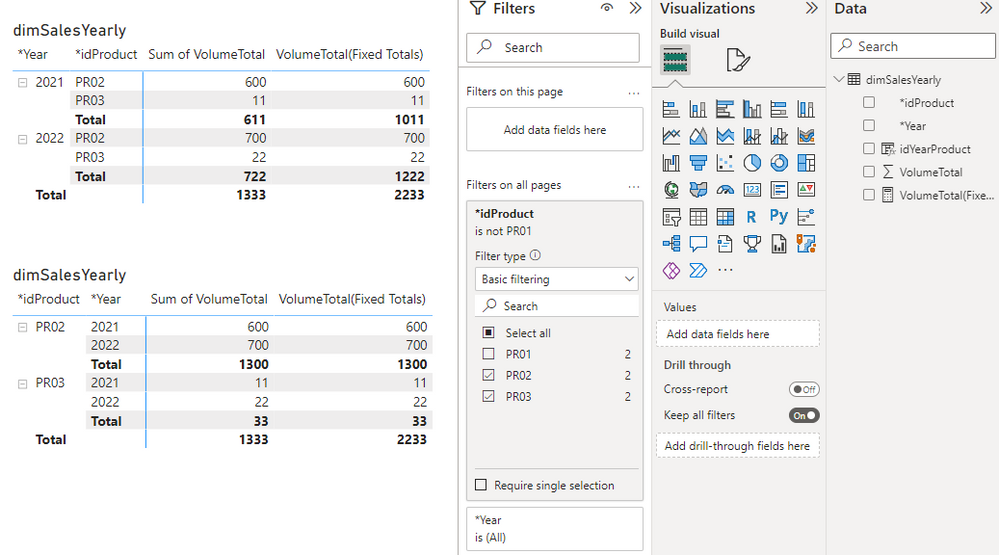
DenisSipchenko_1-1679500242899.png


P.S. I'd appreciate if you support "PowerQuery: Special symbol for previous step name" request feature you vote here or LinkedIn like/repost here.


View solution in original post

2 REPLIES 2
Anonymous
Not applicable

Possible Solution:


VolumeTotal(Fixed Totals) = 
VAR isInSc_Prod = ISINSCOPE(dimSalesYearly[*idProduct])
VAR isInSc_Year = ISINSCOPE(dimSalesYearly[*Year])
VAR Result =
    SWITCH(
        TRUE(),
        NOT isInSc_Prod && NOT isInSc_Year, CALCULATE(SUM(dimSalesYearly[VolumeTotal]), REMOVEFILTERS(dimSalesYearly[*idProduct],dimSalesYearly[*Year])),
        NOT isInSc_Prod , CALCULATE(SUM(dimSalesYearly[VolumeTotal]), REMOVEFILTERS(dimSalesYearly[*idProduct])),
        NOT isInSc_Year , CALCULATE(SUM(dimSalesYearly[VolumeTotal]), REMOVEFILTERS(dimSalesYearly[*Year])),
        SUM(dimSalesYearly[VolumeTotal])
    )

RETURN Result


DenisSipchenko_1-1679500242899.png


P.S. I'd appreciate if you support "PowerQuery: Special symbol for previous step name" request feature you vote here or LinkedIn like/repost here.


Anonymous
Not applicable

Hi @Anonymous ,

Thanks for sharing the solution. If the problem has been resolved, could you please mark your post as Answered? It will help the others in the community find the solution easily if they face the same problem as yours. Thank you.

By the way, I just voted for your idea. It is a good idea, hope it can be realized in the near future.

Best Regards

Helpful resources

Announcements
Power BI DataViz World Championships

Power BI Dataviz World Championships

The Power BI Data Visualization World Championships is back! Get ahead of the game and start preparing now!

November Power BI Update Carousel

Power BI Monthly Update - November 2025

Check out the November 2025 Power BI update to learn about new features.

FabCon Atlanta 2026 carousel

FabCon Atlanta 2026

Join us at FabCon Atlanta, March 16-20, for the ultimate Fabric, Power BI, AI and SQL community-led event. Save $200 with code FABCOMM.