Don't miss your chance to take exam DP-600 or DP-700 on us!
Request nowLearn from the best! Meet the four finalists headed to the FINALS of the Power BI Dataviz World Championships! Register now
Hello everyone,
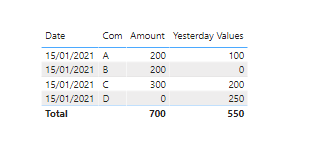
I want to get values of yesterday from the table below:
| Date | Com | Amount |
| 1/14 | A | 100 |
| 1/15 | A | 200 |
| 1/14 | B | 0 |
| 1/15 | B | 200 |
| 1/14 | C | 200 |
| 1/15 | C | 300 |
| 1/14 | D | 250 |
| 1/15 | D | 0 |
If today was 1/15 the values would be like below:
A: 100 B: 0 C: 200 D:250
To do that, I tried Measure and Caluculated Column below:
Column = TODAY()
Measure = CALCULATE(SUM('Sheet1'[Amount]), dateadd('Sheet1'[Column], -1, Day))
But nothing appeared on Table visual.
And also tried the below. but the output was the same as the original table data:
Column = TODAY() -1
Measure = CALCULATE(SUM('Sheet1'[Amount]), dateadd('Sheet1'[Column], 0, Day))
Any advice please?
Thanks,
Vladi
Hello @PbiCeo ,
Please try this measure
Please try this measure expression
Measure = CALCULATE(SUM('Sheet1'[Amount]), 'Sheet1'[Date] = TODAY() - 1)
Regards,
Pat
To learn more about Power BI, follow me on Twitter or subscribe on YouTube.
Thy the following formula in a measure.
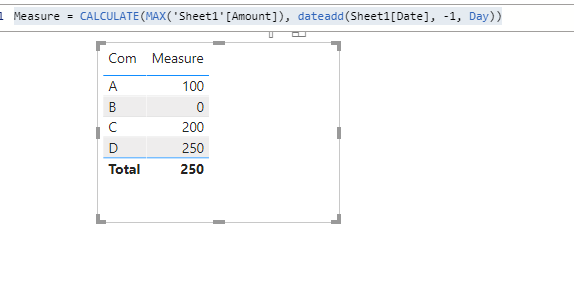
Measure = CALCULATE(MAX('Sheet1'[Amount]), dateadd(Sheet1[Date], -1, Day))Then create a new table and add the field 'Com' and the 'Measure'
@themistoklis ,
Thank you for your advice.
Actually, it gets values of a previous day of the newest data.
I want to get values of yesterday. For example, I open PBIX on 1/15, values should be of 1/14.
How can I do with Today function?
Thank you,
Share feedback directly with Fabric product managers, participate in targeted research studies and influence the Fabric roadmap.
Check out the February 2026 Power BI update to learn about new features.
| User | Count |
|---|---|
| 6 | |
| 4 | |
| 3 | |
| 3 | |
| 2 |
| User | Count |
|---|---|
| 7 | |
| 7 | |
| 6 | |
| 5 | |
| 5 |