cancel
Showing results for 
Search instead for 
Did you mean: 

The Power BI Data Visualization World Championships is back! Get ahead of the game and start preparing now! Learn more

Reply
Anonymous
Not applicable

How to find hours in date

Hi Team,


without using create new column bez i have connected direct query ...........based on measure how we can separate hours, minuts , seconds from date.


so the result i needed 1,2,3, .... 24(hours) based on date and time.

17-05-2023 15:17
3 REPLIES 3
tamerj1
Super User
Super User

Hi @Anonymous 
Please try

Hour =
HOUR ( SELECTEDVALUE ( 'Table'[DateTime] ) )
Anonymous
Not applicable

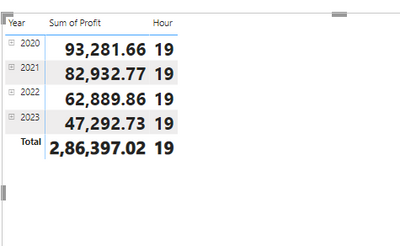
yes its working .... Same measure im trying to keep in matrix table under column field but not taking it.... is that way power Bi design.


So Finaly wat i want  hourly wise sales. but see the below its taking that measure under values field.

not require below kind of farmet.


MKM_0-1684322272976.png


@Anonymous 
What you're looking for requires creating a column in the data table. I think calculated columns that involve time are permitting when using direct query so this has to be done in power query. You can use the Time.Hour function.

Helpful resources

Announcements
Power BI DataViz World Championships

Power BI Dataviz World Championships

The Power BI Data Visualization World Championships is back! Get ahead of the game and start preparing now!

November Power BI Update Carousel

Power BI Monthly Update - November 2025

Check out the November 2025 Power BI update to learn about new features.

FabCon Atlanta 2026 carousel

FabCon Atlanta 2026

Join us at FabCon Atlanta, March 16-20, for the ultimate Fabric, Power BI, AI and SQL community-led event. Save $200 with code FABCOMM.