FabCon is coming to Atlanta
Join us at FabCon Atlanta from March 16 - 20, 2026, for the ultimate Fabric, Power BI, AI and SQL community-led event. Save $200 with code FABCOMM.
Register now!- Power BI forums
- Get Help with Power BI
- Desktop
- Service
- Report Server
- Power Query
- Mobile Apps
- Developer
- DAX Commands and Tips
- Custom Visuals Development Discussion
- Health and Life Sciences
- Power BI Spanish forums
- Translated Spanish Desktop
- Training and Consulting
- Instructor Led Training
- Dashboard in a Day for Women, by Women
- Galleries
- Data Stories Gallery
- Themes Gallery
- Contests Gallery
- QuickViz Gallery
- Quick Measures Gallery
- Visual Calculations Gallery
- Notebook Gallery
- Translytical Task Flow Gallery
- TMDL Gallery
- R Script Showcase
- Webinars and Video Gallery
- Ideas
- Custom Visuals Ideas (read-only)
- Issues
- Issues
- Events
- Upcoming Events
The Power BI Data Visualization World Championships is back! Get ahead of the game and start preparing now! Learn more
- Power BI forums
- Forums
- Get Help with Power BI
- DAX Commands and Tips
- How to calculate % of a count of a column?
- Subscribe to RSS Feed
- Mark Topic as New
- Mark Topic as Read
- Float this Topic for Current User
- Bookmark
- Subscribe
- Printer Friendly Page

- Mark as New
- Bookmark
- Subscribe
- Mute
- Subscribe to RSS Feed
- Permalink
- Report Inappropriate Content
How to calculate % of a count of a column?
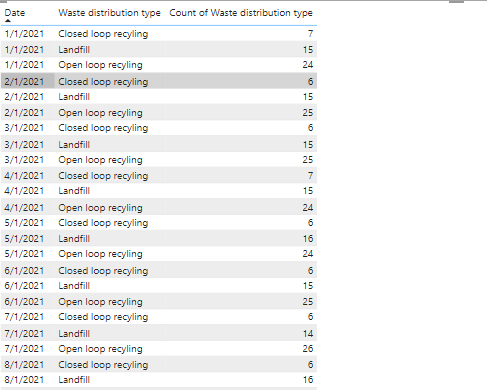
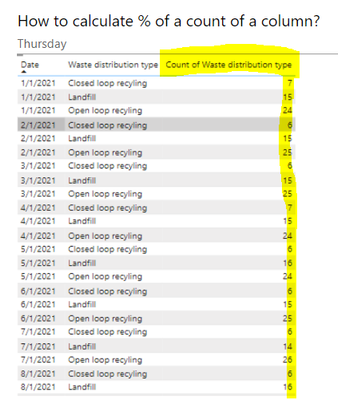
I'm trying to calculate the % of waste distribution type for every month year so for example in the above image, I want a measure to calculate the % of every month so it should be like for Jan 2021 the % of Closed loop recycling =( 7/(7+15+24))*100 and same for landfill and open loop recycling. I want to display the % of waste distribution in a line chart against the date to get a trend of how much is he % of waste distrbution for every type in every month and year.
How do I create a measure for this?
Solved! Go to Solution.


- Mark as New
- Bookmark
- Subscribe
- Mute
- Subscribe to RSS Feed
- Permalink
- Report Inappropriate Content
I did not have access to your dataset, so I simply created a table based on your screenshot from the original post.
In my case, [Count of Waste Distribution Type] is actually a column in the table.
But you don't have this column, which is the reason for the error.
In your case, it's the measure.
Try replacing the SUM clause with your measure as follows:
CALCULATE(
[Count of Waste distribution type],
ALL('Waste data (3)'),
'Calendar'[Date] = GivenDate
)
If it's still not working, perhaps you can share the PBIX on Google Drive and share the link here.
Regards,
Nathan
- Mark as New
- Bookmark
- Subscribe
- Mute
- Subscribe to RSS Feed
- Permalink
- Report Inappropriate Content
I created the % measure and it worked. Thank you so much 🙂 I had been stuck on this for more than 2 weeks. Thank you 🙂
- Mark as New
- Bookmark
- Subscribe
- Mute
- Subscribe to RSS Feed
- Permalink
- Report Inappropriate Content
The new replaced SUM clause worked for me. Can you give me the new % measure as well?
- Mark as New
- Bookmark
- Subscribe
- Mute
- Subscribe to RSS Feed
- Permalink
- Report Inappropriate Content
I did not have access to your dataset, so I simply created a table based on your screenshot from the original post.
In my case, [Count of Waste Distribution Type] is actually a column in the table.
But you don't have this column, which is the reason for the error.
In your case, it's the measure.
Try replacing the SUM clause with your measure as follows:
CALCULATE(
[Count of Waste distribution type],
ALL('Waste data (3)'),
'Calendar'[Date] = GivenDate
)
If it's still not working, perhaps you can share the PBIX on Google Drive and share the link here.
Regards,
Nathan
- Mark as New
- Bookmark
- Subscribe
- Mute
- Subscribe to RSS Feed
- Permalink
- Report Inappropriate Content
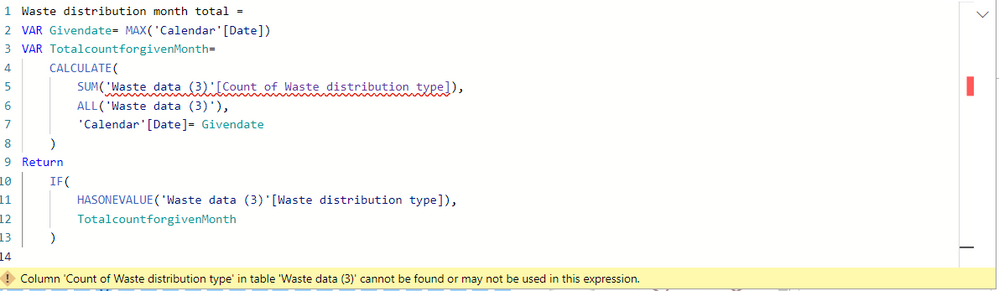

I tried the formula you have provided and I'm getting an error in the Count of waste distribution type in the 1st image as you can see. I've added the screenshot for the count of waste distribution type measure which I have created. Could you please help with what's going wrong?
- Mark as New
- Bookmark
- Subscribe
- Mute
- Subscribe to RSS Feed
- Permalink
- Report Inappropriate Content
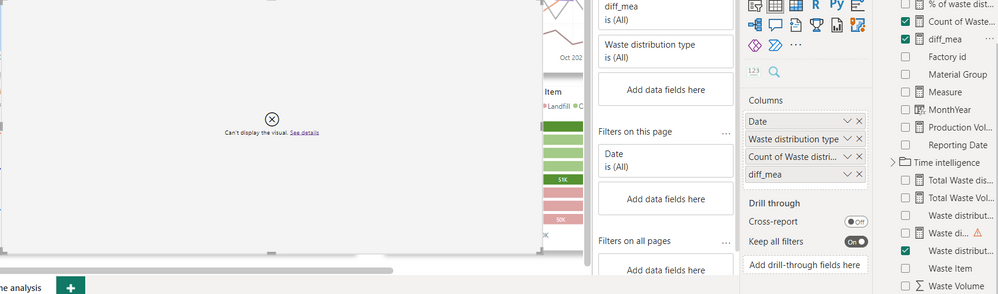
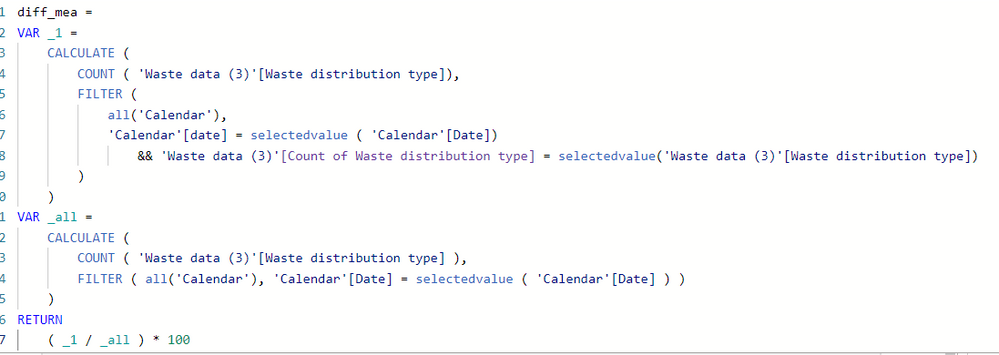
I used the above formula to calculate month total and it's not giving the correct inforation and when I bring it to the visualisation it's not displaying any info.
- Mark as New
- Bookmark
- Subscribe
- Mute
- Subscribe to RSS Feed
- Permalink
- Report Inappropriate Content
@Anonymous
Whenever this happens to me, it's helpful to separate each VAR (and the RETURN section) into its own measure to isolate smaller pieces of code.
If the at-fault piece of code is a CALCULATE statement, try changing it a bit to see if the issue is with the FILTER section or something else. In this way, you should be able to identify the exact line of code that's causing the problem.
Once you can pinpoint which piece of code is causing the visual to break, then you need to click "See Details" to see what the error message is.
Regards,
Nathan
- Mark as New
- Bookmark
- Subscribe
- Mute
- Subscribe to RSS Feed
- Permalink
- Report Inappropriate Content
@Anonymous
I separated this into 2 measures so you can see the results, but feel free to combine them.


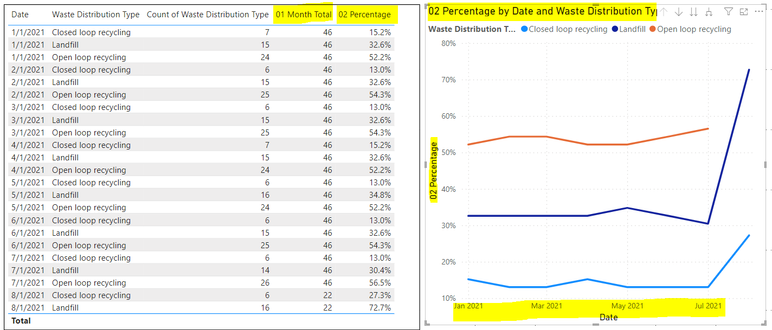
Hopefully this is helpful to you.
Regards,
Nathan
Helpful resources

Power BI Monthly Update - November 2025
Check out the November 2025 Power BI update to learn about new features.

Fabric Data Days
Advance your Data & AI career with 50 days of live learning, contests, hands-on challenges, study groups & certifications and more!

FabCon Atlanta 2026
Join us at FabCon Atlanta, March 16-20, for the ultimate Fabric, Power BI, AI and SQL community-led event. Save $200 with code FABCOMM.

| User | Count |
|---|---|
| 21 | |
| 10 | |
| 9 | |
| 4 | |
| 4 |


| User | Count |
|---|---|
| 34 | |
| 31 | |
| 20 | |
| 13 | |
| 11 |


