Get certified for free when you join Fabric Data Days 2026 and dive into Fabric, Power BI, SQL, AI, and other essential data skills.
Join nowData Days is here! Join us now for 60+ days of learning, challenges, and connection. Learn more
Hello Everyone
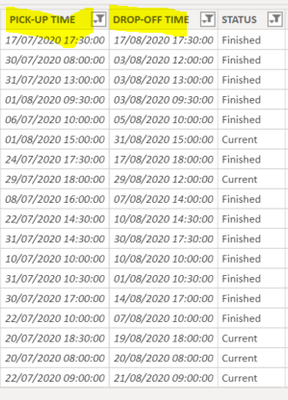
i have the start date of a rental car and the end date .
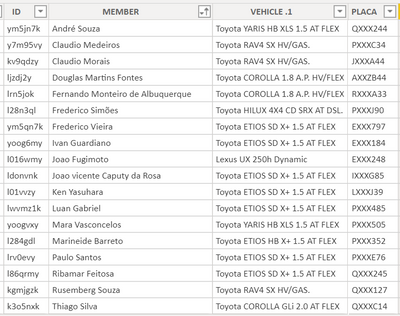
I Need to know a daily occupancy based on these data. So, for example , i need to know what is the correct total occupancy percentage in Aug 1 st. this occupancy must be measured by day , and by vehicle.
any idea ?
@Anonymous , with a date table you need to measure like
CALCULATE(COUNTx(FILTER('Table','Table'[Pick up time]<=max('Date'[Date]) && (ISBLANK('Table'[Drop of time]) || 'Table'[Drop of time]>max('Date'[Date]))),('Table'[Pick up time])),CROSSFILTER('Table'[Drop of time],'Date'[Date],None))
Can you share sample data and sample output in table format? Or a sample pbix after removing sensitive data.
Refer if this can help
https://drive.google.com/file/d/1NY_ci_I4ljKsutrbeO_m1Auy7M39eGdU/view?usp=sharing
this is my sample data. is it enough ?
i need a daily occupancy . for example . in aug 1st 407,5 hours of occupancy and 14,9 % of occupancy based on the total of my fleet cars. if i have 100 cars , the total availability is 100 * 24 hours . the occupancy is the difference between the availability and the total occupancy day.
some cars are rent just part of the day.
@Anonymous - This looks like a variation on Open Tickets. https://community.powerbi.com/t5/Quick-Measures-Gallery/Open-Tickets/m-p/409364#M147
If you want a more specific solution to your exact problem, please post your sample data as text in a table. Thanks.
Not really enough information to go on, please first check if your issue is a common issue listed here: https://community.powerbi.com/t5/Community-Blog/Before-You-Post-Read-This/ba-p/1116882
Also, please see this post regarding How to Get Your Question Answered Quickly: https://community.powerbi.com/t5/Community-Blog/How-to-Get-Your-Question-Answered-Quickly/ba-p/38490
The most important parts are:
1. Sample data as text, use the table tool in the editing bar
2. Expected output from sample data
3. Explanation in words of how to get from 1. to 2.
Don't miss out on Data Days, June 15 through August 7. Learn Fabric, Power BI, SQL, AI and more.
Check out the May 2026 Power BI update to learn about new features.
| User | Count |
|---|---|
| 3 | |
| 2 | |
| 2 | |
| 1 | |
| 1 |