Join us at FabCon Atlanta from March 16 - 20, 2026, for the ultimate Fabric, Power BI, AI and SQL community-led event. Save $200 with code FABCOMM.
Register now!The Power BI Data Visualization World Championships is back! Get ahead of the game and start preparing now! Learn more
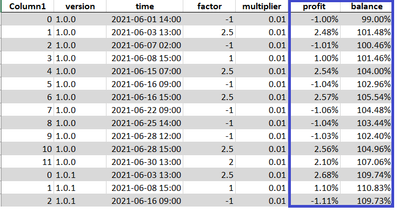
Good day, I have difficulty creating these measures and hope to receive help 🙂 This is what I am trying to create:
Profit formula is: factor * multiplier * previous row balance
Balance formula is: profit + previous row balance
Example:
Row 2 profit: 2.5 * 0.01 * 0.99 (or 99%) = 2.48%
Row 2 balance: 2.48% + 99% = 101.48
As there is no previous balance value for the first row, the calculation for row 1 is different!
Row 1 profit: factor * multiplier * 1
Row 1 balance: profit + 1
How can I create these measures? Thank you in advance for taking time to do this! Cheers! 😁
https://www.dropbox.com/s/6bdtvmf5ltbjipi/powerbi.pbix?dl=0
Solved! Go to Solution.
Hi @greendate ,
This is a bit like a cumulative multiplication algorithm. power bi only supports the calculation of existing data, and cannot perform the next calculation based on its own calculation results. But we can optimize this algorithm.
Here is the logic of my calculation, you can refer to it.
assum a = factor * multiplier
p2 = b1 + a1
p3 = b2 + a2
p4 = b3 + a3
and
b2 = p2+b1
b3 = p3+b2
b4 = p4+b3
so ->
b2 = b1(1+a2)
b3 = b1(1+a2)*(1+a3)
b4 = b1(1+a2)*(1+a3)*(1+a4)
And the measures for [balance] and [profit] is:
balance =
VAR _b_s =
SUMMARIZE (
CALCULATETABLE (
report,
FILTER (
ALLEXCEPT ( report, 'report'[version] ),
[time] <= MAX ( 'report'[time] )
)
),
[version],
[time],
"fac",
[multiplier] * SUM ( report[factor] ) + 1
)
RETURN
PRODUCTX ( _b_s, [fac] )
profit =
VAR _factor =
SUM ( report[factor] )
VAR _a = [multiplier] * _factor
VAR _b_s =
SUMMARIZE (
CALCULATETABLE (
report,
FILTER (
ALLEXCEPT ( report, 'report'[version] ),
[time] < MAX ( 'report'[time] )
)
),
[version],
[time],
"fac",
[multiplier] * SUM ( report[factor] ) + 1
)
VAR _result =
PRODUCTX ( _b_s, [fac] ) * _a
RETURN
IF ( ISBLANK ( _result ), _a, _result )
Resutl:
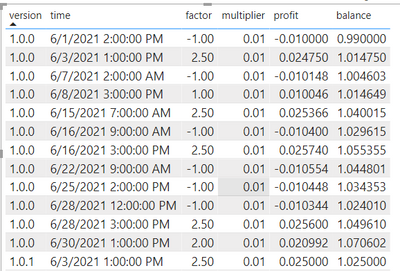
Pbix in the end you can refer.
Best Regards
Community Support Team _ chenwu zhu
If this post helps, then please consider Accept it as the solution to help the other members find it more quickly.
Hi @greendate ,
This is a bit like a cumulative multiplication algorithm. power bi only supports the calculation of existing data, and cannot perform the next calculation based on its own calculation results. But we can optimize this algorithm.
Here is the logic of my calculation, you can refer to it.
assum a = factor * multiplier
p2 = b1 + a1
p3 = b2 + a2
p4 = b3 + a3
and
b2 = p2+b1
b3 = p3+b2
b4 = p4+b3
so ->
b2 = b1(1+a2)
b3 = b1(1+a2)*(1+a3)
b4 = b1(1+a2)*(1+a3)*(1+a4)
And the measures for [balance] and [profit] is:
balance =
VAR _b_s =
SUMMARIZE (
CALCULATETABLE (
report,
FILTER (
ALLEXCEPT ( report, 'report'[version] ),
[time] <= MAX ( 'report'[time] )
)
),
[version],
[time],
"fac",
[multiplier] * SUM ( report[factor] ) + 1
)
RETURN
PRODUCTX ( _b_s, [fac] )
profit =
VAR _factor =
SUM ( report[factor] )
VAR _a = [multiplier] * _factor
VAR _b_s =
SUMMARIZE (
CALCULATETABLE (
report,
FILTER (
ALLEXCEPT ( report, 'report'[version] ),
[time] < MAX ( 'report'[time] )
)
),
[version],
[time],
"fac",
[multiplier] * SUM ( report[factor] ) + 1
)
VAR _result =
PRODUCTX ( _b_s, [fac] ) * _a
RETURN
IF ( ISBLANK ( _result ), _a, _result )
Resutl:
Pbix in the end you can refer.
Best Regards
Community Support Team _ chenwu zhu
If this post helps, then please consider Accept it as the solution to help the other members find it more quickly.
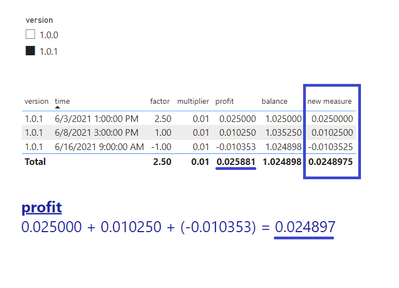
Yes! This is what I was looking for. Thank you for helping @v-chenwuz-msft 😁 I have 1 more issue that I couldn't figure out yet. I want the sum of profit for total but it is not adding up correctly. At the moment I managed to get the desired output only by creating additional measure:
new measure =
SUMX(
VALUES(report[time]),
report[profit])
How can I get the correct total sum for profit without creating another measure? Thank you in advance for helping! 😁
https://www.dropbox.com/s/q0qs0yhydc9fbk6/20220518-powerbi.pbix?dl=0
You could use power query to add the previous balance to the current row, that would make the calculations much simpler and more efficient.
In power query, sort the data by the appropriate column, then add an index column, 0-based. You can then add a new custom column called previous_balance using something like
if [index] = 0 then null else #”Added Index”[balance]{[index] – 1}
The Power BI Data Visualization World Championships is back! Get ahead of the game and start preparing now!
Check out the November 2025 Power BI update to learn about new features.
| User | Count |
|---|---|
| 20 | |
| 11 | |
| 10 | |
| 4 | |
| 4 |
| User | Count |
|---|---|
| 34 | |
| 31 | |
| 19 | |
| 12 | |
| 11 |