Join us at FabCon Atlanta from March 16 - 20, 2026, for the ultimate Fabric, Power BI, AI and SQL community-led event. Save $200 with code FABCOMM.
Register now!The Power BI Data Visualization World Championships is back! It's time to submit your entry. Live now!
Hello,
I am trying to create a measure which can show the highest monthly total sales in a given time period. See the sales table below:
| Date | Sales |
| 7/2/2020 | $ 100 |
| 7/2/2020 | $ 200 |
| 7/28/2020 | $ 500 |
| 8/4/2020 | $ 300 |
| 9/5/2020 | $ 200 |
| 7/2/2021 | $ 100 |
| 7/2/2021 | $ 100 |
| 8/4/2021 | $ 900 |
| 9/5/2021 | $ 200 |
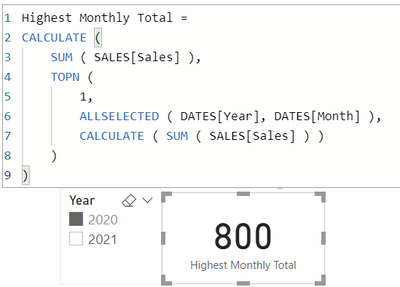
There is another date table that I want to filter on. When I filter year 2020, the measure should show $800 (July 2021 total sales amount); when I filter 2021, the measure should show $900 (August 2021 total sales amount); when I don't filter anything, it should show $900 (August 2021 total sales amount); when I select a sepecific month, it should show the monthly total sales amount of the month selected - e.g. if I select Sept 2021, it should show $200.
Is there a way to create this measure without creating a new table?
Thank you very much for your help!
Solved! Go to Solution.
| Thanks to the great efforts by MS engineers to simplify syntax of DAX! Most beginners are SUCCESSFULLY MISLED to think that they could easily master DAX; but it turns out that the intricacy of the most frequently used RANKX() is still way beyond their comprehension! |
DAX is simple, but NOT EASY! |
| Thanks to the great efforts by MS engineers to simplify syntax of DAX! Most beginners are SUCCESSFULLY MISLED to think that they could easily master DAX; but it turns out that the intricacy of the most frequently used RANKX() is still way beyond their comprehension! |
DAX is simple, but NOT EASY! |
Hi,
Assuming your Sales table is related appropriately to a Date table named Dates:
Max Monthly Sales =
VAR MyTable =
SUMMARIZE (
Sales,
Dates[Date].[Year],
Dates[Date].[Month],
"Monthly Sales", SUM ( Sales[Sales] )
)
RETURN
MAXX ( MyTable, [Monthly Sales] )Regards
The Power BI Data Visualization World Championships is back! It's time to submit your entry.
Check out the January 2026 Power BI update to learn about new features.
| User | Count |
|---|---|
| 7 | |
| 5 | |
| 5 | |
| 3 | |
| 3 |
| User | Count |
|---|---|
| 15 | |
| 14 | |
| 9 | |
| 8 | |
| 8 |