Join us at FabCon Atlanta from March 16 - 20, 2026, for the ultimate Fabric, Power BI, AI and SQL community-led event. Save $200 with code FABCOMM.
Register now!Get Fabric Certified for FREE during Fabric Data Days. Don't miss your chance! Request now
Edited...
Solved! Go to Solution.
Hi @OldN00b ,
Has your problem solved? If solved, please consider Accept it as the solution to help the other members find it more quickly.
Hi @OldN00b ,
Has your problem solved? If solved, please consider Accept it as the solution to help the other members find it more quickly.
Hi @OldN00b ,
This my sample data with two columns: Date and Cashflow.
Then I create a date table:
Date = ADDCOLUMNS(
CALENDAR(DATE(2020,1,1),DATE(2022,1,17)),
"Year",YEAR([Date]),
"Month",MONTH([Date])
)
The relationships of two tables as shown below:
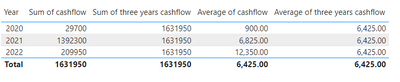
Please try following DAX and create a table visual to find difference with cashflow.
Sum of cashflow = SUM('Table'[Cashflow])
Sum of three years cashflow = CALCULATE(SUM('Table'[Cashflow]),ALLSELECTED('Table'))
Average of cashflow = AVERAGE('Table'[Cashflow])
Average of three years cashflow = CALCULATE(
AVERAGEX(VALUES('Table'[Date]),CALCULATE(SUM('Table'[Cashflow]))),
ALLSELECTED('Table'))
If I misunderstood you, please provide sample data to help us better understand your needs.
Best regards,
Yadong Fang
If this post helps, then please consider Accept it as the solution to help the other members find it more quickly.
Please provide sanitized sample data that fully covers your issue. I can only help you with meaningful sample data.
Please paste the data into a table in your post or use one of the file services like OneDrive or Google Drive. Screenshots of your source data are not useful.
Please show the expected outcome based on the sample data you provided. Screenshots of the expected outcome are ok.
https://community.powerbi.com/t5/Community-Blog/How-to-provide-sample-data-in-the-Power-BI-Forum/ba-...
https://community.powerbi.com/t5/Desktop/How-to-Get-Your-Question-Answered-Quickly/m-p/1447523
Check out the November 2025 Power BI update to learn about new features.
Advance your Data & AI career with 50 days of live learning, contests, hands-on challenges, study groups & certifications and more!
| User | Count |
|---|---|
| 11 | |
| 9 | |
| 9 | |
| 6 | |
| 5 |
| User | Count |
|---|---|
| 27 | |
| 22 | |
| 19 | |
| 17 | |
| 11 |