cancel
Showing results for 
Search instead for 
Did you mean: 

The Power BI Data Visualization World Championships is back! Get ahead of the game and start preparing now! Learn more

Reply
Del235
Helper III
Helper III

Getting TOTALYTD thru yesterday

I need to get the TotalYTD function to only give cumulative totals thru yesterday.  So if today is 4/17.23 I want to see the cumaltive total thru 4/16/23.  On the next day it would go up 1 and so on.


I have successfully written the DAX to give me a cumulative total how to I get it to stop on yesterday?  Itried the TODAY() function but something isn't right.


As a measure, I used

Measure = TOTALYTD(SUM(Table1[Attendance]),Table1[Visit Date])
1 ACCEPTED SOLUTION
Ajendra
Resolver I
Resolver I

Hi @Del235


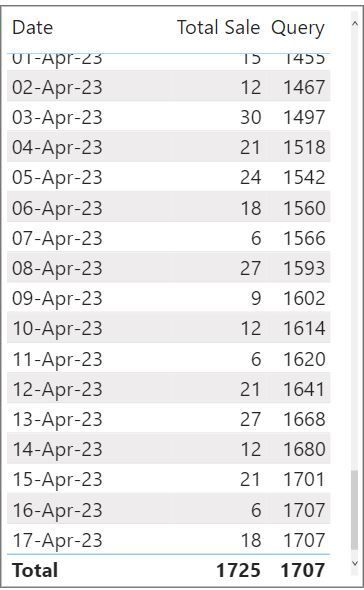
Query = TOTALYTD([Total Sale],
DateMaster[Date],
DateMaster[Date]<TODAY())
 
Check below Screen Shot of Output.
SS.JPG


View solution in original post

3 REPLIES 3
Ajendra
Resolver I
Resolver I

Hi @Del235


Query = TOTALYTD([Total Sale],
DateMaster[Date],
DateMaster[Date]<TODAY())
 
Check below Screen Shot of Output.
SS.JPG


FreemanZ
Super User
Super User

or like:

Measure = 
CALCULATE(
    SUM(Table1[Attendance]),
    Table1[Visit Date]>=DATE(YEAR(TODAY()), 1, 1),
    Table1[Visit Date]<TODAY()
)
FreemanZ
Super User
Super User

hi @Del235 

try like:

Measure = TOTALYTD(SUM(Table1[Attendance]),Table1[Visit Date]
-
CALCULATE(SUM(Table1[Attendance]),Table1[Visit Date]=TODAY()-1)

Helpful resources

Announcements
Power BI DataViz World Championships

Power BI Dataviz World Championships

The Power BI Data Visualization World Championships is back! Get ahead of the game and start preparing now!

December 2025 Power BI Update Carousel

Power BI Monthly Update - December 2025

Check out the December 2025 Power BI Holiday Recap!

FabCon Atlanta 2026 carousel

FabCon Atlanta 2026

Join us at FabCon Atlanta, March 16-20, for the ultimate Fabric, Power BI, AI and SQL community-led event. Save $200 with code FABCOMM.