Join us at FabCon Atlanta from March 16 - 20, 2026, for the ultimate Fabric, Power BI, AI and SQL community-led event. Save $200 with code FABCOMM.
Register now!Get Fabric Certified for FREE during Fabric Data Days. Don't miss your chance! Request now
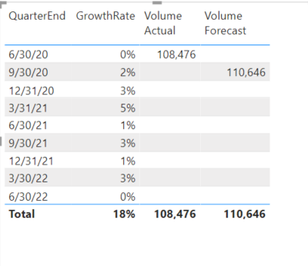
I have two tables. One table has actual sales data and one table has the growth rates and is where I'm trying to derive the forecast. I've aggregated both to the quarter level. In the below picture the 'Volume Actual' is the data from the actual sales table. I would like to take the 'Volume Actual' from the 6/30/20 quarter end and apply the growth rate from the 9/30/20 quarter end and have a running 'Volume Forecast' in which the prior quarter's number is used and the growth rate is applied.
For example, for 12/31/20 'Volume Forecast', I would like to take the 110,646 figure from the 9/30/20 quarter ending and multiply it by the 3% growth rate for the 12/31/20 quarter and so on all the way through 6/30/22.
Thank you for the help.
@Anonymous
The growth rate will always be quarterly. No need to get more granular. Below is a table with my ideal scenario. Thank you for the help.
| QuarterEnd | GrowthRate | VolumeActual | VolumeBaseline (Forecast) |
| 6/30/2020 | 0% | 113,850 | |
| 9/30/2020 | 2% | 116,127 | |
| 12/31/2020 | 3% | 119,611 | |
| 3/31/2021 | 5% | 125,591 | |
| 6/30/2021 | 1% | 126,847 | |
| 9/30/2021 | 3% | 130,653 | |
| 12/31/2021 | 1% | 131,959 | |
| 3/30/2022 | 3% | 135,918 | |
| 6/30/2022 | 0% | 135,918 |
Use productx. Here's the pseudo code
Volume Forecast = productx(1+[Growth rate]) * 108476
Post the sample data in a table if you want the actual formula.
The below is what I would want in table format. Thank you for your help.
| QuarterEnd | GrowthRate | VolumeActual | VolumeBaseline (Forecast) |
| 6/30/2020 | 0% | 113,850 | |
| 9/30/2020 | 2% | 116,127 | |
| 12/31/2020 | 3% | 119,611 | |
| 3/31/2021 | 5% | 125,591 | |
| 6/30/2021 | 1% | 126,847 | |
| 9/30/2021 | 3% | 130,653 | |
| 12/31/2021 | 1% | 131,959 | |
| 3/30/2022 | 3% | 135,918 | |
| 6/30/2022 | 0% | 135,918 |
Check out the November 2025 Power BI update to learn about new features.
Advance your Data & AI career with 50 days of live learning, contests, hands-on challenges, study groups & certifications and more!
| User | Count |
|---|---|
| 11 | |
| 9 | |
| 9 | |
| 6 | |
| 5 |
| User | Count |
|---|---|
| 27 | |
| 22 | |
| 19 | |
| 17 | |
| 11 |