Join us at FabCon Atlanta from March 16 - 20, 2026, for the ultimate Fabric, Power BI, AI and SQL community-led event. Save $200 with code FABCOMM.
Register now!The Power BI Data Visualization World Championships is back! Get ahead of the game and start preparing now! Learn more
Hello All,
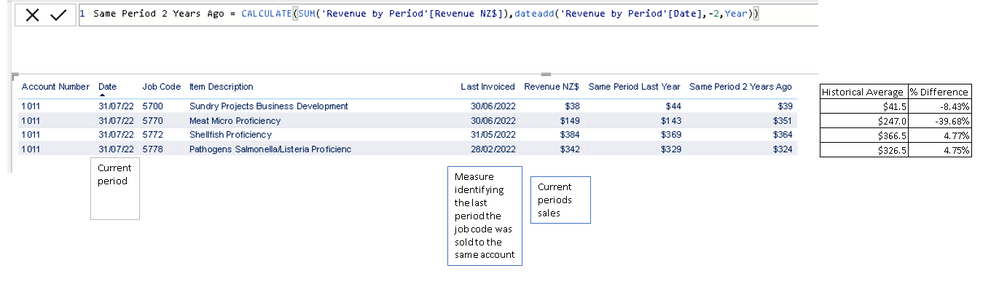
I have a dataset of invoice information FY21, FY22 and building up FY23 as we progress through. I need to assess line by line for the F23 data to find the average of the sales for the last two years compared this current period.
I have a date table linked to this revenue table.
Below image is a snip of what I currently have with what I am hoping to be able to produce added to the RHS.
It needs to ignore any filters on the visuals, page and report.
As far as I remember, one cannot ignore filters on the page or/and report level. Not via DAX at least. When you design your reports, you should always be aware of this limitation (or a feature - depending on how you look at this).
This ignores all filters.
OK, I have googled for it. Yes, it looks like you can override page level filters in a DAX measure 🙂 Looks like my skills are getting a bit rusty 🙂
The Power BI Data Visualization World Championships is back! Get ahead of the game and start preparing now!
Check out the November 2025 Power BI update to learn about new features.
| User | Count |
|---|---|
| 20 | |
| 10 | |
| 9 | |
| 4 | |
| 4 |
| User | Count |
|---|---|
| 32 | |
| 31 | |
| 18 | |
| 12 | |
| 11 |