Join us at FabCon Atlanta from March 16 - 20, 2026, for the ultimate Fabric, Power BI, AI and SQL community-led event. Save $200 with code FABCOMM.
Register now!Vote for your favorite vizzies from the Power BI Dataviz World Championship submissions. Vote now!
Hi all.
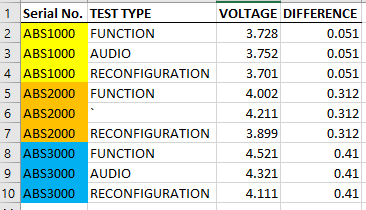
From the screenshot shown above, I would like to filter the serial number first before proceeding to calculate the difference in the higest and lowest voltage within each serial number. Is there a possible way in achieving the above mentioned outcome? Relatively new to power BI so I am quite unsure with how to approach this problem. Any help would be greatly appreciated.
Solved! Go to Solution.
Hi,
I assume you want to create a calculated column.
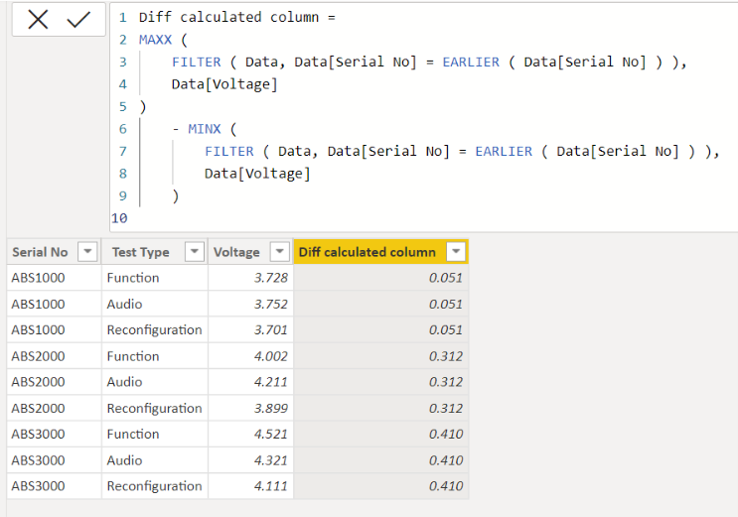
Please check the below picture and the attached pbix file.
Diff calculated column =
MAXX (
FILTER ( Data, Data[Serial No] = EARLIER ( Data[Serial No] ) ),
Data[Voltage]
)
- MINX (
FILTER ( Data, Data[Serial No] = EARLIER ( Data[Serial No] ) ),
Data[Voltage]
)
Hi,
I assume you want to create a calculated column.
Please check the below picture and the attached pbix file.
Diff calculated column =
MAXX (
FILTER ( Data, Data[Serial No] = EARLIER ( Data[Serial No] ) ),
Data[Voltage]
)
- MINX (
FILTER ( Data, Data[Serial No] = EARLIER ( Data[Serial No] ) ),
Data[Voltage]
)
Thank you!
Vote for your favorite vizzies from the Power BI World Championship submissions!
If you love stickers, then you will definitely want to check out our Community Sticker Challenge!
Check out the January 2026 Power BI update to learn about new features.
| User | Count |
|---|---|
| 7 | |
| 6 | |
| 4 | |
| 3 | |
| 3 |
| User | Count |
|---|---|
| 19 | |
| 10 | |
| 10 | |
| 6 | |
| 6 |