Join us at FabCon Atlanta from March 16 - 20, 2026, for the ultimate Fabric, Power BI, AI and SQL community-led event. Save $200 with code FABCOMM.
Register now!The Power BI Data Visualization World Championships is back! Get ahead of the game and start preparing now! Learn more
Hi,
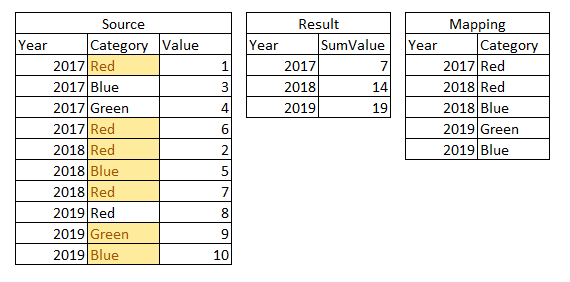
I would like to filter based on Category but category changes each year. Can I do that in measure?
I hope it's clear from the picture.
Thanks.
B.
Solved! Go to Solution.
@kap_55 Create following measure in source table
Measure =
VAR _year = MAX(Source[Year])
VAR _color = CALCULATETABLE(VALUES(Mapping[Category]),Mapping[Year]=_year)
RETURN CALCULATE(SUM(Source[Value]),Source[Category] IN _color)As per my understanding 2017 sum of value should be 7.
@kap_55 Create following measure in source table
Measure =
VAR _year = MAX(Source[Year])
VAR _color = CALCULATETABLE(VALUES(Mapping[Category]),Mapping[Year]=_year)
RETURN CALCULATE(SUM(Source[Value]),Source[Category] IN _color)As per my understanding 2017 sum of value should be 7.
Works awesome. Thanks.
Yes. My mistake 🙂
Let me try your solution.
The Power BI Data Visualization World Championships is back! Get ahead of the game and start preparing now!
| User | Count |
|---|---|
| 19 | |
| 13 | |
| 9 | |
| 4 | |
| 4 |
| User | Count |
|---|---|
| 30 | |
| 26 | |
| 17 | |
| 11 | |
| 10 |