cancel
Showing results for 
Search instead for 
Did you mean: 

The Power BI Data Visualization World Championships is back! Get ahead of the game and start preparing now! Learn more

Reply
Sparkeltje
Frequent Visitor

Filter context issue: how to show record with no value?

Hello guys,


Need your help. I have an openingbalance but when there are no bookings during current year the row is not shown in the result.


For exemple:

For 01-01-2020 I have a filter to ignore all filters and only calculate on periode 0

Mutations during year are in periode 1-13

01-01-2020DebetCredit
CALCULATE([01-01-2020]+ [Debet]+ [Credit])
14.0001.000-1.00014.000
15.0000015.000


The problem is that when I filter with period 0 the 01-01-2020 is correct, but debet and credit also have the total of period 0,  but when I filter period 1 the second row dissapears.

Totals don't change.


How can I make sure that if there are no mutations during the year, that all the rows from calculation 01-01-2020 stay visable?


Thank you for your help.

2 REPLIES 2
amitchandak
Super User
Super User

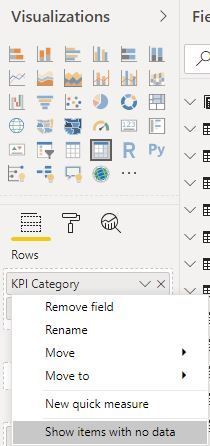
@Sparkeltje , Your table is not very clear. Typically we add +0 to a measure or use this option to show all data from a dimension

ShowItemwithoutdata.JPG

Share with Power BI Enthusiasts: Full Power BI Video (20 Hours) YouTube
Microsoft Fabric Series 60+ Videos YouTube
Microsoft Fabric Hindi End to End YouTube

@amitchandak, I tried +0 but then my first two column gets messed up. Try to make it clear


ACCOUNTDESCRIPTIONOPENING BALANCEMUTATIONS DURING YEAR DEBITMUTATIONS DURING YEAR CREDITCLOSING BALANCE
01004ASSETS783.980.073,84601.956,48-14.669,51784.567.360,81
01005DEPRECIATION-353.337.231,510-23.628.688.57-376.965.920,08
11101TAXES136815,021.155.215,56-1.195.091.2896.939.30
23002OPTIONS530.283,4000530.283,40
30000STOCK2.282,506.782,503.235,00

5.830,00


OPENING BALANCE IS PERIOD 0 > with FILTER ALL I ingnore filters on the sheet which are:  MUTATIONS IS PERIOD 1-13


BUT WHEN I FILTER 1-13 (and leave PERIOD 0 out of it), the table will be as follow, row 23002 OPTIONS dissapears because there are no mutations this year.


ACCOUNTDESCRIPTIONOPENING BALANCEMUTATIONS DURING YEAR DEBITMUTATIONS DURING YEAR CREDITCLOSING BALANCE
01004ASSETS783.980.073,84601.956,48-14.669,51784.567.360,81
01005DEPRECIATION-353.337.231,510-23.628.688.57-376.965.920,08
11101TAXES136815,021.155.215,56-1.195.091.2896.939.30
30000STOCK2.282,506.782,503.235,005.830,00


When I use + 0 the following happens

ACCOUNTDESCRIPTIONOPENING BALANCEMUTATIONS DURING YEAR DEBITMUTATIONS DURING YEAR CREDITCLOSING BALANCE
01004ASSETS783.980.073,84601.956,48-14.669,51784.567.360,81
01004DEPRECIATION0000
01004TAXES0000
01004OPTIONS0000
01004STOCK0000
01004ASSETS0000
01005DEPRECIATION-353.337.231,510-23.628.688.57-376.965.920,08
01005TAXES0000
01005OPTIONS0000
01005STOCK0000


Helpful resources

Announcements
Power BI DataViz World Championships

Power BI Dataviz World Championships

The Power BI Data Visualization World Championships is back! Get ahead of the game and start preparing now!

December 2025 Power BI Update Carousel

Power BI Monthly Update - December 2025

Check out the December 2025 Power BI Holiday Recap!

FabCon Atlanta 2026 carousel

FabCon Atlanta 2026

Join us at FabCon Atlanta, March 16-20, for the ultimate Fabric, Power BI, AI and SQL community-led event. Save $200 with code FABCOMM.