cancel
Showing results for 
Search instead for 
Did you mean: 

The Power BI Data Visualization World Championships is back! Get ahead of the game and start preparing now! Learn more

Reply
Anonymous
Not applicable

Dynamic Filtering

Hello All,


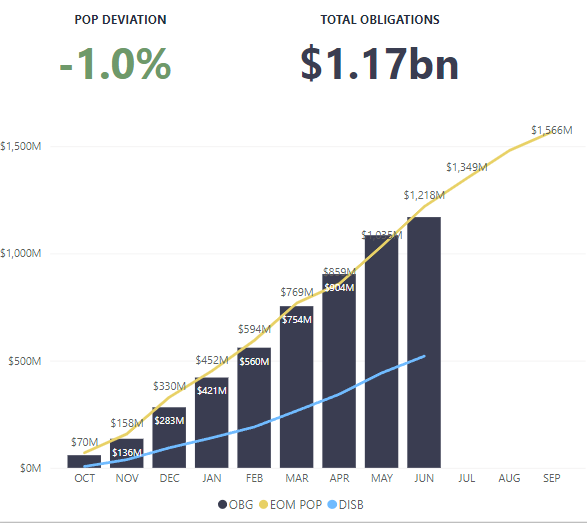
I've got a report with cumulative data on a chart along with a card that displays the total obligations.


themanjk08_0-1656089104912.png


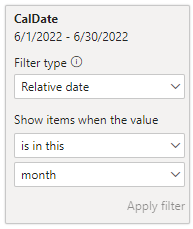
The only way to get the card to display the correct amount is to do a relative filter to show items in the current month. Without the filter, the card will display the sum of all cumulative monthly totals (~$5b) which is incorrect. 

themanjk08_1-1656089183956.png


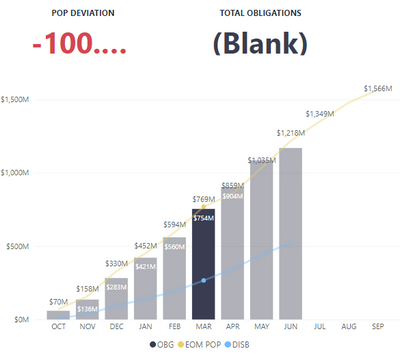
If I select a month on the chart, the card does not update since it already has a filter for items in the current month.

themanjk08_2-1656089309572.png


I'm looking for a solution that allows the "Total Obligations" card to default to filtering for the current month until a month is selected on the chart. Then the filter would change to selected month. I don't know if this can be done, but I'm open to any suggestions. 

1 ACCEPTED SOLUTION
Anonymous
Not applicable

Hi @Anonymous ,


Please try this measure.

Total Obligations =
CALCULATE (
    SUM ( 'Table'[Obligations] ),
    FILTER (
        ALL ( 'Calendar' ),
        'Calendar'[MonthNum]
            = SELECTEDVALUE ( 'Calendar'[MonthNum], MONTH ( TODAY () ) )
    )
)

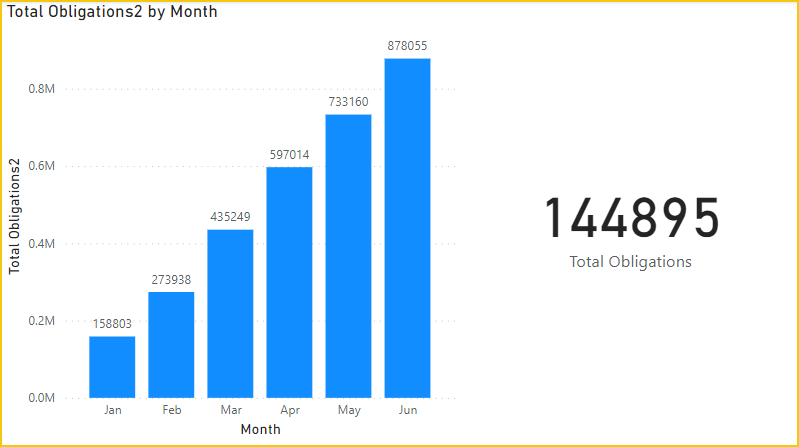
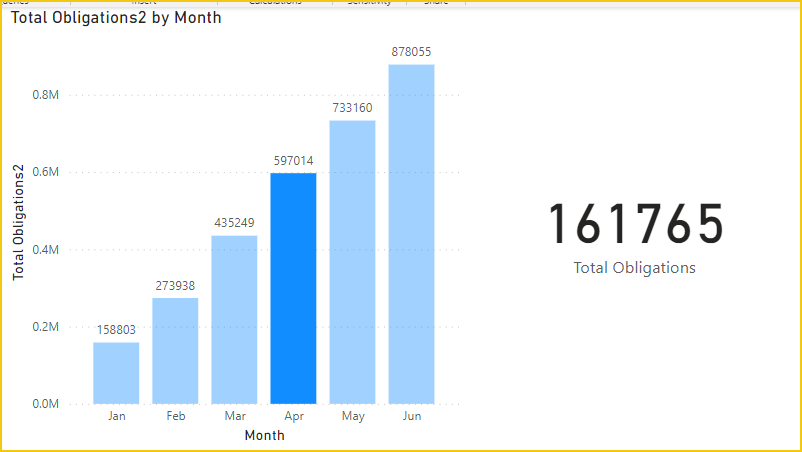
By default the current month is filtered until a month is selected on the graph.

vcgaomsft_0-1656381857108.png

vcgaomsft_1-1656381883786.png

Attached PBIX file for reference.


Best Regards,
Gao

Community Support Team


If there is any post helps, then please consider Accept it as the solution to help the other members find it more quickly. If I misunderstand your needs or you still have problems on it, please feel free to let us know. Thanks a lot!

How to get your questions answered quickly -- How to provide sample data

View solution in original post

2 REPLIES 2
Anonymous
Not applicable

Hi @Anonymous ,


Please try this measure.

Total Obligations =
CALCULATE (
    SUM ( 'Table'[Obligations] ),
    FILTER (
        ALL ( 'Calendar' ),
        'Calendar'[MonthNum]
            = SELECTEDVALUE ( 'Calendar'[MonthNum], MONTH ( TODAY () ) )
    )
)

By default the current month is filtered until a month is selected on the graph.

vcgaomsft_0-1656381857108.png

vcgaomsft_1-1656381883786.png

Attached PBIX file for reference.


Best Regards,
Gao

Community Support Team


If there is any post helps, then please consider Accept it as the solution to help the other members find it more quickly. If I misunderstand your needs or you still have problems on it, please feel free to let us know. Thanks a lot!

How to get your questions answered quickly -- How to provide sample data

Anonymous
Not applicable

Gao, you're a beast. Thanks for the help!

Helpful resources

Announcements
Power BI DataViz World Championships

Power BI Dataviz World Championships

The Power BI Data Visualization World Championships is back! Get ahead of the game and start preparing now!

November Power BI Update Carousel

Power BI Monthly Update - November 2025

Check out the November 2025 Power BI update to learn about new features.

FabCon Atlanta 2026 carousel

FabCon Atlanta 2026

Join us at FabCon Atlanta, March 16-20, for the ultimate Fabric, Power BI, AI and SQL community-led event. Save $200 with code FABCOMM.