Join us at FabCon Atlanta from March 16 - 20, 2026, for the ultimate Fabric, Power BI, AI and SQL community-led event. Save $200 with code FABCOMM.
Register now!The Power BI Data Visualization World Championships is back! Get ahead of the game and start preparing now! Learn more
Hi Everyone,
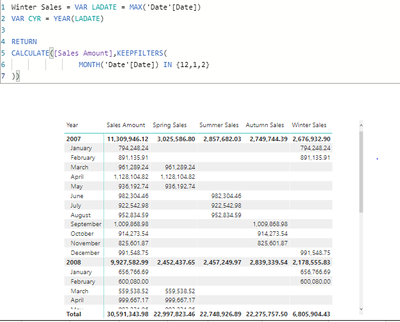
i am trying to calculate "Winter sale" and want to build the dynamic "Date" so that power bi calpture that period and give results according to that.
Below is my DAX, but it is not working, seems that "Date" Measure inside is not accepting same:
Solved! Go to Solution.
Hey @sandee ,
if I understand it right the winter sales should just cover the sales in December, January and February, correct?
In this case I would just filter to these months. Check if the following measure would work:
Winter Sales =
CALCULATE(
[Sales Amount],
MONTH( 'Date'[Date] )
IN {
12,
1,
2
}
)
Also be aware that your approach wouldn't cover February 29th in a leap year.
Hi Selimovd,
this is incredible, you made this DAX very easy , i was working on filter condition on ">= && "<=". and was trying to work on "Date" dax so that i can enter the proper format. but it was not accepting same.
Hey @sandee ,
if I understand it right the winter sales should just cover the sales in December, January and February, correct?
In this case I would just filter to these months. Check if the following measure would work:
Winter Sales =
CALCULATE(
[Sales Amount],
MONTH( 'Date'[Date] )
IN {
12,
1,
2
}
)
Also be aware that your approach wouldn't cover February 29th in a leap year.
My Solution :
thnaks Selimovd....
Hey @sandee ,
I'm happy it worked 🙂
That's also normal, many times I was thinking way too complicated. But when you write more DAX thing will get easier. Keep going 🙂
Have fun and best regards
Denis
Hi Selimovd,
this is incredible, you made this DAX very easy , i was working on filter condition on ">= && "<=". and was trying to work on "Date" dax so that i can enter the proper format. but it was not accepting same.
The Power BI Data Visualization World Championships is back! Get ahead of the game and start preparing now!
Check out the November 2025 Power BI update to learn about new features.
| User | Count |
|---|---|
| 20 | |
| 11 | |
| 10 | |
| 4 | |
| 4 |
| User | Count |
|---|---|
| 32 | |
| 28 | |
| 19 | |
| 11 | |
| 10 |