Join us at FabCon Atlanta from March 16 - 20, 2026, for the ultimate Fabric, Power BI, AI and SQL community-led event. Save $200 with code FABCOMM.
Register now!The Power BI Data Visualization World Championships is back! Get ahead of the game and start preparing now! Learn more
Hi Community,
I have a column with a duration in sec.
I need to transform this into time HH:MM:SS
First, I did 3 new columns:
-Hour = ROUNDDOWN(table[duration]/3600,0)
-Minute = ROUNDDOWN((table[duration]-table[Hour]*3600)/60,0)
-Second = table[duration] - (table[Hour]*3600 + table[Minute]*60)
Now that I have the hours, minutes and seconds, I want to get all together in a time format:
-Time = time(table[Hour], table[Minute],table[Second])
But, I'm having 2 issues:
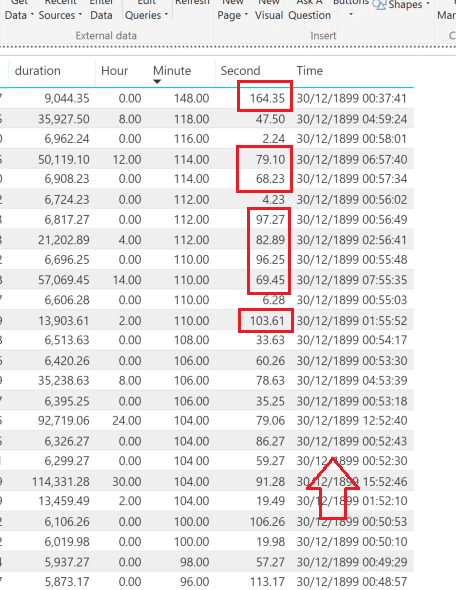
The first one is that the time is not shown only as HH:MM:SS but as 30/12/1899 HH:MM:SS
The second one is that in some cases the calculation is not working, for example there are durations with 94 minutes (that should be 1 hour and 34 minutes)
@Anonymous If you are wanting to use a measure and not a column , ive had success with the measure below. All you need is a measure that sums up the seconds.
Duration = // Duration formatting
// * @konstatinos 1/25/2016
// * Given a number of seconds, returns a format of "hh:mm:ss"
//
// We start with a duration in number of seconds
VAR Duration = *Put your measure here*
// There are 3,600 seconds in an hour
VAR Hours =
INT ( Duration / 3600)
// There are 60 seconds in a minute
VAR Minutes =
INT ( MOD( Duration - ( Hours * 3600 ),3600 ) / 60)
// Remaining seconds are the remainder of the seconds divided by 60 after subtracting out the hours
VAR Seconds =
ROUNDUP(MOD ( MOD( Duration - ( Hours * 3600 ),3600 ), 60 ),0) // We round up here to get a whole number
// These intermediate variables ensure that we have leading zero's concatenated onto single digits
// Hours with leading zeros
VAR H =
IF ( LEN ( Hours ) = 1,
CONCATENATE ( "0", Hours ),
CONCATENATE ( "", Hours )
)
// Minutes with leading zeros
VAR M =
IF (
LEN ( Minutes ) = 1,
CONCATENATE ( "0", Minutes ),
CONCATENATE ( "", Minutes )
)
// Seconds with leading zeros
VAR S =
IF (
LEN ( Seconds ) = 1,
CONCATENATE ( "0", Seconds ),
CONCATENATE ( "", Seconds )
)
// Now return hours, minutes and seconds with leading zeros in the proper format "hh:mm:ss"
RETURN
CONCATENATE (
H,
CONCATENATE ( ":", CONCATENATE ( M, CONCATENATE ( ":", S ) ) )
)
To be honest i do not think you will be able to make it work in Power Bi to dispaly this way. I have tried many options, and unfortunately currently is not supported as far as i am aware.
I think you are right.
I tried another 2 totally different ways, that logically should work, and get the same (mistaken) result.
The Power BI Data Visualization World Championships is back! Get ahead of the game and start preparing now!
| User | Count |
|---|---|
| 19 | |
| 13 | |
| 8 | |
| 4 | |
| 4 |
| User | Count |
|---|---|
| 29 | |
| 19 | |
| 18 | |
| 11 | |
| 10 |