Join us at FabCon Atlanta from March 16 - 20, 2026, for the ultimate Fabric, Power BI, AI and SQL community-led event. Save $200 with code FABCOMM.
Register now!The Power BI Data Visualization World Championships is back! Get ahead of the game and start preparing now! Learn more
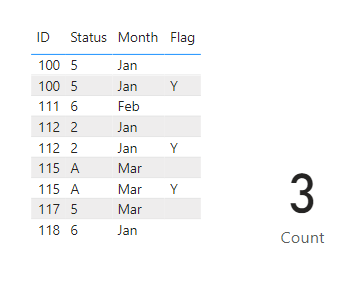
i was working in a measure which takes distinct count of id when status is either 5 or 6. I need to exclude ID which has flag as Y for ID. Eg-From the screenshot below 100 has status 5 and Flag as Y so it should be excluded from count. (total count should be 3).
measure= calculate (distinctcount(FI_Table[id]), FI_Table(status) in {5,6} && FI_Table[flag] <>"Y").
this measure seems to be not working.
Input table
Output
Solved! Go to Solution.
Hi @Anonymous ,
Create a column as below:-
Column =
var if_Y = COUNTROWS(FILTER('Table (2)','Table (2)'[ID] = EARLIER('Table (2)'[ID]) && 'Table (2)'[Flag] = "Y" ))
var req_status = COUNTROWS(FILTER('Table (2)',('Table (2)'[Status] in {"5","6"} && 'Table (2)'[ID] = EARLIER('Table (2)'[ID]) )))
return if(if_Y = 0 && req_status > 0,1,0)
and now create a measure as below:-
Measure = calculate(DISTINCTCOUNT('Table (2)'[ID]),'Table (2)'[Column] = 1)
Thanks,
Samarth
Best Regards,
Samarth
If this post helps, please consider accepting it as the solution to help the other members find it more quickly.
Appreciate your Kudos!!
Connect on Linkedin
Hi @Anonymous
Check sample file https://www.dropbox.com/t/kSgJ3giWijfZE60V
For card viasual you can use
Count =
VAR FlaggedIDs =
DISTINCT (
SELECTCOLUMNS (
FILTER ( FI_Table, FI_Table[Flag] = "Y" ),
"@ID", FI_Table[ID]
)
)
VAR AllIDs =
VALUES ( FI_Table[ID] )
RETURN
COUNTROWS ( EXCEPT( AllIDs, FlaggedIDs ) )
Hi @Anonymous ,
Create a column as below:-
Column =
var if_Y = COUNTROWS(FILTER('Table (2)','Table (2)'[ID] = EARLIER('Table (2)'[ID]) && 'Table (2)'[Flag] = "Y" ))
var req_status = COUNTROWS(FILTER('Table (2)',('Table (2)'[Status] in {"5","6"} && 'Table (2)'[ID] = EARLIER('Table (2)'[ID]) )))
return if(if_Y = 0 && req_status > 0,1,0)
and now create a measure as below:-
Measure = calculate(DISTINCTCOUNT('Table (2)'[ID]),'Table (2)'[Column] = 1)
Thanks,
Samarth
Best Regards,
Samarth
If this post helps, please consider accepting it as the solution to help the other members find it more quickly.
Appreciate your Kudos!!
Connect on Linkedin
Check out the November 2025 Power BI update to learn about new features.
Advance your Data & AI career with 50 days of live learning, contests, hands-on challenges, study groups & certifications and more!
| User | Count |
|---|---|
| 21 | |
| 10 | |
| 9 | |
| 4 | |
| 4 |
| User | Count |
|---|---|
| 34 | |
| 31 | |
| 19 | |
| 13 | |
| 10 |