This is my first time posting, so bear with me.
I have a dataset like below:
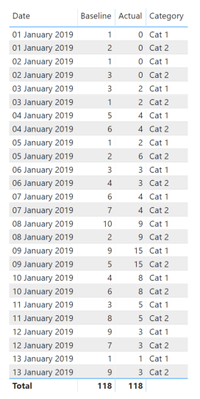
I have the following two measures that calculate running totals. These running totals change based on the current filter context (Category) slicer.
	Actual running total (Measure) =
	CALCULATE(
	    SUM('Table1'[Actual]),
	    FILTER(
	        ALLSELECTED('Table1'[Date]),
	        ISONORAFTER('Table1'[Date], MAX('Table1'[Date]), DESC)
	    )
	)

	Baseline running total (Measure) =
	CALCULATE(
	    SUM([Baseline]),
	    FILTER(
	        ALLSELECTED('Table1'[Date]),
	        ISONORAFTER('Table1'[Date], MAX('Table1'[Date]), DESC)
	    )
	)
I need to create a measure that identifies "Days Delay" for each row.
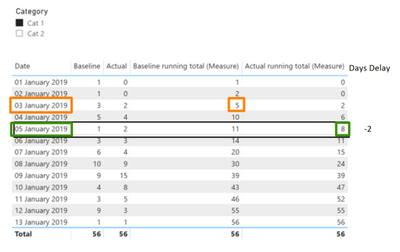
For each row I need to take the "Actual running total (Measure)", find the Max "Baseline running total (measure)" that is less than the "Actual running total (Measure)" and then compare the differences in dates.
Let's take row "05 January 2019" as an example.
- Take "Actual running total (Measure)" = (8)
- Find Max "Baseline running total (measure)" that is less than "Actual running total (Measure)" = (5)
- Get the corresponding date = (03 January 2019)
- Compare (Datediff) with original Row Date (05 January 2019) = (-2)
The big challenge is that the solution needs to be dynamic i.e. if I change the "Category" slicer, the measures need to recalculate and produce the relevant results based on the context of the slicer / filter.
Any direction or help would be greatly appreciated.


