FabCon is coming to Atlanta
Join us at FabCon Atlanta from March 16 - 20, 2026, for the ultimate Fabric, Power BI, AI and SQL community-led event. Save $200 with code FABCOMM.
Register now!- Power BI forums
- Get Help with Power BI
- Desktop
- Service
- Report Server
- Power Query
- Mobile Apps
- Developer
- DAX Commands and Tips
- Custom Visuals Development Discussion
- Health and Life Sciences
- Power BI Spanish forums
- Translated Spanish Desktop
- Training and Consulting
- Instructor Led Training
- Dashboard in a Day for Women, by Women
- Galleries
- Data Stories Gallery
- Themes Gallery
- Contests Gallery
- QuickViz Gallery
- Quick Measures Gallery
- Visual Calculations Gallery
- Notebook Gallery
- Translytical Task Flow Gallery
- TMDL Gallery
- R Script Showcase
- Webinars and Video Gallery
- Ideas
- Custom Visuals Ideas (read-only)
- Issues
- Issues
- Events
- Upcoming Events
The Power BI Data Visualization World Championships is back! Get ahead of the game and start preparing now! Learn more
- Power BI forums
- Forums
- Get Help with Power BI
- DAX Commands and Tips
- Dax formula for "4 Weeks to Date" (I have 1WTD)
- Subscribe to RSS Feed
- Mark Topic as New
- Mark Topic as Read
- Float this Topic for Current User
- Bookmark
- Subscribe
- Printer Friendly Page


- Mark as New
- Bookmark
- Subscribe
- Mute
- Subscribe to RSS Feed
- Permalink
- Report Inappropriate Content
Dax formula for "4 Weeks to Date" (I have 1WTD)
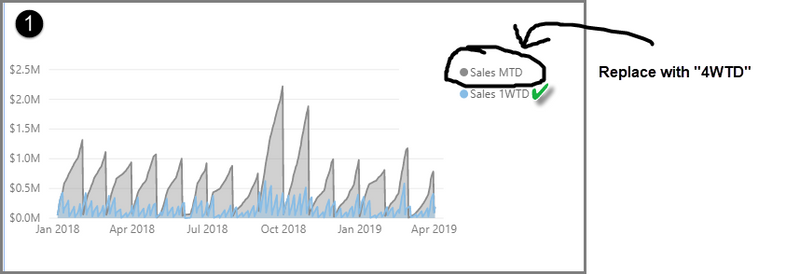
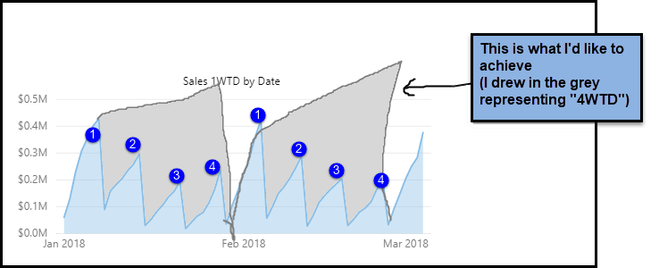
Hi there. In the first image below I have plotted "One Week to Date (1WTD)" sales and "Month to Date (MTD)" sales. I would like to replace MTD with "4 weeks to date (4WTD)". I would then get a consistent pattern as illustrated in image 2 (where I hand drew 4WTD).
Question:
- Could someone please help me with the DAX code for "4WTD" similar to my 1WTD formula?
- Dataset & .pbix: here (dataset from Enterprise DNA's Ultimate Beginners Guide to Dax)
- 1WTD formula: (formula from RADCAD's tutorial )

As always, thank you.
Michelle
Solved! Go to Solution.


- Mark as New
- Bookmark
- Subscribe
- Mute
- Subscribe to RSS Feed
- Permalink
- Report Inappropriate Content
@michellepace
Please find below the measures that calculates One Week-To-Date and Four Week-To-Date. I used my approach for One Week To Date as it will dynamically change the week based on the current date selection range.
New Sales 1WTD =
var CurrentDate=LASTDATE(Dates[Date])
var DayOne = CALCULATE(MIN(Dates[Date]),WEEKDAY(Dates[Date],3)=0,ALLSELECTED(Dates[Date]))
var FourWeekStart = MAXX(GENERATESERIES(DayOne,CurrentDate,7),[Value])
return
CALCULATE(
    [Total Sales],
    FILTER(
        ALLSELECTED(Dates[Date]),
        Dates[Date] >= FourWeekStart && Dates[Date] <= CurrentDate)
)
New Sales 4WTD =
var CurrentDate=LASTDATE(Dates[Date])
var DayOne = CALCULATE(MIN(Dates[Date]),WEEKDAY(Dates[Date],3)=0,ALLSELECTED(Dates[Date]))
var FourWeekStart = MAXX(GENERATESERIES(DayOne,CurrentDate,28),[Value])
return
CALCULATE(
[Total Sales],
FILTER(
ALLSELECTED(Dates[Date]),
Dates[Date] >= FourWeekStart && Dates[Date] <= CurrentDate)
)________________________
If my answer was helpful, please consider Accept it as the solution to help the other members find it
Click on the Thumbs-Up icon if you like this reply 🙂
⭕ Subscribe and learn Power BI from these videos
⚪ Website ⚪ LinkedIn ⚪ PBI User Group

- Mark as New
- Bookmark
- Subscribe
- Mute
- Subscribe to RSS Feed
- Permalink
- Report Inappropriate Content
- Mark as New
- Bookmark
- Subscribe
- Mute
- Subscribe to RSS Feed
- Permalink
- Report Inappropriate Content
@michellepace
Please find below the measures that calculates One Week-To-Date and Four Week-To-Date. I used my approach for One Week To Date as it will dynamically change the week based on the current date selection range.
New Sales 1WTD =
var CurrentDate=LASTDATE(Dates[Date])
var DayOne = CALCULATE(MIN(Dates[Date]),WEEKDAY(Dates[Date],3)=0,ALLSELECTED(Dates[Date]))
var FourWeekStart = MAXX(GENERATESERIES(DayOne,CurrentDate,7),[Value])
return
CALCULATE(
    [Total Sales],
    FILTER(
        ALLSELECTED(Dates[Date]),
        Dates[Date] >= FourWeekStart && Dates[Date] <= CurrentDate)
)
New Sales 4WTD =
var CurrentDate=LASTDATE(Dates[Date])
var DayOne = CALCULATE(MIN(Dates[Date]),WEEKDAY(Dates[Date],3)=0,ALLSELECTED(Dates[Date]))
var FourWeekStart = MAXX(GENERATESERIES(DayOne,CurrentDate,28),[Value])
return
CALCULATE(
[Total Sales],
FILTER(
ALLSELECTED(Dates[Date]),
Dates[Date] >= FourWeekStart && Dates[Date] <= CurrentDate)
)________________________
If my answer was helpful, please consider Accept it as the solution to help the other members find it
Click on the Thumbs-Up icon if you like this reply 🙂
⭕ Subscribe and learn Power BI from these videos
⚪ Website ⚪ LinkedIn ⚪ PBI User Group
- Mark as New
- Bookmark
- Subscribe
- Mute
- Subscribe to RSS Feed
- Permalink
- Report Inappropriate Content
Hello @Fowmy .
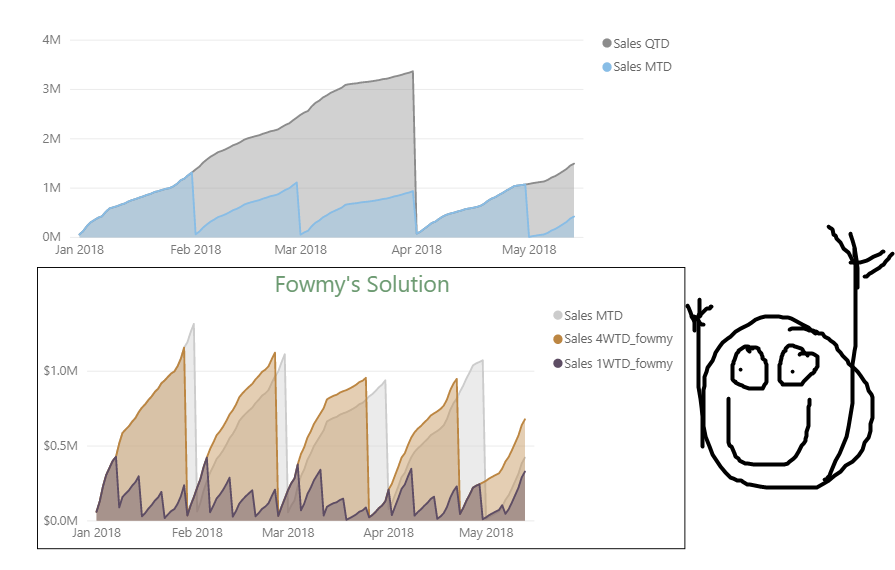
You've done it again, thank you so very much! I have uploaded the solution file here, in case it is useful to anyone else. This is what it looks like:
It's going to take me a little while to pick through your equations to understand and learn from them. Is there a way I can "step-through" them and see the values of the variables as the equation evaluates? Would I need to use something like Dax Studio to do this? (I've only heard of it, never used it)
- Mark as New
- Bookmark
- Subscribe
- Mute
- Subscribe to RSS Feed
- Permalink
- Report Inappropriate Content
@michellepace
Glad it worked for!
Follow these links to learn how to step through DAX codes and even debug them. I mostly use CONCATENATEX and COMBINEVALUES.
https://www.youtube.com/watch?v=9SV2VnYbgg4
https://radacad.com/some-simple-ways-to-debug-your-dax-measure-code-in-power-bi-debugging-virtual-ta...
Good Luck
Fowmy
⭕ Subscribe and learn Power BI from these videos
⚪ Website ⚪ LinkedIn ⚪ PBI User Group
- Mark as New
- Bookmark
- Subscribe
- Mute
- Subscribe to RSS Feed
- Permalink
- Report Inappropriate Content
For anyone interested - the youtube video Fowny recommends above (10 minutes from guy in a cube) is EXCELLENT.


- Mark as New
- Bookmark
- Subscribe
- Mute
- Subscribe to RSS Feed
- Permalink
- Report Inappropriate Content
@michellepace - First, you probably want something like Rolling Weeks - https://community.powerbi.com/t5/Quick-Measures-Gallery/Rolling-Weeks/m-p/391694#M128
Also, you might find Sequential helpful - https://community.powerbi.com/t5/Quick-Measures-Gallery/Sequential/m-p/380231#M116
Also, you may find this helpful - https://community.powerbi.com/t5/Community-Blog/To-bleep-With-Time-Intelligence/ba-p/1260000
Also, see if my Time Intelligence the Hard Way provides a different way of accomplishing what you are going for.
https://community.powerbi.com/t5/Quick-Measures-Gallery/Time-Intelligence-quot-The-Hard-Way-quot-TIT...
Follow on LinkedIn
@ me in replies or I'll lose your thread!!!
Instead of a Kudo, please vote for this idea
Become an expert!: Enterprise DNA
External Tools: MSHGQM
YouTube Channel!: Microsoft Hates Greg
Latest book!: DAX For Humans
DAX is easy, CALCULATE makes DAX hard...

Helpful resources

Power BI Dataviz World Championships
The Power BI Data Visualization World Championships is back! Get ahead of the game and start preparing now!

Power BI Monthly Update - December 2025
Check out the December 2025 Power BI Holiday Recap!

FabCon Atlanta 2026
Join us at FabCon Atlanta, March 16-20, for the ultimate Fabric, Power BI, AI and SQL community-led event. Save $200 with code FABCOMM.

| User | Count |
|---|---|
| 13 | |
| 5 | |
| 5 | |
| 3 | |
| 3 |


| User | Count |
|---|---|
| 25 | |
| 10 | |
| 10 | |
| 6 | |
| 6 |


