cancel
Showing results for 
Search instead for 
Did you mean: 

The Power BI Data Visualization World Championships is back! Get ahead of the game and start preparing now! Learn more

Reply
jamc
Frequent Visitor

DYNAMIC FUTURE RUNNING TOTAL

Hi 


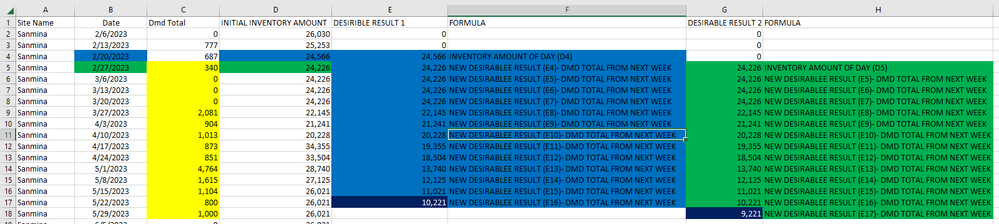
I have really scratiching my head, i have being trying to get a dynamic running total calculation Dax, in which depedning of the week I choose I get a different running total calculation, like the one I depict into  the excercise.

DAX PROBLEM1.PNG


For example if I chose week feb 20 I need to get the running total calculation into the future depict in column e, First cell is exactly the same for the initial invontiry amount, but for the next week it will be this new value in E4 - Dmd Total for that new week C5, (and so on until you reach 10,221),


Also I want to have the flexibility if Change the date from Next week get the result in column G starting on Febreruary 27. 


Hope someone can help me out


Regards

2 REPLIES 2
amitchandak
Super User
Super User

@jamc , Try measure like 


Cumm Sales =

Var _max = maxx(allselected('Date') , 'Date'[date] )

return

CALCULATE(SUM(Sales[Sales Amount]),filter(all('Date'),'Date'[date] <=max('Date'[date]) && Date[Date] > _max ))


Cumm Sales =

Var _max = maxx(allselected('Date') , 'Date'[date] )

return

CALCULATE(SUM(Sales[Sales Amount]),filter(allselected(date),date[date] <=max(date[Date]) && Date[Date] > _max ))


But if you need a trend then slicer need to me an independent date table


//Date1 is independent Date table, Date is joined with Table
new measure =
var _max = maxx(allselected(Date1),Date1[Date])
return

CALCULATE(SUM(Sales[Sales Amount]),filter(all('Date'),'Date'[date] <=max('Date'[date]) && Date[Date] > _max ))


Share with Power BI Enthusiasts: Full Power BI Video (20 Hours) YouTube
Microsoft Fabric Series 60+ Videos YouTube
Microsoft Fabric Hindi End to End YouTube

Hi 


Ill already try the soluti the first step without success, also we are no cumulating the Dmd it is more  Inventory initial - Dmd Total and that will give you a future inventory amount, afterwards for the next wee will be this new inventory - Dmd for next week and so on (as explained in the formula section in the picture),

Helpful resources

Announcements
Power BI DataViz World Championships

Power BI Dataviz World Championships

The Power BI Data Visualization World Championships is back! Get ahead of the game and start preparing now!

December 2025 Power BI Update Carousel

Power BI Monthly Update - December 2025

Check out the December 2025 Power BI Holiday Recap!

FabCon Atlanta 2026 carousel

FabCon Atlanta 2026

Join us at FabCon Atlanta, March 16-20, for the ultimate Fabric, Power BI, AI and SQL community-led event. Save $200 with code FABCOMM.