FabCon is coming to Atlanta
Join us at FabCon Atlanta from March 16 - 20, 2026, for the ultimate Fabric, Power BI, AI and SQL community-led event. Save $200 with code FABCOMM.
Register now!- Power BI forums
- Get Help with Power BI
- Desktop
- Service
- Report Server
- Power Query
- Mobile Apps
- Developer
- DAX Commands and Tips
- Custom Visuals Development Discussion
- Health and Life Sciences
- Power BI Spanish forums
- Translated Spanish Desktop
- Training and Consulting
- Instructor Led Training
- Dashboard in a Day for Women, by Women
- Galleries
- Data Stories Gallery
- Themes Gallery
- Contests Gallery
- QuickViz Gallery
- Quick Measures Gallery
- Visual Calculations Gallery
- Notebook Gallery
- Translytical Task Flow Gallery
- TMDL Gallery
- R Script Showcase
- Webinars and Video Gallery
- Ideas
- Custom Visuals Ideas (read-only)
- Issues
- Issues
- Events
- Upcoming Events
The Power BI Data Visualization World Championships is back! Get ahead of the game and start preparing now! Learn more
- Power BI forums
- Forums
- Get Help with Power BI
- DAX Commands and Tips
- DAX help- Unique customer count basis on sales
- Subscribe to RSS Feed
- Mark Topic as New
- Mark Topic as Read
- Float this Topic for Current User
- Bookmark
- Subscribe
- Printer Friendly Page

- Mark as New
- Bookmark
- Subscribe
- Mute
- Subscribe to RSS Feed
- Permalink
- Report Inappropriate Content
DAX help- Unique customer count basis on sales
Hello Experts,
Need help on this.
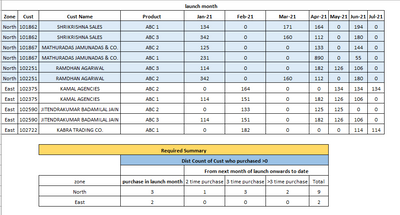
I have compare count unique customers based on their sales >0 after launch months onwards as summary have given below.
@Tanushree_Kapse @VahidDM @GregM @amitchandak - Please help me on this.
Thanks a ton in advance.


- Mark as New
- Bookmark
- Subscribe
- Mute
- Subscribe to RSS Feed
- Permalink
- Report Inappropriate Content
Hi @Anonymous ,
Please check my reply in your another post: Re: Need help on custom report - Microsoft Power BI Community.
Best Regards,
Icey
If this post helps, then please consider Accept it as the solution to help the other members find it more quickly.


- Mark as New
- Bookmark
- Subscribe
- Mute
- Subscribe to RSS Feed
- Permalink
- Report Inappropriate Content
Hi @Anonymous
Can you add more details about the calculation? how did you create the result table in Excel? can you share the Excel formula?
Appreciate your Kudos!!
- Mark as New
- Bookmark
- Subscribe
- Mute
- Subscribe to RSS Feed
- Permalink
- Report Inappropriate Content
Hi,
Thanks for reply.
Actually , I have to count distinct of customer code from launch month to last months but we have to check sales >0 every month at customer level total sales
For example.
customore abc is purchased in launch month jan21 but not purchased in feb21 and again purchased in last month- hence then unique count will be 1 but it purchased 2 times.
Summary will be like abc customer is in north zone then
Zone launch month purchase 2 times purchase 3 times purchase >3 times
North 0 1 0 0
I Hope it will help
@VahidDM @Tanushree_Kapse @amitchandak @Greg_Deckler
Thanks.
- Mark as New
- Bookmark
- Subscribe
- Mute
- Subscribe to RSS Feed
- Permalink
- Report Inappropriate Content
@Anonymous
If abc is purchased in launch month jan21 why in the result table launch month purchase is Zero?
Zone launch month purchase 2 times purchase 3 times purchase >3 times
North 0 1 0 0
Appreciate your Kudos!!
- Mark as New
- Bookmark
- Subscribe
- Mute
- Subscribe to RSS Feed
- Permalink
- Report Inappropriate Content
Sorry type error, It should count 1 in launch month as well as in 2 times purchase column.
Thanks.
Zone launch month purchase 2 times purchase 3 times purchase >3 times
North 1 1 0 0
- Mark as New
- Bookmark
- Subscribe
- Mute
- Subscribe to RSS Feed
- Permalink
- Report Inappropriate Content
@Anonymous
Can you change your data structure? Unpivot all month columns.
Appreciate your Kudos!!
- Mark as New
- Bookmark
- Subscribe
- Mute
- Subscribe to RSS Feed
- Permalink
- Report Inappropriate Content
Hi,
I have done 90% of work by help of summarize funtion.
but one point on which I am stucking is that for example
| Customer | Sales | Month | |
| abc1 | 2202 | Jan-21 | |
| abc2 | 1043 | Jan-21 | |
| abc3 | 1576 | Jan-21 | |
| abc1 | 0 | Feb-21 | |
| abc2 | 1211 | Feb-21 | |
| abc3 | 2989 | Feb-21 | |
| abc1 | 1209 | Mar-21 | |
| abc2 | 0 | Mar-21 | |
| abc3 | 2036 | Mar-21 | |
| abc4 | 1279 | Mar-21 | |
| abc1 | 2258 | Apr-21 | |
| abc2 | 0 | Apr-21 | |
| abc3 | 320 | Apr-21 | |
| abc4 | 2050 | Apr-21 | |
| Summary will be | |||
| Retention customer Count | |||
| Measure | Feb-21 | Mar-21 | Apr-21 |
| Unique Cust count | 2 | 2 | 3 |
** Retention means customers who have purchased at leat 1 time in any previous month.
I am not able to compare the customer wise sales in all previous months to get this result.
Please help me on this.
Thanks
@amitchandak @Greg_Deckler @Tanushree_Kapse @AlexisOlson @Jihwan_Kim @PBICommunity
- Mark as New
- Bookmark
- Subscribe
- Mute
- Subscribe to RSS Feed
- Permalink
- Report Inappropriate Content
Hi,
Data is in row level (inpivot). I had given the sample data set which i use in excel for working.
Thanks.
Helpful resources

Power BI Dataviz World Championships
The Power BI Data Visualization World Championships is back! Get ahead of the game and start preparing now!

Power BI Monthly Update - December 2025
Check out the December 2025 Power BI Holiday Recap!

FabCon Atlanta 2026
Join us at FabCon Atlanta, March 16-20, for the ultimate Fabric, Power BI, AI and SQL community-led event. Save $200 with code FABCOMM.

| User | Count |
|---|---|
| 16 | |
| 8 | |
| 4 | |
| 4 | |
| 3 |


| User | Count |
|---|---|
| 25 | |
| 13 | |
| 12 | |
| 10 | |
| 5 |


