Join us at FabCon Atlanta from March 16 - 20, 2026, for the ultimate Fabric, Power BI, AI and SQL community-led event. Save $200 with code FABCOMM.
Register now!The Power BI Data Visualization World Championships is back! Get ahead of the game and start preparing now! Learn more
HI
I'm working on logic to combine multiple columns each cell value to derive single column, detials are
To calculate sum of values in each cell by count of values excluding Zero
So logically in below table
For Sum of row it should calculate sum of values at row level for multiple columns defined
For count of rows it should calculate count of each cell excluding 0 then consider rest values as 1.(example for third row and for all 5 columns it should be 1+0+0+1+1=3)
| Product1_Rating | Product2_Rating | Product3_Rating | Product4_Rating | Product5_Rating |
| 0 | 0 | 0 | 0 | 0 |
| 4 | 5 | 5 | 4 | 5 |
| 5 | 0 | 0 | 5 | 5 |
| 0 | 5 | 5 | 0 | 5 |
You can download PBIX file from below link -
Solved! Go to Solution.
Hi @Anonymous Try this on a calculated column.
Column =
VAR Ratings = {
Products[Product1_Rating],
Products[Product2_Rating],
Products[Product3_Rating],
Products[Product4_Rating],
Products[Product5_Rating]
}
VAR S =
SUMX ( Ratings, [Value] )
VAR NonzeroRatings =
COUNTX ( FILTER ( Ratings, [Value] > 0 ), [Value] )
RETURN
DIVIDE(S, NonzeroRatings, 0)
Hope this helps.
Appreciate a kudos.
Please mark as solution if this resolves your problem.
Hi @Anonymous Try this on a calculated column.
Column =
VAR Ratings = {
Products[Product1_Rating],
Products[Product2_Rating],
Products[Product3_Rating],
Products[Product4_Rating],
Products[Product5_Rating]
}
VAR S =
SUMX ( Ratings, [Value] )
VAR NonzeroRatings =
COUNTX ( FILTER ( Ratings, [Value] > 0 ), [Value] )
RETURN
DIVIDE(S, NonzeroRatings, 0)
Hope this helps.
Appreciate a kudos.
Please mark as solution if this resolves your problem.
Thanks Everyone above both queries worked
Kudos to you
@Anonymous - So basically you are looking at a multi-column aggregation with some filtering of 0 values. BTW the first line you would need to use DIVIDE with the third parameter to avoid a divide by zero error.
You *may* wish to consider unpivoting your rating columns and the whole thing would potentially be much easier.
@Anonymous ,
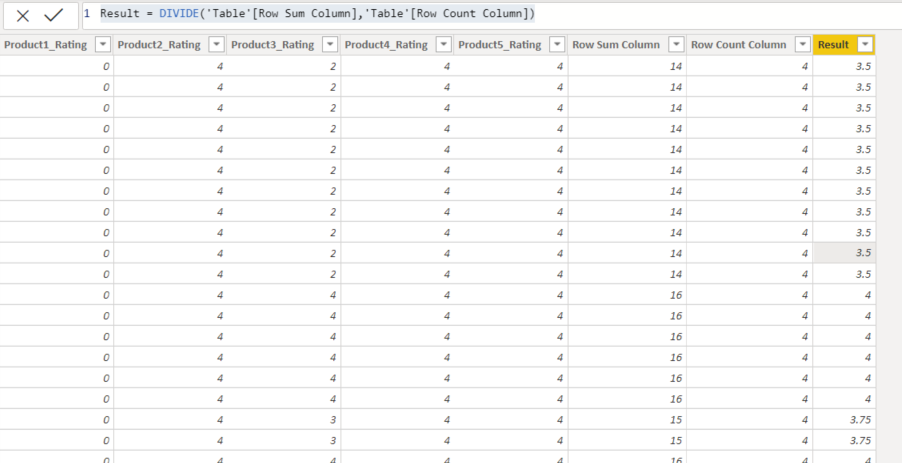
1) create calculated column to sum values per each row:
Check out the November 2025 Power BI update to learn about new features.
Advance your Data & AI career with 50 days of live learning, contests, hands-on challenges, study groups & certifications and more!
| User | Count |
|---|---|
| 21 | |
| 10 | |
| 9 | |
| 4 | |
| 4 |
| User | Count |
|---|---|
| 34 | |
| 31 | |
| 19 | |
| 13 | |
| 10 |