Join us at FabCon Atlanta from March 16 - 20, 2026, for the ultimate Fabric, Power BI, AI and SQL community-led event. Save $200 with code FABCOMM.
Register now!The Power BI Data Visualization World Championships is back! Get ahead of the game and start preparing now! Learn more
I have a table for Opportunities and a table for Payments (example data below). They both share a ProductID but no direct relationship currently exists in the schema. I'd like to create a calculated column in the Opportunities table with PaymentID that most closely matches the Opportunity's ProductID and Date. The Payment just after the Opportunity is preferred but matching an earlier Payment if not. However, there are likely multiple more Opportunities than payments and I'd like to not duplicate PaymentIDs in the Opportunity table. In other words, I'd like to create this relationship between the two where one doesn't really exist but only one-to-one.
Payments Table
| ProductID | PaymentID | Date |
| Red | X | 1/3/2022 |
| Red | Z | 1/12/2022 |
| Red | Y | 1/8/2022 |
| Green | X1 | 2/1/2022 |
Opportunities Table
| ProductID | OppID | Date | Correct Result |
| Red | A | 1/1/2022 | |
| Red | B | 1/2/2022 | X |
| Red | C | 1/5/2022 | |
| Red | D | 1/6/2022 | Y |
| Red | E | 1/9/2022 | Z |
| Green | A1 | 2/4/2022 | X1 |
| Green | B1 | 2/5/2022 |
I've got the following DAX in a column but am getting duplicated IDs as expected. Is there a way to change this formula, or one like it, to get only unique results?
=
IF (
ISBLANK (
CALCULATE (
MIN ( Payments[PaymentID] ),
FILTER (
Payments,
[ProductID] = Opportunities[ProductID]
&& [Date] >= Opportunities[Date]
)
)
),
CALCULATE (
MAX ( Payments[PaymentID] ),
FILTER (
Payments,
[ProductID] = Opportunities[ProductID]
&& [Date] < Opportunities[Date]
)
),
CALCULATE (
MIN ( Payments[PaymentID] ),
FILTER (
Payments,
[ProductID] = Opportunities[ProductID]
&& [Date] >= Opportunities[Date]
)
)
)
My Results (Incorrect)
| ProductID | OppID | Date | Correct Result | My DAX Result |
| Red | A | 1/1/2022 | X | |
| Red | B | 1/2/2022 | X | X |
| Red | C | 1/5/2022 | Y | |
| Red | D | 1/6/2022 | Y | Y |
| Red | E | 1/9/2022 | Z | Z |
| Green | A1 | 2/4/2022 | X1 | X1 |
| Green | B1 | 2/5/2022 | X1 |
Is DAX the right solution for what I'm trying to achieve?
Solved! Go to Solution.
Hi @N-PivotMeasure ,
You can try the following methods.
Columns:
Payment date =
Var N1=CALCULATE (
MIN ( Payments[Date]),
FILTER (
Payments,
[ProductID] = Opportunities[ProductID]
&& [Date]>=Opportunities[Date]
)
)
Var N2=CALCULATE (
MAX ( Payments[Date] ),
FILTER (
Payments,
[ProductID] = Opportunities[ProductID]
&& [Date] <Opportunities[Date]
)
)
Return
IF(ISBLANK(N1),N2,N1)Days = ABS(DATEDIFF([Date],[Payment date],DAY))Result =
VAR minday =
CALCULATE (
MIN ( Opportunities[Days] ),
FILTER (
Opportunities,
[Payment date] = EARLIER ( Opportunities[Payment date] )
)
)
RETURN
CALCULATE (
MAX ( Payments[PaymentID] ),
FILTER (
Payments,
[Date] = EARLIER ( Opportunities[Payment date] )
&& [Days] = minday
)
)
Is this the result you expect?
Best Regards,
Community Support Team _Yinliw
If this post helps, then please consider Accept it as the solution to help the other members find it more quickly.
Hi @N-PivotMeasure ,
You can try the following methods.
Columns:
Payment date =
Var N1=CALCULATE (
MIN ( Payments[Date]),
FILTER (
Payments,
[ProductID] = Opportunities[ProductID]
&& [Date]>=Opportunities[Date]
)
)
Var N2=CALCULATE (
MAX ( Payments[Date] ),
FILTER (
Payments,
[ProductID] = Opportunities[ProductID]
&& [Date] <Opportunities[Date]
)
)
Return
IF(ISBLANK(N1),N2,N1)Days = ABS(DATEDIFF([Date],[Payment date],DAY))Result =
VAR minday =
CALCULATE (
MIN ( Opportunities[Days] ),
FILTER (
Opportunities,
[Payment date] = EARLIER ( Opportunities[Payment date] )
)
)
RETURN
CALCULATE (
MAX ( Payments[PaymentID] ),
FILTER (
Payments,
[Date] = EARLIER ( Opportunities[Payment date] )
&& [Days] = minday
)
)
Is this the result you expect?
Best Regards,
Community Support Team _Yinliw
If this post helps, then please consider Accept it as the solution to help the other members find it more quickly.
Hi @N-PivotMeasure
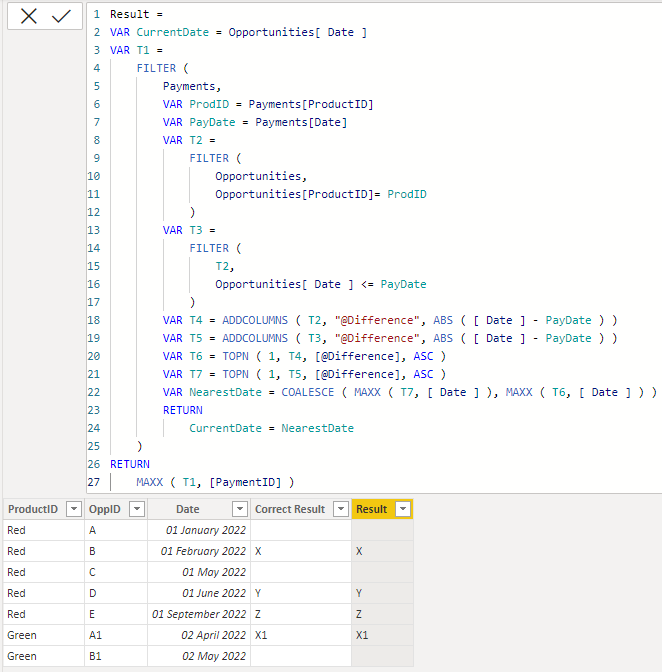
Actually the filtering criteria is not well bounded. For example for PaymentID "Y", the date 1st June is not the nearest date to 1st August unless we consider only the dates before 1st August. However, if we do that then there would be no match for PaymentID "X1" - Payment Date "2nd January" as all the related dates in the Opportunity table are after 2nd January. So need to double check your requirement.
For the provided sample data, following is my proposed solution. Please refer to attached sample file.
Result =
VAR CurrentDate = Opportunities[ Date ]
VAR T1 =
FILTER (
Payments,
VAR ProdID = Payments[ProductID]
VAR PayDate = Payments[Date]
VAR T2 =
FILTER (
Opportunities,
Opportunities[ProductID]= ProdID
)
VAR T3 =
FILTER (
T2,
Opportunities[ Date ] <= PayDate
)
VAR T4 = ADDCOLUMNS ( T2, "@Difference", ABS ( [ Date ] - PayDate ) )
VAR T5 = ADDCOLUMNS ( T3, "@Difference", ABS ( [ Date ] - PayDate ) )
VAR T6 = TOPN ( 1, T4, [@Difference], ASC )
VAR T7 = TOPN ( 1, T5, [@Difference], ASC )
VAR NearestDate = COALESCE ( MAXX ( T7, [ Date ] ), MAXX ( T6, [ Date ] ) )
RETURN
CurrentDate = NearestDate
)
RETURN
MAXX ( T1, [PaymentID] )
@N-PivotMeasure , Try like
new column in Opportunities
Col 1=
var _max = maxx(filter(Payment, [ProductID] = Opportunities[ProductID] && Payment[Date] >= Opportunities[Date]) , Payment[Date])
return
maxx(filter(Payment, [ProductID] = Opportunities[ProductID] && Payment[Date] =_max) , Payment[Date])
Final column =
var _cnt = countx(filter(Opportunities, Opportunities[ProductID] = earlier(Opportunities[ProductID]) && [Col 1] = earlier([Col 1]) && [Date] < earlier([Date]) ) , [Col 1])
return
if(not(isblank(_cnt), Blank(), [Col1])
The Power BI Data Visualization World Championships is back! Get ahead of the game and start preparing now!
| User | Count |
|---|---|
| 19 | |
| 13 | |
| 8 | |
| 4 | |
| 4 |
| User | Count |
|---|---|
| 29 | |
| 19 | |
| 18 | |
| 11 | |
| 10 |