cancel
Showing results for 
Search instead for 
Did you mean: 

The FabCon + SQLCon recap series starts April 14th at 8am Pacific. If you’re tracking where AI is going inside Fabric, this first session is a can't miss. Register now

Reply
Lannersten
New Member

DAX calculate with filters from two different dimensions

Hi

Suppose that you want to count your customers

And that you just want to count those that has money in their account  (This filter is easy and is applied in my code sample)

And sadly some of your customers pass away and you just want to count them as long as their alive (Scary ?)

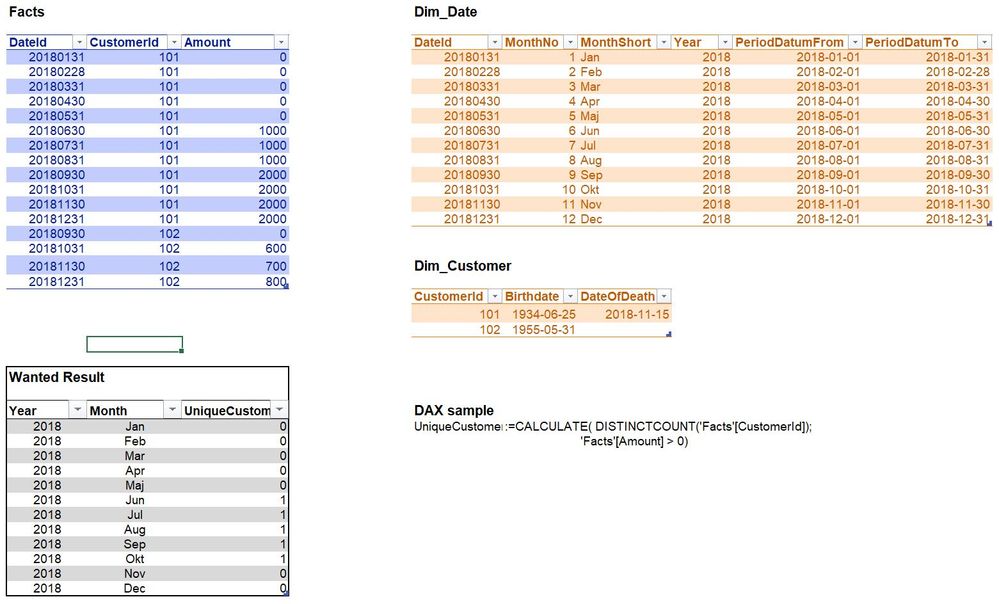
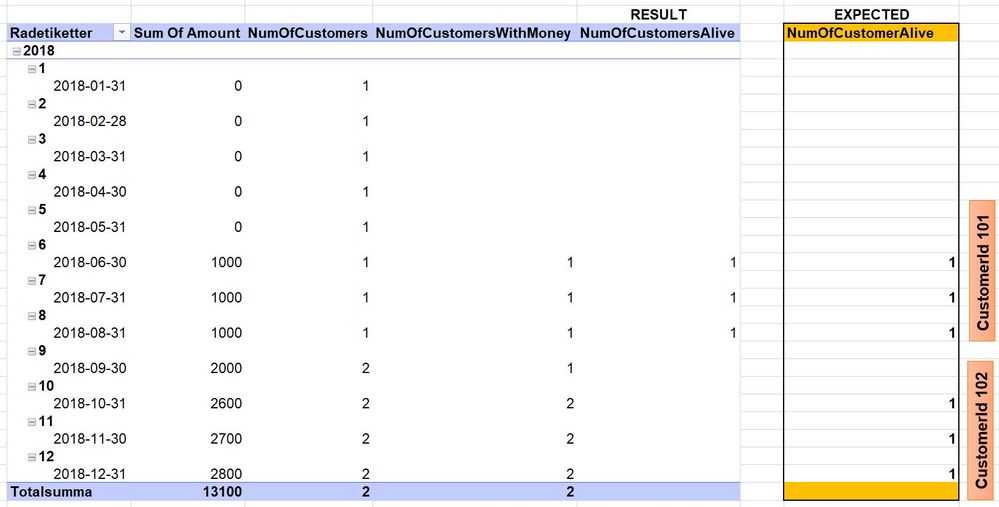
In my sample I have tried to visualize what I am expecting.

My problem is in that I need to filter rows in my result based on if the customer is alive at this specific time or not.
The dateofdeath is in Dim_Customer, and present time is in Dim_Date, my filter would be something like Dim_Customer[DateOfDeath] > Dim_Date[PeriodDateTo] But this gives an error


SO how would you solve this problem?


Best Regards, Joakimscreenshotscreenshot

2 REPLIES 2
Anonymous
Not applicable

@Lannersten Please try below measure and check if it works for you.

Measure = 
VAR _customerId = SELECTEDVALUE('Fact'[CustomerId])
VAR _deathdate = CALCULATE(MAX(DimCustomer[Deathdate]),DimCustomer[CustomerId]=_customerId)
RETURN CALCULATE(DISTINCTCOUNT('Fact'[CustomerId]),'Fact'[Amount]>0,Dim_Date[To]<_deathdate)

Hi Vimal

I had an issue with the selectedvalue formula in Excel, but I retyped it like this:

NumOfCustomersAlive:=VAR _customerId = IF(HASONEVALUE('Facts'[CustomerId]);VALUES('Facts'[CustomerId]))
VAR _deathdate = CALCULATE(MAX(Dim_Customer[CalculatedDateOfDeath]);Dim_Customer[CustomerId]=_customerId)
RETURN CALCULATE(DISTINCTCOUNT('Facts'[CustomerId]);'Facts'[Amount]>0;Dim_Date[PeriodDatumTo]<_deathdate)


And it made the job, but when I added one more CustomerId to my facts table,  the code fails. I guess it has to do with VAR _customerid just keeps  one value ? Or? (In my production environment I have a couple of millions of customers...)

I have attached the result and my expected result + The data I'm using.

Do you suggest some other tweak to my code?


Best, Joakim


Data.jpgResult.jpg


Helpful resources

Announcements
New to Fabric survey Carousel

New to Fabric Survey

If you have recently started exploring Fabric, we'd love to hear how it's going. Your feedback can help with product improvements.

Power BI DataViz World Championships carousel

Power BI DataViz World Championships - June 2026

A new Power BI DataViz World Championship is coming this June! Don't miss out on submitting your entry.

Join our Fabric User Panel

Join our Fabric User Panel

Share feedback directly with Fabric product managers, participate in targeted research studies and influence the Fabric roadmap.

March Power BI Update Carousel

Power BI Community Update - March 2026

Check out the March 2026 Power BI update to learn about new features.