cancel
Showing results for 
Search instead for 
Did you mean: 

The Power BI Data Visualization World Championships is back! Get ahead of the game and start preparing now! Learn more

Reply
dkel6177
Regular Visitor

DAX: YTD and PYTD questions

I have a dashboard with a table view that has categories of crime along the left side and columns of totals for YTD figures and Previous YTD figures. On the current year or monthly totals the figures are correct. If it is the first few days in January I get correct numbers for the current month, but on all previous time calculations I get the totals for the entire month and the formulas do not respect the partial days in the current month. For instance,.... if I run the report for the first 5 days in January I would like the previous calculations for the year prior to respect only those first 5 days in January as well. Also I cannot share the model for obvious reasons. Any help would be appreciated. 


My YTD DAX:

YTD = CALCULATE(DISTINCTCOUNT(lwmain[lwmainid]),DATESYTD(MasterDate[Date])) 


My PYTD DAX:

LYTD = CALCULATE(DISTINCTCOUNT(lwmain[lwmainid]), DATEADD(DATESYTD(MasterDate[Date]),-1,YEAR)) 


My MTD DAX:

MTD = CALCULATE(DISTINCTCOUNT(lwmain[lwmainid]),DATESMTD(MasterDate[Date]))


My PMTD DAX:

LYMTD = CALCULATE(DISTINCTCOUNT(lwmain[lwmainid]),DATEADD(DATESMTD(MasterDate[Date]), -1,YEAR))
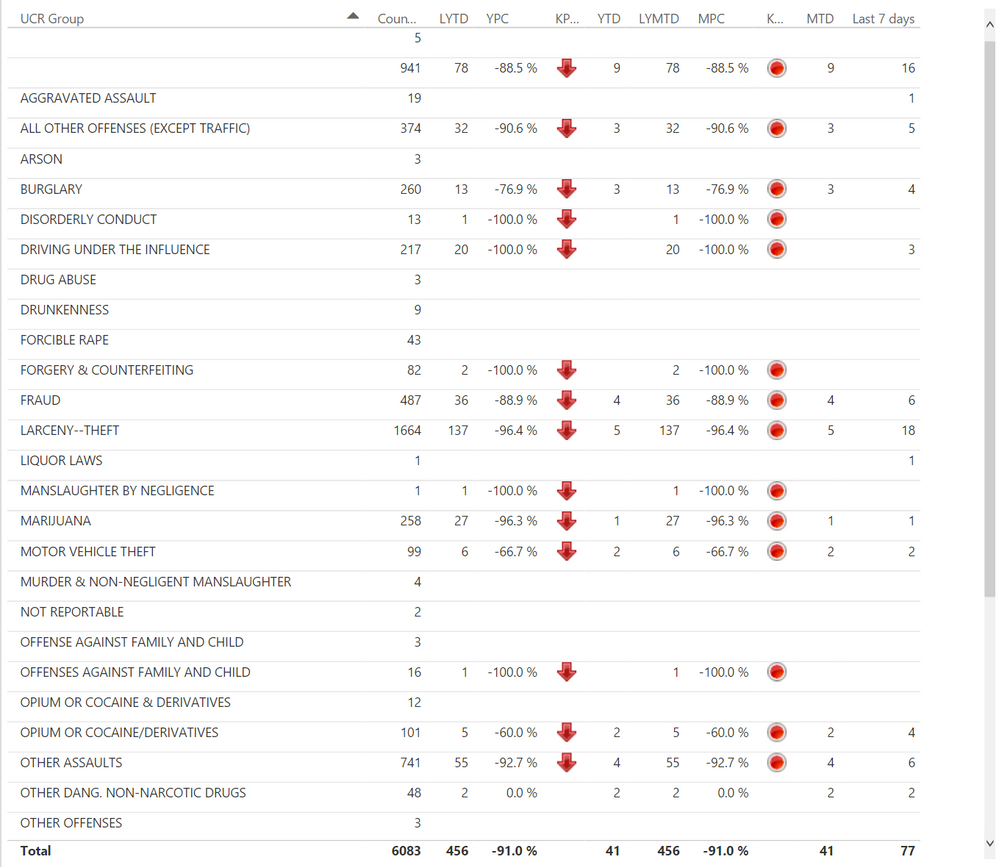
 

Table.png


1 ACCEPTED SOLUTION
Ssingh
Frequent Visitor

Use of DATESBETWEEN and EDATE functions should resolve this, please check this.

LYMTD = CALCULATE(DISTINCTCOUNT(lwmain[lwmainid]),DATESBETWEEN(MasterDate[Date], EDATE(STARTOFMONTH(MasterDate[Date]),-12),
EDATE(TODAY(),-12)
))

View solution in original post

4 REPLIES 4
AlecMaly
New Member

How did you get the status icons for KP_ and K_ columns?

Anonymous
Not applicable

Anonymous
Not applicable

Hi @dkel6177


Please check out the link


http://community.powerbi.com/t5/Desktop/How-to-display-sales-YTD-and-sales-last-YTD-over-years/m-p/1...


If this solves your issue please give KUDOS.


Cheers


CheenuSing

Ssingh
Frequent Visitor

Use of DATESBETWEEN and EDATE functions should resolve this, please check this.

LYMTD = CALCULATE(DISTINCTCOUNT(lwmain[lwmainid]),DATESBETWEEN(MasterDate[Date], EDATE(STARTOFMONTH(MasterDate[Date]),-12),
EDATE(TODAY(),-12)
))

Helpful resources

Announcements
Power BI DataViz World Championships

Power BI Dataviz World Championships

The Power BI Data Visualization World Championships is back! Get ahead of the game and start preparing now!

December 2025 Power BI Update Carousel

Power BI Monthly Update - December 2025

Check out the December 2025 Power BI Holiday Recap!

FabCon Atlanta 2026 carousel

FabCon Atlanta 2026

Join us at FabCon Atlanta, March 16-20, for the ultimate Fabric, Power BI, AI and SQL community-led event. Save $200 with code FABCOMM.