cancel
Showing results for 
Search instead for 
Did you mean: 

The Power BI Data Visualization World Championships is back! Get ahead of the game and start preparing now! Learn more

Reply
jjones90274
Frequent Visitor

DAX RANKX by Quarter

I am having issues creating a RANKX function that ranks values that are in the same period. My data contains multiple cities with multiple years and quarters for each city (Ex: Dallas for 1Q 2021, 2Q 2021..../Phoenix for 1Q 2021, 2Q 2021...). For each period I would like to rank the cities with regards to a specific metric (i.e vacancy). I have tried to accomplish this both through adding a column and meaures but have been unable to make it work.


My current measure formula is: 

Test Vacancy Rank = RANKX(CALCULATETABLE(VALUES('Costar Data'[Vacancy Rate]),FILTER(ALLSELECTED('Costar Data'),'Costar Data'[End Of Quarter]=SELECTEDVALUE('Costar Data'[End Of Quarter]))),CALCULATE(SUM('Costar Data'[Vacancy Rate])))
 
I am less familuar with DAX so any help will be greatly appreciated.
 
Thanks!
3 REPLIES 3
amitchandak
Super User
Super User

@jjones90274 , Try measure like


Rankx(allselected(Table[City]) , CALCULATE(SUM('Costar Data'[Vacancy Rate])), , desc,dense)


Rankx(filter(allselected(Table[City], Table[Qtr Year]), [Qtr Year] =max(Table[Qtr Year])  , CALCULATE(SUM('Costar Data'[Vacancy Rate])), , desc,dense)


For Rank Refer these links
https://radacad.com/how-to-use-rankx-in-dax-part-2-of-3-calculated-measures
https://radacad.com/how-to-use-rankx-in-dax-part-1-of-3-calculated-columns
https://radacad.com/how-to-use-rankx-in-dax-part-3-of-3-the-finale

Share with Power BI Enthusiasts: Full Power BI Video (20 Hours) YouTube
Microsoft Fabric Series 60+ Videos YouTube
Microsoft Fabric Hindi End to End YouTube

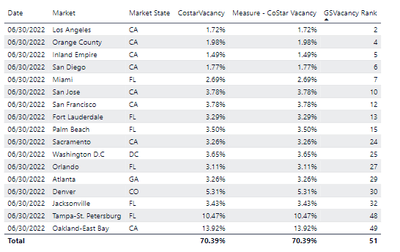
I also tried another method that got me close but it is still off.  It does not seem to be ranking properly and the ranking does not start at 1 (see below):


jjones90274_0-1665528059747.png


The formula for GSVacancy Rank is: 

GSVacancy Rank =
CALCULATE(
    RANKX(ALL('GreenStreet-Data-2022-08-30'[Market]),[Measure - CoStar Vacancy],,ASC,Dense),
        ALL('GreenStreet-Data-2022-08-30'),
            VALUES('GreenStreet-Data-2022-08-30'[Market]))

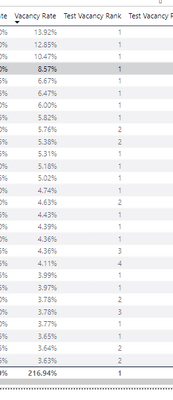
Thanks for the reply @amitchandak! I gave the first measure a try and I am still getting duplicate rankings (see below)


jjones90274_0-1665502669131.png


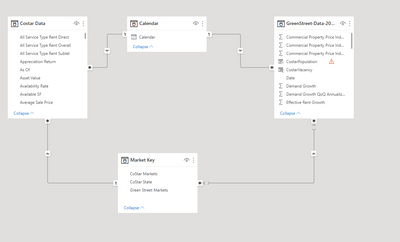
 For reference I have included a snapshot of the relationships I have in the model.

jjones90274_1-1665502669133.png


The data I am using has both past dates with historical data and future dates with forcasted data. I tie the two data sources together through the calendar and market key tables. In my report I have slicers for Date (Year and Qtr) and Market.


Helpful resources

Announcements
Power BI DataViz World Championships

Power BI Dataviz World Championships

The Power BI Data Visualization World Championships is back! Get ahead of the game and start preparing now!

December 2025 Power BI Update Carousel

Power BI Monthly Update - December 2025

Check out the December 2025 Power BI Holiday Recap!

FabCon Atlanta 2026 carousel

FabCon Atlanta 2026

Join us at FabCon Atlanta, March 16-20, for the ultimate Fabric, Power BI, AI and SQL community-led event. Save $200 with code FABCOMM.