Advance your Data & AI career with 50 days of live learning, dataviz contests, hands-on challenges, study groups & certifications and more!
Get registeredGet Fabric Certified for FREE during Fabric Data Days. Don't miss your chance! Request now
I am looking for some help "back filtering" sales.
The requirement to to retunr the Top X products that contibute to 80% of the total sales value. I am guessing that I could use a combination of a cumulative total and rankx somehow.
I have a the following tables in my model,
FactSales
DimDate
DimProduct
DimCustomer
Any help greatfully received
Solved! Go to Solution.
Hi @NanDeb ,
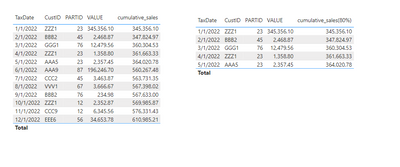
Please create following measure:
cumulative_sales(80%) =
var cumulative_sales = CALCULATE(SUM('Table'[VALUE]),FILTER(ALL('Table'),'Table'[TaxDate] <= SELECTEDVALUE('Table'[TaxDate])))
var total_sales = CALCULATE(SUM('Table'[VALUE]),ALL('Table'))
return
IF(cumulative_sales <= total_sales * 0.8, cumulative_sales)
I think this is the result you want:
Best regards,
Yadong Fang
If this post helps, then please consider Accept it as the solution to help the other members find it more quickly.
to start with I would like returned a table of all the products and their cumulative sales.
If possible I would then also like to exclude the lower ranking sales after cumulative value of 80% of total sales value is reached
EG,
Total Sale Value = £800,000
80% Sales Value = £640,000
I want to return something like this:
| Product ID | Rank | Total Sale Value | Cumulative |
| AAA | 1 | £90,000 | £80,000 |
| BBB | 2 | £85,000 | £175,000 |
| CCC | 3 | £80,000 | £255,000 |
| DDD | 4 | £75,000 | £330,000 |
| EEE | 5 | £70,000 | £400,000 |
| FFF | 6 | £65,000 | £465,000 |
| GGG | 7 | £60,000 | £525,000 |
| HHH | 8 | £55,000 | £580,000 |
| III | 9 | £50,000 | £620,000 |
| JJJ | 10 | £45,000 | NOT INCLUDED If possible |
Is there anyway of achieving this in DAX
Hi @NanDeb ,
Please create following measure:
cumulative_sales(80%) =
var cumulative_sales = CALCULATE(SUM('Table'[VALUE]),FILTER(ALL('Table'),'Table'[TaxDate] <= SELECTEDVALUE('Table'[TaxDate])))
var total_sales = CALCULATE(SUM('Table'[VALUE]),ALL('Table'))
return
IF(cumulative_sales <= total_sales * 0.8, cumulative_sales)
I think this is the result you want:
Best regards,
Yadong Fang
If this post helps, then please consider Accept it as the solution to help the other members find it more quickly.
Hi @NanDeb ,
In order to better understanding your demands and give the right solution, could you please tell me what's your expected output?
Thanks for your efforts & time in advance.
Best regards,
Yadong Fang
If this post helps, then please consider Accept it as the solution to help the other members find it more quickly.
A simplied example of by data here:
| TaxDate | CustID | PARTID | VALUE |
| 01/01/2022 | ZZZ1 | 23 | 345356.1 |
| 02/01/2022 | BBB2 | 45 | 2468.87 |
| 03/01/2022 | GGG1 | 76 | 12479.56 |
| 04/01/2022 | ZZZ1 | 23 | 1358.8 |
| 05/01/2022 | AAA5 | 23 | 2357.45 |
| 06/01/2022 | AAA9 | 87 | 196246.7 |
| 07/01/2022 | CCC2 | 45 | 3463.87 |
| 08/01/2022 | VVV1 | 67 | 3666.67 |
| 09/01/2022 | BBB2 | 76 | 234.98 |
| 10/01/2022 | ZZZ1 | 12 | 2352.87 |
| 11/01/2022 | CCC9 | 12 | 6345.56 |
| 12/01/2022 | EEE6 | 56 | 34653.78 |
| Id | CustID |
| 1 | AAA5 |
| 2 | AAA9 |
| 3 | BBB2 |
| 4 | CCC2 |
| 5 | CCC9 |
| 6 | EEE9 |
| 7 | GGG1 |
| 8 | VVV1 |
| 9 | ZZZ1 |
| Id | PartID |
| 1 | 23 |
| 2 | 45 |
| 3 | 76 |
| 4 | 87 |
| 5 | 67 |
| 6 | 12 |
| 7 | 56 |
Advance your Data & AI career with 50 days of live learning, contests, hands-on challenges, study groups & certifications and more!
Check out the October 2025 Power BI update to learn about new features.
| User | Count |
|---|---|
| 8 | |
| 6 | |
| 6 | |
| 4 | |
| 4 |
| User | Count |
|---|---|
| 25 | |
| 16 | |
| 8 | |
| 7 | |
| 6 |