cancel
Showing results for 
Search instead for 
Did you mean: 

Learn from the best! Meet the four finalists headed to the FINALS of the Power BI Dataviz World Championships! Register now

Reply
JavidRobatian
Frequent Visitor

DATEDIFF between DATE column and User SELECT Date

Hello, I have a very complicated problem. Thank you for your help.
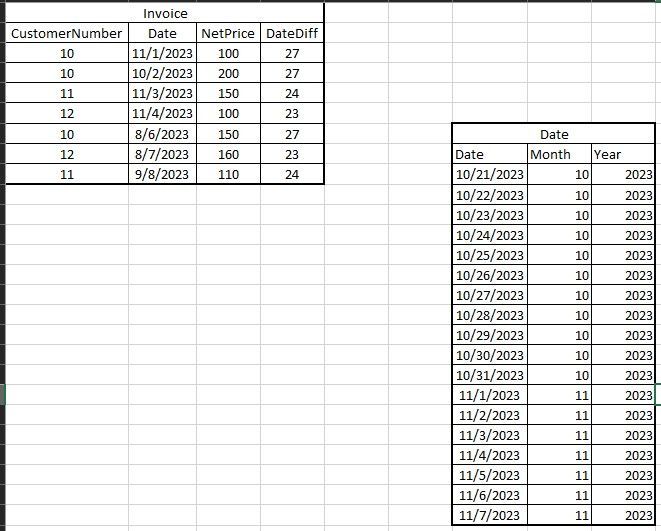
I have two tables in Power BI called Date and Invoice that are related
Now I want to calculate the DateDiff column in the invoice table as follows:
Using the date table and the month column, we create a date filter on the page.
There are two modes
1- The user has not selected the month, in this case:
DateDiff = date[invoice] - today()
Of course, this number must be the smallest number for each customer, for example, for customer number 10
11/28/2023-11/1/2023 =27
2- The user selects the date of the month using the table:
In this case, Today() is equal to the first day of the month selected by the user, and then the DateDiff calculation changes according to the user's selection.

1.jpg

1 ACCEPTED SOLUTION
Dangar332
Super User
Super User

hi, @JavidRobatian 

try below code

Measure = 
var a = SELECTEDVALUE('date'[month])
var b = DATEDIFF(CALCULATE(min(invoice[date]),ALLEXCEPT(invoice,invoice[cu nu])),TODAY(),DAY)
var c = DATEDIFF(CALCULATE(min(invoice[date]),ALLEXCEPT(invoice,invoice[cu nu])),DATE(2023,a,1),DAY)
var d = IF(ISFILTERED('date'[month]),c,b)
return
d

View solution in original post

2 REPLIES 2
Dangar332
Super User
Super User

hi, @JavidRobatian 

try below code

Measure = 
var a = SELECTEDVALUE('date'[month])
var b = DATEDIFF(CALCULATE(min(invoice[date]),ALLEXCEPT(invoice,invoice[cu nu])),TODAY(),DAY)
var c = DATEDIFF(CALCULATE(min(invoice[date]),ALLEXCEPT(invoice,invoice[cu nu])),DATE(2023,a,1),DAY)
var d = IF(ISFILTERED('date'[month]),c,b)
return
d
JavidRobatian
Frequent Visitor

If the explanation is not clear, please tell me so that I can explain more.

Helpful resources

Announcements
Join our Fabric User Panel

Join our Fabric User Panel

Share feedback directly with Fabric product managers, participate in targeted research studies and influence the Fabric roadmap.

February Power BI Update Carousel

Power BI Monthly Update - February 2026

Check out the February 2026 Power BI update to learn about new features.