Join us at FabCon Atlanta from March 16 - 20, 2026, for the ultimate Fabric, Power BI, AI and SQL community-led event. Save $200 with code FABCOMM.
Register now!Get Fabric Certified for FREE during Fabric Data Days. Don't miss your chance! Request now
I am needing to create a visit window report to show the expected visit windows for visits based on the procedure date.
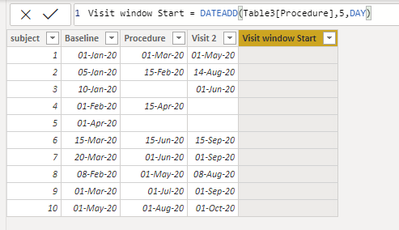
here is what i have uploaded as an example:
I am trying to have the [Visit window Start] column display to show the [Procedure] date plus 5 days. (see formula bar for what i used).
So for example, the first procedure date is listed as 01-MAR-2020 so the date that should be calculated is 06-MAR-2020. But nothing shows up.
What am I doing incorrectly?
Solved! Go to Solution.
@guanel1 ,
You need a table with continuos date, create a date table and relate them, use this code on your column:
Column = DATEADD(Data[Date], 5, DAY)
@guanel1 , date add need continuous dates , Simply add +5 for days
Visit Window Start = Table3[Procedure] +5
Also, refer: https://www.youtube.com/watch?v=YWo-ZpKM6gU
Thank you, this is works when there is always a date listed in the procedure column. However, if it is blank, what formula should i use to have it give me a blank answer?
@guanel1 ,
You need a table with continuos date, create a date table and relate them, use this code on your column:
Column = DATEADD(Data[Date], 5, DAY)
Check out the November 2025 Power BI update to learn about new features.
Advance your Data & AI career with 50 days of live learning, contests, hands-on challenges, study groups & certifications and more!
| User | Count |
|---|---|
| 11 | |
| 9 | |
| 9 | |
| 6 | |
| 5 |
| User | Count |
|---|---|
| 27 | |
| 22 | |
| 19 | |
| 17 | |
| 11 |