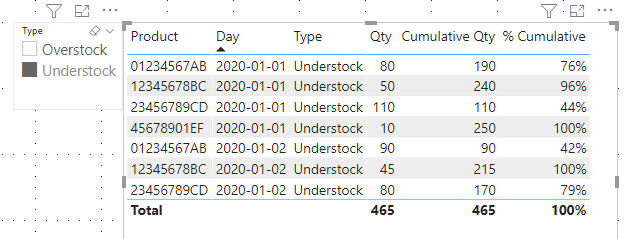
I'm trying to perform an analysis in which I can see the biggest understocks and overstocks in a Pareto chart for a selected date. To achieve this, I need a cumulative sum of all volumes, taking on account the biggest gap/excess in the referred day.
My data is being displayed as below. The headers in grey are already available; the red and yellow headers are those that I'm striving to obtain. Despite being shown as columns, they should be measures.
| Product | Day | Understock | UndRank | CumUnd | CumUnd% | Overstock | OveRank | CumOve | CumOve% |
| 01234567AB | 01/01/2020 | 80 | 2 | 190 | 76% | | | | |
| 12345678BC | 01/01/2020 | 50 | 3 | 240 | 96% | | | | |
| 23456789CD | 01/01/2020 | 110 | 1 | 110 | 44% | | | | |
| 34567890DE | 01/01/2020 | | | | | 55 | 2 | 115 | 100% |
| 45678901EF | 01/01/2020 | 10 | 4 | 250 | 100% | | | | |
| 56789012FG | 01/01/2020 | | | | | 60 | 1 | 60 | 52% |
| 01234567AB | 02/01/2020 | 90 | 1 | 90 | 42% | | | | |
| 12345678BC | 02/01/2020 | 45 | 3 | 215 | 100% | | | | |
| 23456789CD | 02/01/2020 | 80 | 2 | 170 | 79% | | | | |
| 34567890DE | 02/01/2020 | | | | | 50 | 2 | 105 | 91% |
| 45678901EF | 02/01/2020 | | | | | 10 | 3 | 115 | 100% |
| 56789012FG | 02/01/2020 | | | | | 55 | 1 | 55 | 48% |
So far, I was had worked only with the latest date, so the formulas below had been enough. I tried a lot of different solutions, but with no success. If the MAX formula considers the maximum value for the day shown in the row, I believe it will be enough.
CumUnd = CALCULATE(SUM(Table[Understock]), FILTER(ALLSELECTED(Table), Table[UndRank] <= MAX(Pareto[UndRank])))
CumUnd% = [CumUnd]/CALCULATE(SUM(Table[Understock]), ALL(Table))
Thanks in advance for any help you can provide!