This time we’re going bigger than ever. Fabric, Power BI, SQL, AI and more. We're covering it all. You won't want to miss it.
Learn moreLevel up your Power BI skills this month - build one visual each week and tell better stories with data! Get started
I have ireegular date values. For example, data before 2023(2021,2021,etc.) only contains December data (integrated), and for 2023, only September and October exist. the cumulative population graph trend is drawn well, but I'm trying to see the rate of change by vomparing the values with the previous month's data, but the dax function doesn't work. It seems to be more difficult because the date values are not sequential. I just need to know the rate of change compared to the previous value of the existing date. Could you please five me some tips?
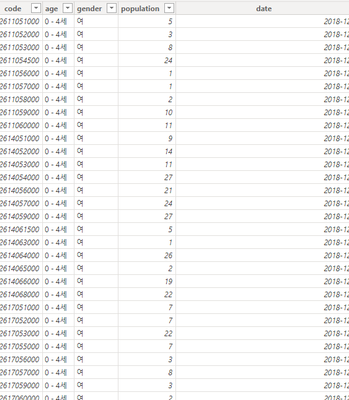
I wort my own dax function. CurrentDate, currentPopulation, and PreviousDate are returnde well, but only the PreviousPopulation value is not returned well. Why?
---------------------------------------------------------------------------------------
Population Change Rate =
VAR CurrentDate = SELECTEDVALUE('Table'[date])
VAR CurrentPopulation = CALCULATE(
SUM('Table'[population])
'Table'[date] = CurrentDate
)
VAR PreviousDate = CALCULATE(
MAX('Table'[date])
FILTER(
ALL('Table'),
'Table'[date] < CurrentDate
)
)
VAR PreviousPopulation = CALCULATE(
SUM('Table'[population]},
'Table'[date] = PreviousDate
)
RETURN IF(
NOT ISBLANK(PreviousPopulation),
(CurrentPopulation - PreviousPopulation) / PreviousPopulation,
BLANK()
)
------------------------------------------------------------------------------------------
Please understand that I am not good at English beacuse I am Korean.
Solved! Go to Solution.
Hi,
I am not sure how your semantic model looks like, but please try something like below whether it suits your requirement.
Population Change Rate =
VAR CurrentDate =
SELECTEDVALUE ( 'Table'[date] )
VAR CurrentPopulation =
CALCULATE ( SUM ( 'Table'[population] ), 'Table'[date] = CurrentDate )
VAR PreviousDate =
CALCULATE (
MAX ( 'Table'[date] ),
FILTER ( ALL ( 'Table' ), 'Table'[date] < CurrentDate )
)
VAR PreviousPopulation =
CALCULATE (
SUM ( 'Table'[population] ),
FILTER ( ALL ( 'Table' ), 'Table'[date] = PreviousDate )
)
RETURN
IF (
NOT ISBLANK ( PreviousPopulation ),
( CurrentPopulation - PreviousPopulation ) / PreviousPopulation,
BLANK ()
)
Hi,
I am not sure how your semantic model looks like, but please try something like below whether it suits your requirement.
Population Change Rate =
VAR CurrentDate =
SELECTEDVALUE ( 'Table'[date] )
VAR CurrentPopulation =
CALCULATE ( SUM ( 'Table'[population] ), 'Table'[date] = CurrentDate )
VAR PreviousDate =
CALCULATE (
MAX ( 'Table'[date] ),
FILTER ( ALL ( 'Table' ), 'Table'[date] < CurrentDate )
)
VAR PreviousPopulation =
CALCULATE (
SUM ( 'Table'[population] ),
FILTER ( ALL ( 'Table' ), 'Table'[date] = PreviousDate )
)
RETURN
IF (
NOT ISBLANK ( PreviousPopulation ),
( CurrentPopulation - PreviousPopulation ) / PreviousPopulation,
BLANK ()
)
Thank you soooooooooo much!!!!!!!!!!!!!!!!!!!!
Check out the April 2026 Power BI update to learn about new features.
Sign up to receive a private message when registration opens and key events begin.
If you have recently started exploring Fabric, we'd love to hear how it's going. Your feedback can help with product improvements.
| User | Count |
|---|---|
| 3 | |
| 3 | |
| 3 | |
| 3 | |
| 2 |
| User | Count |
|---|---|
| 8 | |
| 8 | |
| 7 | |
| 6 | |
| 6 |