Let's think of a project management scenario where projects status change from Open (1) to In-Progress (2) and finally Closed (3). In this example I have 10 projects. My requirement is to produce a count of projects based on a date and/or status type. The key thing here is that the value returned by the measure is related to the evalutation context.
Here's an example of the Project Status table:
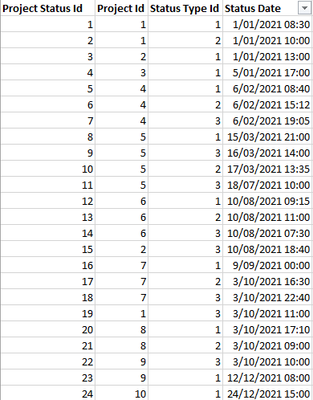
Now think of this visualization below:

For example: on 6th Feb we had 4 projects in the system where 2 were open, 1 was In-Progress and 1 was closed. That gives me a total of 4! It looks at the data of 7 rows which is self and the previous 6 rows. If want to know the status of the projects as of today we just need to look at the last entry on 24th Dec which will give me 10.
When I display this measure which calculates the number of projects on a table visual without dates and status types, I would expect 10. In this scenario my context filter doesn't have dates and status types to filter by.
If my visualization (matrix) only has Status Type as the column field I would expect:

If my matrix has Date as a row field and Status Type as column field then I would expect to see what I've shown earlier.
What I'm earnestly asking is for your advice on the best way to tackle this challenge. As a first attempt I've come up with something which is not giving me no where near what I expect but I would appreciate your comments if I'm tackling this the right way.
Project Status Count =

    VAR MaxKnownDate =
        MAX ( 'Project Status'[Status Date] )

    VAR StatusSummaryBase =
        SUMMARIZE (
            'Date'
            ,'Date'[Date]
        )

     VAR StatusSummary =
        CALCULATETABLE (
            ADDCOLUMNS (
                StatusSummaryBase,
                  "Latest Count",
                  VAR DateSnapshot = 'Date'[Date]
                  RETURN
                    CALCULATE (
                        COUNTX (
                             'Project Status',
                              'Project Status'[Project Id]
                              ),
                        LASTNONBLANK (
                            FILTER(
                                ALL('Date'),
                                'Date'[Date] <= DateSnapshot
                            ),
                            COUNTROWS(RELATEDTABLE('Project Status'))
                        )
                    )

            )
            ,FILTER (
                ALL ( 'Project Status'[Status Date] ),
                'Project Status'[Status Date] <= MaxKnownDate
            )
        )

    VAR Result =
        SUMX(StatusSummary, [Latest Count])

	RETURN
		Result
I understand I may still need to check for the presence of context filters such as data and status type in order to produce the right calculation.


