
Join us at FabCon Atlanta from March 16 - 20, 2026, for the ultimate Fabric, Power BI, AI and SQL community-led event. Save $200 with code FABCOMM.
Register now!Get Fabric Certified for FREE during Fabric Data Days. Don't miss your chance! Request now
Hi,
I've created a table by appending "Required Attendee" with "Attendance" with the goal of visualising this to see an Attendance report. As you can see, for this particular "Meeting ID" 4 people were invited, but only 2 people attended (Name ID = 1112 and Name ID = 1703).
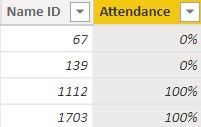
How can I write a measure to show the full list of attendees with a column showing those who attended as 100% and those who didn't as 0%?
Something like this:
| Name ID | Attendance |
| 67 | 0% |
| 139 | 0% |
| 1112 | 100% |
| 1703 | 100% |
Solved! Go to Solution.
Hi @Anonymous,
You can use the following DAX Formula to create the result table:
Attendance Percentage = SUMMARIZE('Table','Table'[Name ID],"Attendance",IF(MIN('Table'[Type])="Attendance",1,0))
Format the Attendance column as percentage to see this result:
Works for you? Mark this post as a solution if it does!
Perfect! Thanks so much for that!
Thanks but I get this error:
Hi @Anonymous,
Since this will return a table, you can not create this formula as a measure. Use it to create a new DAX table.
Did I answer your question? Mark this post as a solution if I did!
Hi @Anonymous,
You can use the following DAX Formula to create the result table:
Attendance Percentage = SUMMARIZE('Table','Table'[Name ID],"Attendance",IF(MIN('Table'[Type])="Attendance",1,0))
Format the Attendance column as percentage to see this result:
Works for you? Mark this post as a solution if it does!
Check out the November 2025 Power BI update to learn about new features.
Advance your Data & AI career with 50 days of live learning, contests, hands-on challenges, study groups & certifications and more!
| User | Count |
|---|---|
| 11 | |
| 9 | |
| 9 | |
| 6 | |
| 5 |
| User | Count |
|---|---|
| 27 | |
| 22 | |
| 20 | |
| 17 | |
| 12 |