cancel
Showing results for 
Search instead for 
Did you mean: 

The Power BI Data Visualization World Championships is back! Get ahead of the game and start preparing now! Learn more

Reply
souvik900766
Helper IV
Helper IV

Count rows on the basis of If condition output !

Hi !
My data link:-https://www.dropbox.com/s/qww6kbl4ytb70aw/Count%20rows.pbix?dl=0


I want to count rows on the basis of a measure made out of if condition.
My condition will return L, C, E and need to count them that how many country falls under each.

I used this measure to count rows:-

E Count Brand View = COUNTROWS(FILTER(VALUES(MSR[ctry_nm]),[LCE Brand View]="E"))
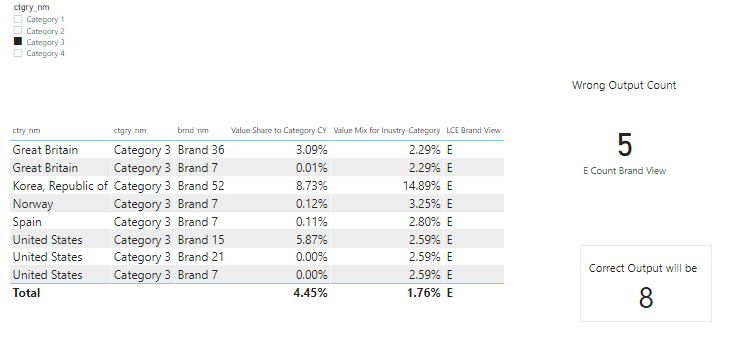
This measure is working only when I am keeping the ctgry_nm column and removing brnd_nm then it is returning 5 which is correct but keeping both column it woluld return 8 which is correct.

Capture 3.PNG

Thanks in advance !

1 ACCEPTED SOLUTION

Hi,

Try this measure

COUNTROWS(FILTER(SUMMARIZE(GENERATE(VALUES(MSR[ctry_nm]),VALUES(MSR[brnd_nm])),MSR[ctry_nm],MSR[brnd_nm],"ABCD",[LCE Brand View]),[ABCD]="L"))

Untitled.png


Regards,
Ashish Mathur
http://www.ashishmathur.com
https://www.linkedin.com/in/excelenthusiasts/

View solution in original post

6 REPLIES 6
Ashish_Mathur
Super User
Super User

Hi,

Try this measure

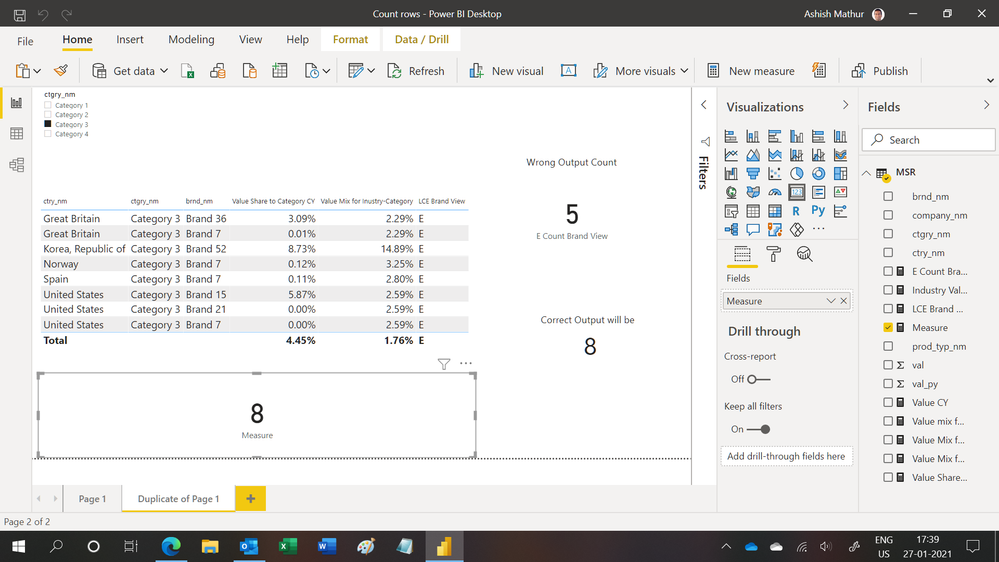
Measure = COUNTROWS(FILTER(SUMMARIZE(MSR,MSR[brnd_nm],MSR[ctry_nm],"ABCD",[LCE Brand View]),[ABCD]="E"))

Untitled.png 


Regards,
Ashish Mathur
http://www.ashishmathur.com
https://www.linkedin.com/in/excelenthusiasts/

Hi @Ashish_Mathur 
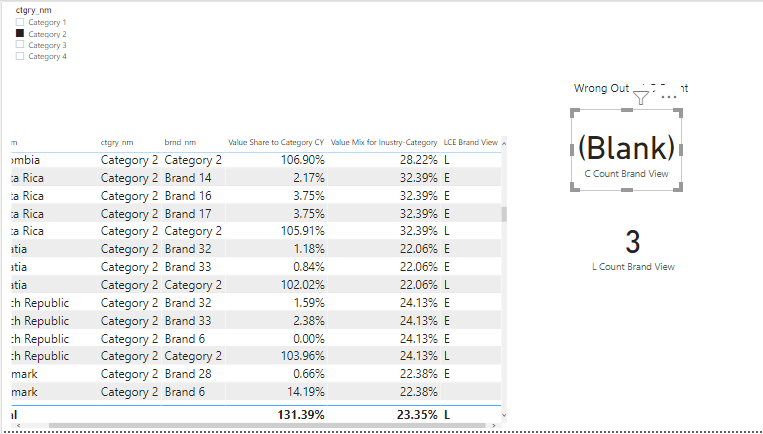
I used your DAX it is showing blank in my original file !!!🤔

Capture 5.PNG

Hi,

I have no idea why.  As you can clearly see, in the file that you uploaded, my formula is giving the correct result.


Regards,
Ashish Mathur
http://www.ashishmathur.com
https://www.linkedin.com/in/excelenthusiasts/

Hi @Ashish_Mathur 
Kindly check the dashboard for once.
https://www.dropbox.com/s/imw6h6mspnufty5/Count%20rows.pbix?dl=0
Numbers are showing blank or wrong !
Capture 10.PNG
Thanks in advance !

Hi,

Try this measure

COUNTROWS(FILTER(SUMMARIZE(GENERATE(VALUES(MSR[ctry_nm]),VALUES(MSR[brnd_nm])),MSR[ctry_nm],MSR[brnd_nm],"ABCD",[LCE Brand View]),[ABCD]="L"))

Untitled.png


Regards,
Ashish Mathur
http://www.ashishmathur.com
https://www.linkedin.com/in/excelenthusiasts/
amitchandak
Super User
Super User

@souvik900766 , Try a measure like

E Count Brand View = COUNTROWS(FILTER(MSR,[LCE Brand View]="E"))

Share with Power BI Enthusiasts: Full Power BI Video (20 Hours) YouTube
Microsoft Fabric Series 60+ Videos YouTube
Microsoft Fabric Hindi End to End YouTube

Helpful resources

Announcements
November Power BI Update Carousel

Power BI Monthly Update - November 2025

Check out the November 2025 Power BI update to learn about new features.

Fabric Data Days Carousel

Fabric Data Days

Advance your Data & AI career with 50 days of live learning, contests, hands-on challenges, study groups & certifications and more!

FabCon Atlanta 2026 carousel

FabCon Atlanta 2026

Join us at FabCon Atlanta, March 16-20, for the ultimate Fabric, Power BI, AI and SQL community-led event. Save $200 with code FABCOMM.