Join us at FabCon Atlanta from March 16 - 20, 2026, for the ultimate Fabric, Power BI, AI and SQL community-led event. Save $200 with code FABCOMM.
Register now!The Power BI Data Visualization World Championships is back! Get ahead of the game and start preparing now! Learn more
Hey, I'm trying to create a column where if the "end date"(prev_tency_end) is in the prevous month it should equal 1. I cant use the calculate function though because I'm using direct query.
I need it to be a column for row context for a table I'm trying to create.
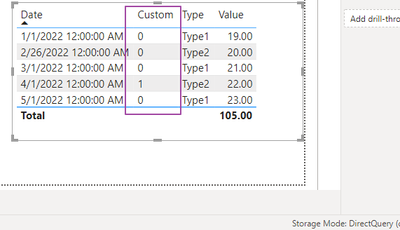
Pretty much like this:
Solved! Go to Solution.
Hi @Anonymous
Thanks for reaching out to us.
Under Direct Query mode, we can only create a column in PQ, you can try the way below,
click Add column - Custom column
=Date.IsInPreviousMonth([Date])
result
Best Regards,
Community Support Team _Tang
If this post helps, please consider Accept it as the solution to help the other members find it more quickly.
Hi @Anonymous
Thanks for reaching out to us.
Under Direct Query mode, we can only create a column in PQ, you can try the way below,
click Add column - Custom column
=Date.IsInPreviousMonth([Date])
result
Best Regards,
Community Support Team _Tang
If this post helps, please consider Accept it as the solution to help the other members find it more quickly.
The Power BI Data Visualization World Championships is back! Get ahead of the game and start preparing now!
| User | Count |
|---|---|
| 16 | |
| 7 | |
| 4 | |
| 3 | |
| 3 |
| User | Count |
|---|---|
| 25 | |
| 13 | |
| 12 | |
| 10 | |
| 6 |