Party with Power BI’s own Guy in a Cube
Power BI is turning 10! Tune in for a special live episode on July 24 with behind-the-scenes stories, product evolution highlights, and a sneak peek at what’s in store for the future.
Save the date- Power BI forums
- Get Help with Power BI
- Desktop
- Service
- Report Server
- Power Query
- Mobile Apps
- Developer
- DAX Commands and Tips
- Custom Visuals Development Discussion
- Health and Life Sciences
- Power BI Spanish forums
- Translated Spanish Desktop
- Training and Consulting
- Instructor Led Training
- Dashboard in a Day for Women, by Women
- Galleries
- Data Stories Gallery
- Themes Gallery
- Contests Gallery
- Quick Measures Gallery
- Notebook Gallery
- Translytical Task Flow Gallery
- TMDL Gallery
- R Script Showcase
- Webinars and Video Gallery
- Ideas
- Custom Visuals Ideas (read-only)
- Issues
- Issues
- Events
- Upcoming Events
Enhance your career with this limited time 50% discount on Fabric and Power BI exams. Ends August 31st. Request your voucher.
- Power BI forums
- Forums
- Get Help with Power BI
- DAX Commands and Tips
- Concatenate or Combine rows based on column condit...
- Subscribe to RSS Feed
- Mark Topic as New
- Mark Topic as Read
- Float this Topic for Current User
- Bookmark
- Subscribe
- Printer Friendly Page


- Mark as New
- Bookmark
- Subscribe
- Mute
- Subscribe to RSS Feed
- Permalink
- Report Inappropriate Content
Concatenate or Combine rows based on column condition
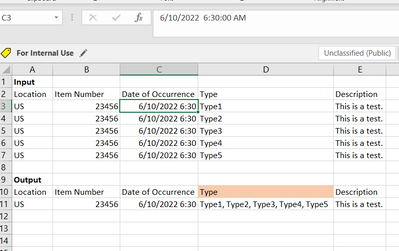
Scenario is shown in the below image.
Is there a way to build a measure to concatenate values of column 'Type' based on condition i.e. distinct 'Item Number'?
Solved! Go to Solution.


- Mark as New
- Bookmark
- Subscribe
- Mute
- Subscribe to RSS Feed
- Permalink
- Report Inappropriate Content
Hi @bmk ,
I think I have a solution in Power Query:
Before:

After:

Here the code in Power Query M that you can paste into the advanced editor (if you do not know, how to exactly do this, please check out this quick walkthrough)
let
    Source = Table.FromRows(Json.Document(Binary.Decompress(Binary.FromText("i45WCg1W0lEyMjYxNQPSZvqGBvpGBkZGCmZWxgZAgZDKglRDEJ2RWawARIkKJanFJUqxOsRoNCJXozG5Gk3I1WiKRWMsAA==", BinaryEncoding.Base64), Compression.Deflate)), let _t = ((type nullable text) meta [Serialized.Text = true]) in type table [Location = _t, #"Item Nunber" = _t, #"Date of ocurrence" = _t, Type = _t, Description = _t]),
    #"Changed Type" = Table.TransformColumnTypes(Source,{{"Location", type text}, {"Item Nunber", Int64.Type}, {"Date of ocurrence", type datetime}, {"Type", type text}, {"Description", type text}}),
    #"Goup By" = Table.Group(#"Changed Type", {"Location", "Item Nunber", "Date of ocurrence", "Description"}, {{"Type", each Text.Combine(List.Transform(_[Type], (x) => Value.FromText(x)), ", "), type text}})

in
    #"Goup By"
Let me know if this helps 🙂
/Tom
https://www.tackytech.blog/
https://www.instagram.com/tackytechtom/
| Did I answer your question❓➡️ Please, mark my post as a solution ✔️ |
| Also happily accepting Kudos 🙂 |
| Feel free to connect with me on LinkedIn! | |
| #proudtobeasuperuser |  |

- Mark as New
- Bookmark
- Subscribe
- Mute
- Subscribe to RSS Feed
- Permalink
- Report Inappropriate Content
Hi @bmk
I guess you are slicing by Location and Item Number. Then you can use
Types =
CONCATENATEX (
    VALUES ( TableName[Type] ),
    TableName[Type],
    UNICHAR ( 10 ),
    TableName[Type], ASC
)

- Mark as New
- Bookmark
- Subscribe
- Mute
- Subscribe to RSS Feed
- Permalink
- Report Inappropriate Content
If it is many to one relationship,
ITEMS = ConcatenateX(RELATEDTABLE(order_goods),order_goods[item],UNICHAR(10),order_goods[item])
UNICHAR(10) means start new line.
- Mark as New
- Bookmark
- Subscribe
- Mute
- Subscribe to RSS Feed
- Permalink
- Report Inappropriate Content
Hi @bmk ,
I think I have a solution in Power Query:
Before:
After:
Here the code in Power Query M that you can paste into the advanced editor (if you do not know, how to exactly do this, please check out this quick walkthrough)
let
    Source = Table.FromRows(Json.Document(Binary.Decompress(Binary.FromText("i45WCg1W0lEyMjYxNQPSZvqGBvpGBkZGCmZWxgZAgZDKglRDEJ2RWawARIkKJanFJUqxOsRoNCJXozG5Gk3I1WiKRWMsAA==", BinaryEncoding.Base64), Compression.Deflate)), let _t = ((type nullable text) meta [Serialized.Text = true]) in type table [Location = _t, #"Item Nunber" = _t, #"Date of ocurrence" = _t, Type = _t, Description = _t]),
    #"Changed Type" = Table.TransformColumnTypes(Source,{{"Location", type text}, {"Item Nunber", Int64.Type}, {"Date of ocurrence", type datetime}, {"Type", type text}, {"Description", type text}}),
    #"Goup By" = Table.Group(#"Changed Type", {"Location", "Item Nunber", "Date of ocurrence", "Description"}, {{"Type", each Text.Combine(List.Transform(_[Type], (x) => Value.FromText(x)), ", "), type text}})

in
    #"Goup By"
Let me know if this helps 🙂
/Tom
https://www.tackytech.blog/
https://www.instagram.com/tackytechtom/
| Did I answer your question❓➡️ Please, mark my post as a solution ✔️ |
| Also happily accepting Kudos 🙂 |
| Feel free to connect with me on LinkedIn! | |
| #proudtobeasuperuser | |
- Mark as New
- Bookmark
- Subscribe
- Mute
- Subscribe to RSS Feed
- Permalink
- Report Inappropriate Content
Hello tomfox,
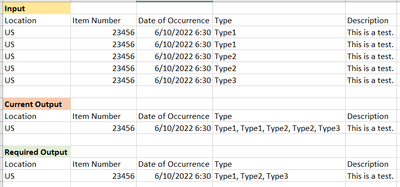
Thank you. This technically worked well. Except for scenarios wherein the 'type' column have same values.
In which case I would need the distinct values to be concatenated, since currently it is being duplicated.
- Mark as New
- Bookmark
- Subscribe
- Mute
- Subscribe to RSS Feed
- Permalink
- Report Inappropriate Content
I just wrapped the list.transform function with list.distinct and it workas required. Please let me know if I need to keep anything in mind from an error handling perspective. Thank you!

Helpful resources

Fabric Community Update - July 2025
Find out what's new and trending in the Fabric community.

Power BI Monthly Update - July 2025
Check out the July 2025 Power BI update to learn about new features.

| User | Count |
|---|---|
| 22 | |
| 11 | |
| 8 | |
| 6 | |
| 6 |


| User | Count |
|---|---|
| 25 | |
| 12 | |
| 11 | |
| 7 | |
| 6 |


