Don't miss your chance to take the Fabric Data Engineer (DP-600) exam for FREE! Find out how by attending the DP-600 session on April 23rd (pacific time), live or on-demand.
Learn moreNext up in the FabCon + SQLCon recap series: The roadmap for Microsoft SQL and Maximizing Developer experiences in Fabric. All sessions are available on-demand after the live show. Register now
Dear Community,
Can someone please help me implement one smart filter in PowerBI.
I think with DAX it is possible to do, thus posting here.
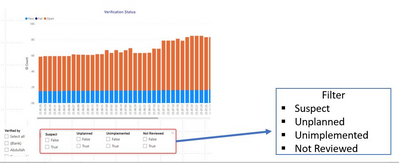
So I have several slicers, which only TRUE values are interesitng.
And I want to combine these seperate slicers - Suspect, Unplanned,... into 1 slicer, something like this:
( each of them is seperate measure)
So 1 Filter slicer, which contains these measures. And when in Filter section, user select Suspect, it shows only the Suspect=True values.
Is there any ideas how I can do this?
I read and tries so many google posts, that now lost a hope to accomplish this 😞
Thanks
Hayk
Hi @haykp ,
According to your description, here are my steps you can follow as a solution.
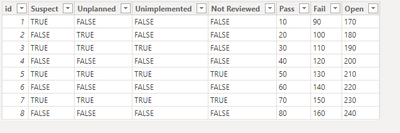
(1) This is my test data.
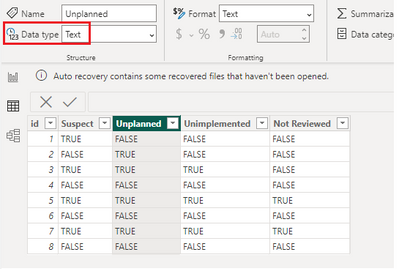
(2)Create a slicer table.
Slicer = {"Suspect","Unplanned","Unimplemented","Not Reviewed"}
(3) We can create a measure.
Flag = SWITCH(TRUE(),
SELECTEDVALUE('Slicer'[Filter])="Suspect" && MAX('Data'[Suspect])="TRUE",1,
SELECTEDVALUE('Slicer'[Filter])="Unplanned" && MAX('Data'[Unplanned])="TRUE",1,
SELECTEDVALUE('Slicer'[Filter])="Unimplemented" && MAX('Data'[Unimplemented])="TRUE",1,
SELECTEDVALUE('Slicer'[Filter])="Not Reviewed" && MAX('Data'[Not Reviewed])="TRUE",1,
ISFILTERED(Slicer[Filter])=FALSE(),1,0)
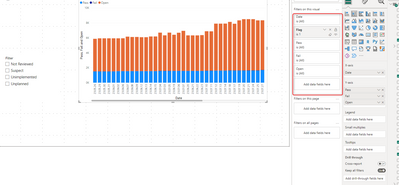
(4) Place [Flag]=1 on the visual object filter.
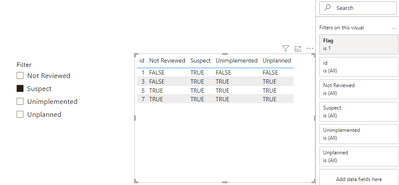
If the above one can't help you get the desired result, please provide some sample data in your tables (exclude sensitive data) with Text format and your expected result with backend logic and special examples. It is better if you can share a simplified pbix file. Thank you.
Best Regards,
Neeko Tang
If this post helps, then please consider Accept it as the solution to help the other members find it more quickly.
Dear Neeko Tang,
Thank you very much for your help.
You know, when I make standalone same example as you have provided then it works good.
But when I integrate the logic into my Query, it stop working.
And I cannot undertand why.
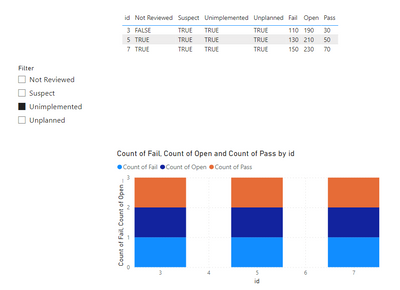
I think the reason is that I have multiple Filter sections like Pass, Open, Fail and the Flag does not have any affect on them.
When I select any field from Filter, nothing is happening.
Or another reason can be that another thing, the Filter value is always 1.
Do you have any ideas what is hapenning please?
Hi @haykp ,
(1) This is my test data.
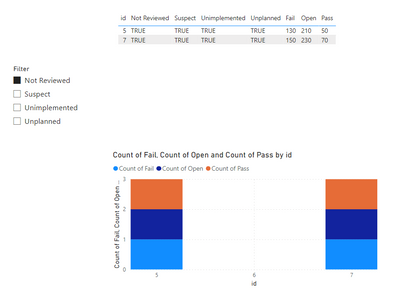
(2)Through my tests it worked.
If the above one can't help you get the desired result, please provide some sample data in your tables (exclude sensitive data) with Text format and your expected result with backend logic and special examples. It is better if you can share a simplified pbix file. Thank you.
Best Regards,
Neeko Tang
If this post helps, then please consider Accept it as the solution to help the other members find it more quickly.
If you have recently started exploring Fabric, we'd love to hear how it's going. Your feedback can help with product improvements.
A new Power BI DataViz World Championship is coming this June! Don't miss out on submitting your entry.
Share feedback directly with Fabric product managers, participate in targeted research studies and influence the Fabric roadmap.
| User | Count |
|---|---|
| 9 | |
| 6 | |
| 3 | |
| 2 | |
| 2 |
| User | Count |
|---|---|
| 21 | |
| 12 | |
| 9 | |
| 5 | |
| 5 |