Don't miss your chance to take the Fabric Data Engineer (DP-600) exam for FREE! Find out how by attending the DP-600 session on April 23rd (pacific time), live or on-demand.
Learn moreNext up in the FabCon + SQLCon recap series: The roadmap for Microsoft SQL and Maximizing Developer experiences in Fabric. All sessions are available on-demand after the live show. Register now
Preciso de uma medida que conte todos os clientes de um grupo se um CNPJ desse grupo atender a regra de cliente ativo. Montei a medida abaixo mas não deu certo.
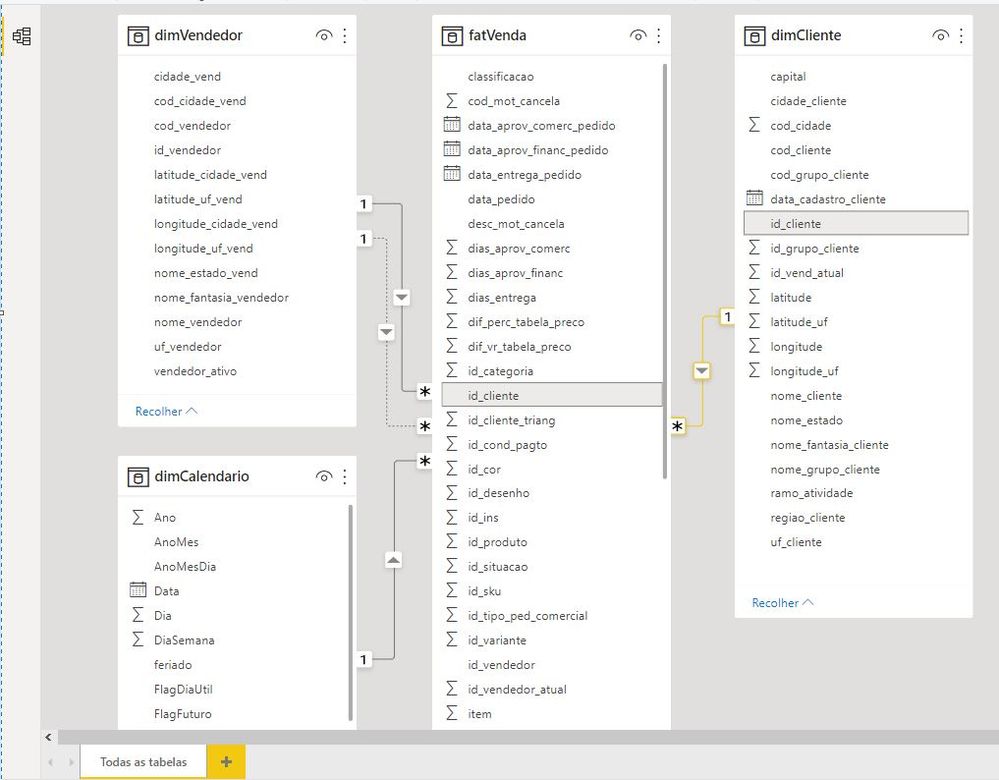
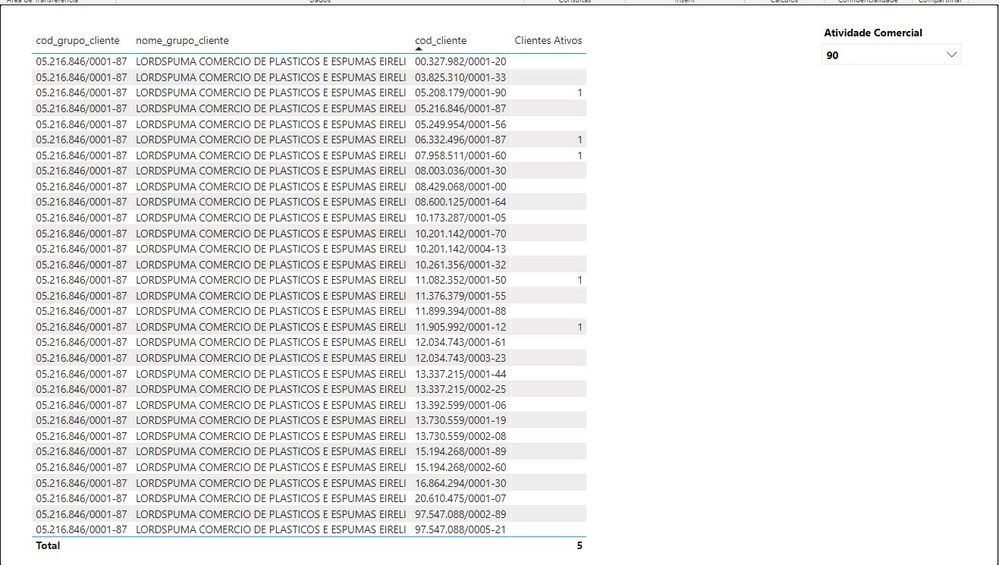
Estou adicionando também o modelo de dados e a tabela que tenho como resultado hoje. Percebam que apenas alguns cnpj's do grupo ficam com o 1 e preciso que todos fiquem.
Solved! Go to Solution.
Hi @Nobeltex_PBI ,
Please try the following formula:
Measure =
var tab =
CALCULATETABLE (
VALUES ( dimCliente[Group] ),
FILTER (
ALL ( dimCliente ),
dimCliente[Group] = MAX ( dimCliente[Group] )
&& [Clientes Ativos] > 0
)
)
return
CALCULATE (
COUNT ( dimCliente[id_cliente] ),
FILTER ( all ( dimCliente ), dimCliente[Group] in tab )
)
If the problem is still not resolved, please provide detailed error information or the expected result you expect. Let me know immediately, looking forward to your reply.
Best Regards,
Winniz
If this post helps, then please consider Accept it as the solution to help the other members find it more quickly.
@Nobeltex_PBI , what is the logic for the active customers? please share that
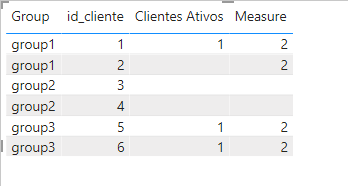
refer example
Customer Retention Part 5: LTD Vs Period Retention
https://community.powerbi.com/t5/Community-Blog/Customer-Retention-Part-5-LTD-and-PeriodYoY-Retentio...
The logic for finding active customers is correct. What I need is that if a customer in the group meets the logic, all the others, even not meeting it, must count as assets. Did you understand?
Hi @Nobeltex_PBI ,
Please try the following formula:
Measure =
var tab =
CALCULATETABLE (
VALUES ( dimCliente[Group] ),
FILTER (
ALL ( dimCliente ),
dimCliente[Group] = MAX ( dimCliente[Group] )
&& [Clientes Ativos] > 0
)
)
return
CALCULATE (
COUNT ( dimCliente[id_cliente] ),
FILTER ( all ( dimCliente ), dimCliente[Group] in tab )
)
If the problem is still not resolved, please provide detailed error information or the expected result you expect. Let me know immediately, looking forward to your reply.
Best Regards,
Winniz
If this post helps, then please consider Accept it as the solution to help the other members find it more quickly.
Check out the April 2026 Power BI update to learn about new features.
If you have recently started exploring Fabric, we'd love to hear how it's going. Your feedback can help with product improvements.
A new Power BI DataViz World Championship is coming this June! Don't miss out on submitting your entry.
| User | Count |
|---|---|
| 6 | |
| 6 | |
| 3 | |
| 2 | |
| 2 |
| User | Count |
|---|---|
| 22 | |
| 10 | |
| 10 | |
| 7 | |
| 5 |