Join us at FabCon Atlanta from March 16 - 20, 2026, for the ultimate Fabric, Power BI, AI and SQL community-led event. Save $200 with code FABCOMM.
Register now!Get Fabric Certified for FREE during Fabric Data Days. Don't miss your chance! Request now
Hello,
I'm showing the last 12 months( last month is May 2020 ) data but I'm unable to show order like from start to end (June to May)
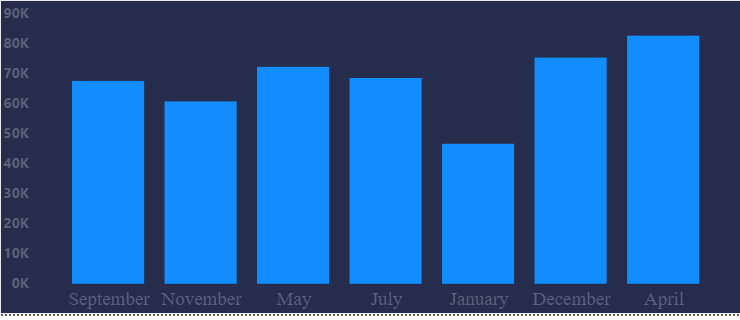
See the graph : (There is no data for some months so it's ok if some months are not in the graph)
So actual graph order: September, November, May, July, January, December, April
What I want: July, September, November, December, January, April, May
What I already did till for order :
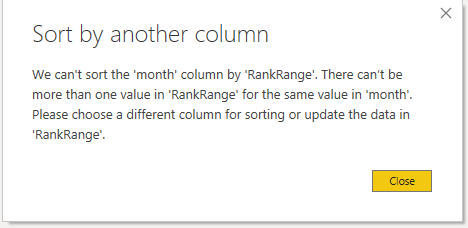
1.Try to change the sort by rank column but got this error :
2.Also, I can show perfect order if I add the year from Date Hierarchy but its add year in the axis which I don't want like this: May 2020
I attach a file please take a look: testFile.pbix
Thanks In advance
Solved! Go to Solution.
Hi @mohittimpus -
First, use "month" from the Date table, not the Sales table
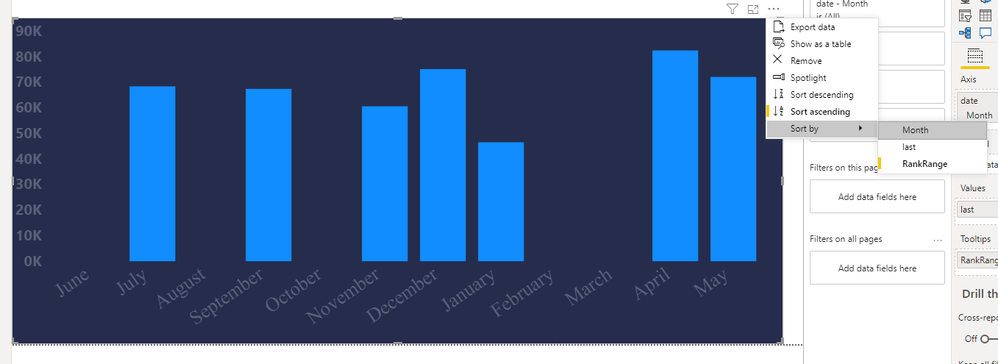
Second, you can put RankRange in the Tooltip field for that visual, then sort by Rank Range using the 3-dots in the corner of the header.
Hope this helps
David
Hi @mohittimpus -
First, use "month" from the Date table, not the Sales table
Second, you can put RankRange in the Tooltip field for that visual, then sort by Rank Range using the 3-dots in the corner of the header.
Hope this helps
David
Thank you so much. it works and I choose an only nonblank value in the filter so I Get What I want.
Check out the November 2025 Power BI update to learn about new features.
Advance your Data & AI career with 50 days of live learning, contests, hands-on challenges, study groups & certifications and more!
| User | Count |
|---|---|
| 11 | |
| 9 | |
| 9 | |
| 6 | |
| 5 |
| User | Count |
|---|---|
| 27 | |
| 22 | |
| 19 | |
| 17 | |
| 11 |